
Free AI clothes changer
KostenlosKI-BildPick the piece to change, type what it should become, and see it on the same person: same face, pose and background, only that piece of clothing is new.
- 100% free
- No sign-up
- No watermark
- Works on phone
Beispielergebnis
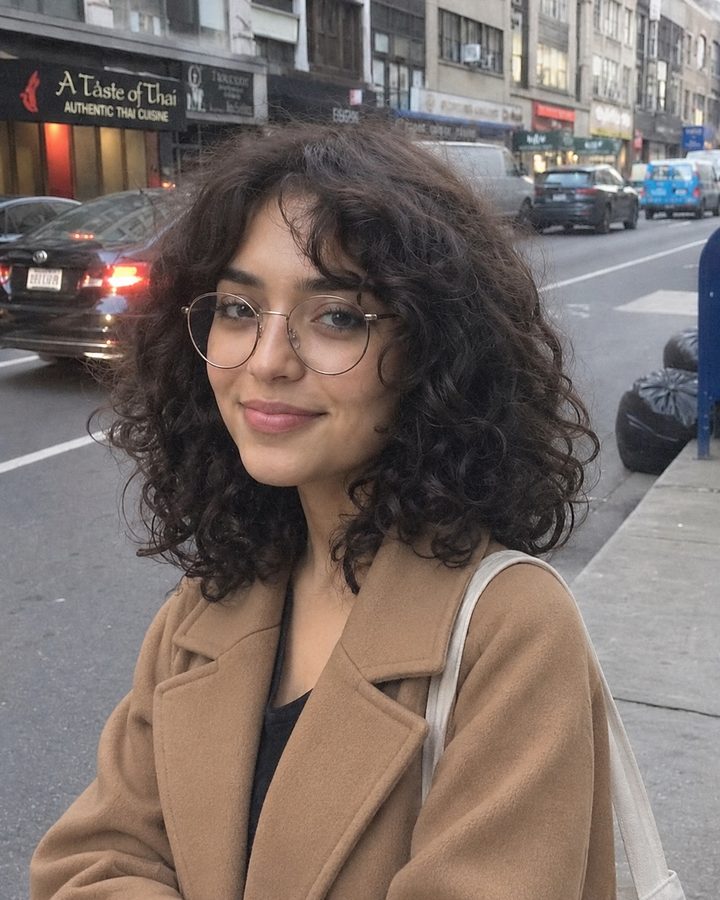
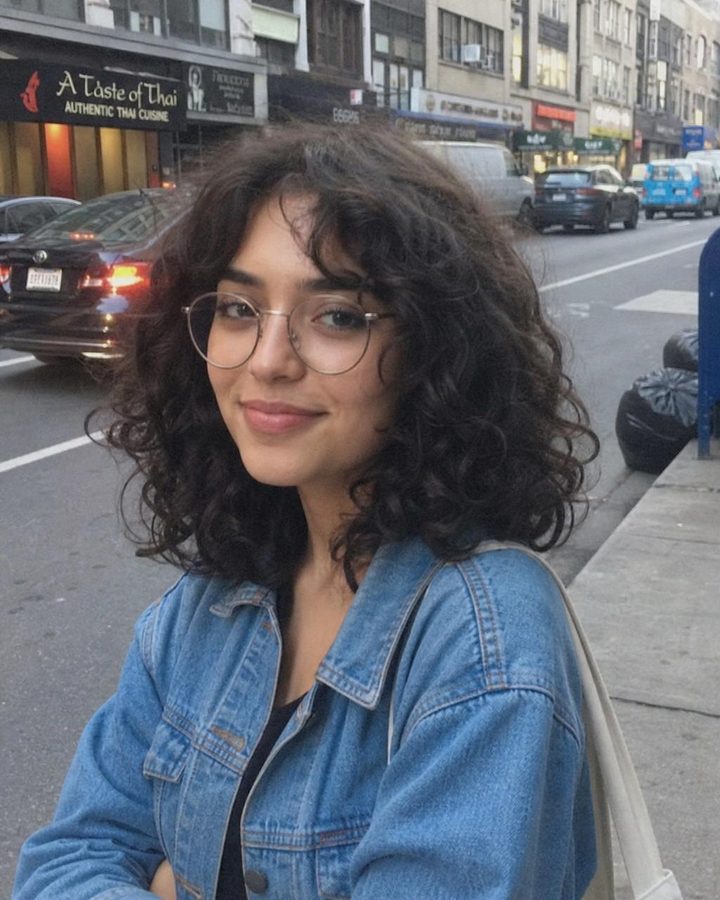 VorherNachher
A denim jacket changed to a camel wool coat; the face, hair and background stay the same.
So verwenden Sie AI Clothes Changer
Drei Schritte, am Computer oder auf dem Smartphone.
- 01
Upload a photo
Drop, paste or pick a JPG, PNG, WebP or HEIC image; on a phone you can take one with the camera. Then type your change it to (optional), for example "a red knit sweater".
- 02
Choose what to change
Pick What to change (Top, Trousers or skirt, Jacket or coat, Dress or Shoes (full-body photo)), then select Change clothes. A result usually takes about 25 seconds.
- 03
Compare and download
Compare it with your original, then download a JPG. Example on this page: a denim jacket changed to a camel wool coat; the face, hair and background stay the same.
Wofür es verwendet wird
Shopping
See a color or style on yourself before you buy.
Fix a photo
Swap a stained, wrinkled or clashing top in a good photo.
Online stores and content
Show one product photo in other colors or fabrics.
Mehr Kontrolle nötig? Verwenden Sie die API
Dieses Tool läuft auf der SandBase-Bild-API. Die API gibt Ihnen jede Einstellung, die das kostenlose Tool für Sie festlegt.
- Höhere Qualität und Größequality=high, Größen bis zu 2K und transparente Hintergründe in einem Aufruf.
- Ihr eigener PromptÄndern Sie die Vorlage, fügen Sie Referenzbilder hinzu oder verarbeiten Sie Hunderte von Bildern stapelweise aus Ihrem Code oder Agent.
- Pro Bild bezahlenVerwenden Sie Ihr SandBase-Guthaben über das kostenlose Tool-Kontingent hinaus. Modellverfügbarkeit und API-Ratenlimits gelten weiterhin.
# Set SANDBASE_API_KEY and choose your local image file.
IMAGE_FILE="photo.jpg"
curl --fail-with-body https://api.sandbase.ai/v1/images/edits \
  -H "Authorization: Bearer $SANDBASE_API_KEY" \
  --form-string 'model=gpt-image-2.6-flare' \
  --form "image=@${IMAGE_FILE}" \
  --form-string 'quality=high' \
  --form-string 'size=2048x2048' \
--form-string 'prompt=Edit the clothing in this photo: replace the jacket or coat, or add one over the top if there is none. The new piece: a camel wool coat. Keep the face, identity, age, skin tone and facial features exactly the same; do not beautify, slim or change any feature. Keep every other piece of clothing, the pose, body shape, hands, hairstyle, accessories, background, lighting and the framing exactly as they are; do not zoom out, crop or reframe the photo. If that piece of clothing is not visible in the photo, leave the photo unchanged. The new garment fits the body naturally, with realistic fabric, seams, folds and shadows. One photorealistic photo, suitable for all audiences.'FAQ
How is this different from the AI outfit changer?
This tool changes one piece and keeps everything else you wear. The outfit changer restyles the whole look at once.
How do I describe the new clothes?
Name the type, color and fabric, like “a cream cable-knit cardigan” or “black leather trousers”. Leave it empty and the tool picks a piece that suits the person.
Why was my request refused?
The image model refuses swimwear, underwear, lingerie and see-through or very revealing clothes, and some requests on photos of children. Pick everyday clothes, or describe the piece differently, and try again. A refused run does not count as a free run.
Why did more of my photo change when I picked shoes?
Shoes and trousers can only be changed when the photo shows them. On a head-and-shoulders photo the model may redraw the whole picture to fit them in, or change something else. Use a full-body photo for shoes.
Can I change clothes on a photo of someone else?
Only on photos you have the right to use: of yourself, or of people who agreed. Do not use it to make revealing or misleading images of anyone.
Ist AI Clothes Changer kostenlos?
Ja, ohne Wasserzeichen und ohne Anmeldung. Ein Durchlauf von AI Clothes Changer dauert etwa 25 Sekunden und liefert Ihnen ein JPG. Er nutzt einen Durchlauf des kostenlosen täglichen Kontingents für KI-Bilder, das für alle KI-Bild-Tools gemeinsam gilt: 10 Durchläufe pro Tag ohne Anmeldung und 30 mit einem kostenlosen SandBase-Konto. Das Tool zeigt Ihnen, wie viele noch übrig sind, und das Kontingent wird um Mitternacht UTC zurückgesetzt; es können außerdem Netzwerk- und seitenweite Limits gelten.
Was passiert mit dem Foto, das ich in AI Clothes Changer hochlade?
Ihr Foto und Ihre Einstellungen werden von SandBase und dem Bildanbieter verarbeitet, um dieses eine Ergebnis zu erstellen. AI Clothes Changer veröffentlicht nichts in einer öffentlichen Galerie. Ergebnisse können bis zu 24 Stunden aus einem Cache wiederverwendet werden, sodass eine identische Anfrage keinen weiteren Durchlauf verbraucht; laden Sie jedes Ergebnis herunter, das Sie behalten möchten.
SandBase APIs für diese Aufgabe
Dieselben Daten in Ihrem eigenen Code oder Agent: ein API-Schlüssel, Abrechnung pro Aufruf.
Weitere Tools
AI Outfit Changer
Try a new outfit on your photo: suit, streetwear, jacket, evening wear or your own idea.
AI Hairstyle Changer
Try new hairstyles and colors on your own photo: bob, pixie, fade, curls, braids and more.
AI Fashion Design Generator
Generate fashion concepts from a description: sketch, flat drawing, model photo or moodboard.
AI Photoshoot Generator
Turn one photo into a professional photoshoot in seven looks, with your face kept the same.
Face Swap
Swap a face from one photo into another, with a consent check before every run.
AI Photo Editor
Edit any photo by describing the change in plain words: weather, outfit, light, background. Review the rest of the image for unintended changes.