
Free image sharpener
KostenlosKI-BildUpload a soft photo and get a sharper one: edges, fine detail and texture come back, with light, medium or strong strength and no strange halos.
- 100% free
- No sign-up
- No watermark
- Works on phone
Beispielergebnis

 VorherNachher
A soft tram photo sharpened.
So verwenden Sie Image Sharpener
Drei Schritte, am Computer oder auf dem Smartphone.
- 01
Upload a photo
Drop, paste or pick a JPG, PNG, WebP or HEIC image; on a phone you can take one with the camera.
- 02
Choose strength
Pick Strength (Light, Medium or Strong), then select Sharpen. A result usually takes about 20 seconds.
- 03
Compare and download
Compare it with your original, then download a JPG. Example on this page: a soft tram photo sharpened.
Weitere Beispiele
Das gleiche Tool auf anderen Fotos, ganz ohne manuelle Bearbeitung. Öffnen Sie eines, um es selbst auszuprobieren.
Vorher 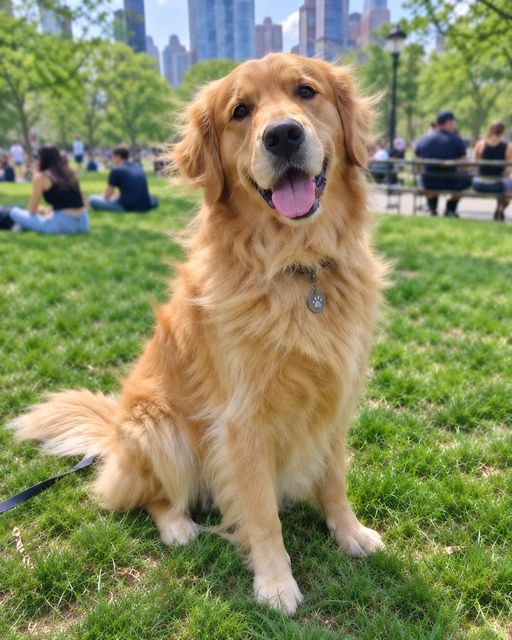
Nachher Auf Ihrem Foto ausprobieren
Laden Sie ein Foto hoch und erhalten Sie in Sekunden das Ergebnis. Kostenlos, ohne Anmeldung, ohne Wasserzeichen.
Ein Foto hochladen
Wofür es verwendet wird
Phone photos
Fix a shot that came out soft.
Product shots
Crisper images for listings.
Documents and scans
Clearer text and lines.
Tipps für ein besseres Ergebnis
- Start with Light; Strong can look harsh on skin.
- Strong suits text, buildings and product details.
- It helps soft focus, not heavy motion blur.
Mehr Kontrolle nötig? Verwenden Sie die API
Dieses Tool läuft auf der SandBase-Bild-API. Die API gibt Ihnen jede Einstellung, die das kostenlose Tool für Sie festlegt.
- Höhere Qualität und Größequality=high, Größen bis zu 2K und transparente Hintergründe in einem Aufruf.
- Ihr eigener PromptÄndern Sie die Vorlage, fügen Sie Referenzbilder hinzu oder verarbeiten Sie Hunderte von Bildern stapelweise aus Ihrem Code oder Agent.
- Pro Bild bezahlenVerwenden Sie Ihr SandBase-Guthaben über das kostenlose Tool-Kontingent hinaus. Modellverfügbarkeit und API-Ratenlimits gelten weiterhin.
# Set SANDBASE_API_KEY and choose your local image file.
IMAGE_FILE="photo.jpg"
curl --fail-with-body https://api.sandbase.ai/v1/images/edits \
  -H "Authorization: Bearer $SANDBASE_API_KEY" \
  --form-string 'model=gpt-image-2.6-flare' \
  --form "image=@${IMAGE_FILE}" \
  --form-string 'quality=high' \
  --form-string 'size=2048x2048' \
--form-string 'prompt=Sharpen this photo and restore fine detail and texture. Apply a clear sharpening that restores edges and texture. Keep everything else exactly as it is: the same people, faces, identity, pose, clothing, text, logos, colors, lighting and framing. Do not add new objects, do not change faces or text, and keep the original colors.'FAQ
Can it fix very blurry photos?
Light blur improves well. A heavily blurred photo gets sharper but cannot recover details that are not there.
Ist Image Sharpener kostenlos?
Ja, ohne Wasserzeichen und ohne Anmeldung. Ein Durchlauf von Image Sharpener dauert etwa 20 Sekunden und liefert Ihnen ein JPG. Er nutzt einen Durchlauf des kostenlosen täglichen Kontingents für KI-Bilder, das für alle KI-Bild-Tools gemeinsam gilt: 10 Durchläufe pro Tag ohne Anmeldung und 30 mit einem kostenlosen SandBase-Konto. Das Tool zeigt Ihnen, wie viele noch übrig sind, und das Kontingent wird um Mitternacht UTC zurückgesetzt; es können außerdem Netzwerk- und seitenweite Limits gelten.
Was passiert mit dem Foto, das ich in Image Sharpener hochlade?
Ihr Foto und Ihre Einstellungen werden von SandBase und dem Bildanbieter verarbeitet, um dieses eine Ergebnis zu erstellen. Image Sharpener veröffentlicht nichts in einer öffentlichen Galerie. Ergebnisse können bis zu 24 Stunden aus einem Cache wiederverwendet werden, sodass eine identische Anfrage keinen weiteren Durchlauf verbraucht; laden Sie jedes Ergebnis herunter, das Sie behalten möchten.
SandBase APIs für diese Aufgabe
Dieselben Daten in Ihrem eigenen Code oder Agent: ein API-Schlüssel, Abrechnung pro Aufruf.
Weitere Tools
AI Photo Editor
Edit any photo by describing the change in plain words: weather, outfit, light, background. Review the rest of the image for unintended changes.
AI Photo Restoration
Restore old photos with AI: remove scratches, creases and fading, and colorize black and white pictures.
AI Image Upscaler
Generate a 2K or 4K version of a photo or artwork with AI. Compare the result carefully: fine details and text may change.
AI Object Remover
Erase people, cars, wires, text and other objects from a photo by painting over them or describing them.
Magic Eraser
Paint over anything you want gone and the magic eraser rebuilds the background behind it.
Image Translator
Translate the text in a picture and keep its layout.