
Free remove text from image tool
KostenlosKI-BildErase captions, subtitles, date stamps and text overlays from a photo; the area behind the text is rebuilt so the picture looks untouched. Use it on your own images.
- 100% free
- No sign-up
- No watermark
- Works on phone
Beispielergebnis
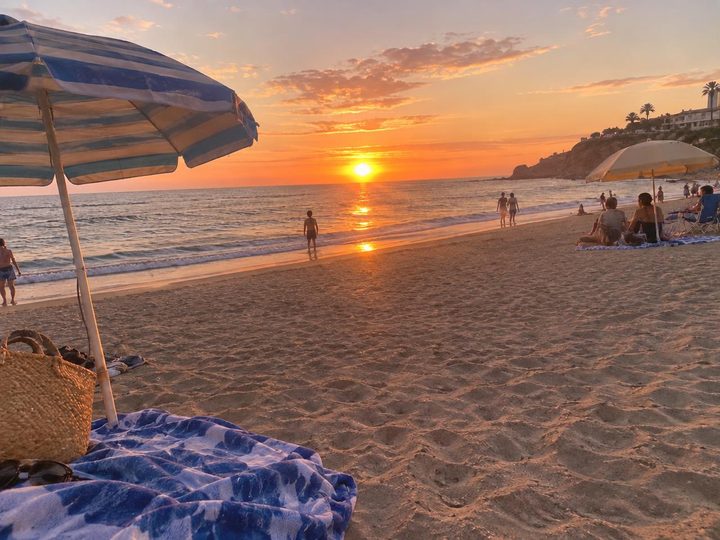
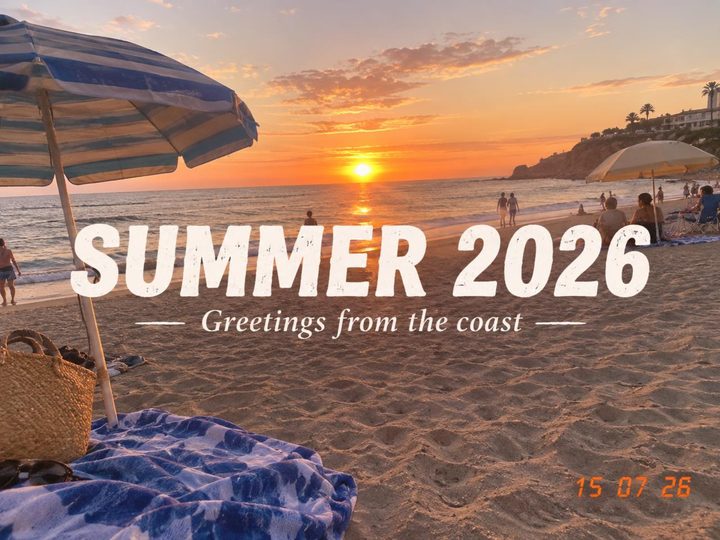 VorherNachher
A beach photo with a big caption and a date stamp, both removed.
So verwenden Sie Remove Text from Image
Drei Schritte, am Computer oder auf dem Smartphone.
- 01
Upload a photo
Drop, paste or pick a JPG, PNG, WebP or HEIC image; on a phone you can take one with the camera. Then type your which text (optional), for example "only the caption at the bottom".
- 02
Run it
Select Remove text (erase captions, stamps and overlays). A result usually takes about 20 seconds.
- 03
Compare and download
Compare it with your original, then download a JPG. Example on this page: a beach photo with a big caption and a date stamp, both removed.
Wofür es verwendet wird
Date stamps
Clean old photos that have a printed date in the corner.
Your own graphics
Reuse a design without its old text.
Screenshots
Remove labels and notes from your own screenshots.
Tipps für ein besseres Ergebnis
- Say which text to remove: “the date stamp in the corner”.
- Small text on plain backgrounds comes off cleanest.
- Remove one block of text at a time for busy pictures.
Mehr Kontrolle nötig? Verwenden Sie die API
Dieses Tool läuft auf der SandBase-Bild-API. Die API gibt Ihnen jede Einstellung, die das kostenlose Tool für Sie festlegt.
- Höhere Qualität und Größequality=high, Größen bis zu 2K und transparente Hintergründe in einem Aufruf.
- Ihr eigener PromptÄndern Sie die Vorlage, fügen Sie Referenzbilder hinzu oder verarbeiten Sie Hunderte von Bildern stapelweise aus Ihrem Code oder Agent.
- Pro Bild bezahlenVerwenden Sie Ihr SandBase-Guthaben über das kostenlose Tool-Kontingent hinaus. Modellverfügbarkeit und API-Ratenlimits gelten weiterhin.
# Set SANDBASE_API_KEY and choose your local image file.
IMAGE_FILE="photo.jpg"
curl --fail-with-body https://api.sandbase.ai/v1/images/edits \
  -H "Authorization: Bearer $SANDBASE_API_KEY" \
  --form-string 'model=gpt-image-2.6-flare' \
  --form "image=@${IMAGE_FILE}" \
  --form-string 'quality=high' \
  --form-string 'size=2048x2048' \
--form-string 'prompt=Remove all overlaid text, captions, date stamps and stickers from this image. Rebuild the areas behind it so the photo looks untouched, matching the texture, lighting and perspective. Keep everything else exactly as it is.'FAQ
Can I remove a watermark?
Use this on your own photos and graphics. Removing someone else's watermark or copyright notice is not allowed.
Ist Remove Text from Image kostenlos?
Ja, ohne Wasserzeichen und ohne Anmeldung. Ein Durchlauf von Remove Text from Image dauert etwa 20 Sekunden und liefert Ihnen ein JPG. Er nutzt einen Durchlauf des kostenlosen täglichen Kontingents für KI-Bilder, das für alle KI-Bild-Tools gemeinsam gilt: 10 Durchläufe pro Tag ohne Anmeldung und 30 mit einem kostenlosen SandBase-Konto. Das Tool zeigt Ihnen, wie viele noch übrig sind, und das Kontingent wird um Mitternacht UTC zurückgesetzt; es können außerdem Netzwerk- und seitenweite Limits gelten.
Was passiert mit dem Foto, das ich in Remove Text from Image hochlade?
Ihr Foto und Ihre Einstellungen werden von SandBase und dem Bildanbieter verarbeitet, um dieses eine Ergebnis zu erstellen. Remove Text from Image veröffentlicht nichts in einer öffentlichen Galerie. Ergebnisse können bis zu 24 Stunden aus einem Cache wiederverwendet werden, sodass eine identische Anfrage keinen weiteren Durchlauf verbraucht; laden Sie jedes Ergebnis herunter, das Sie behalten möchten.
SandBase APIs für diese Aufgabe
Dieselben Daten in Ihrem eigenen Code oder Agent: ein API-Schlüssel, Abrechnung pro Aufruf.
Weitere Tools
Remove People from Photo
Remove tourists, strangers and photobombers from a photo; the scene behind them is rebuilt naturally.
Remove Shadow from Photo
Remove harsh shadows from a photo and even out the light on faces, documents and products.
AI Photo Editor
Edit any photo by describing the change in plain words: weather, outfit, light, background. Review the rest of the image for unintended changes.
AI Photo Restoration
Restore old photos with AI: remove scratches, creases and fading, and colorize black and white pictures.
AI Image Upscaler
Generate a 2K or 4K version of a photo or artwork with AI. Compare the result carefully: fine details and text may change.
Rim Visualizer
See new rims on your car.