
Free YouTube banner maker
KostenlosKI-BildDescribe your channel, add its name, pick a style, and get wide channel art with the important parts in the central safe area that shows on every device.
- 100% free
- No sign-up
- No watermark
- Any shape
Beispielergebnis
 Beispiel
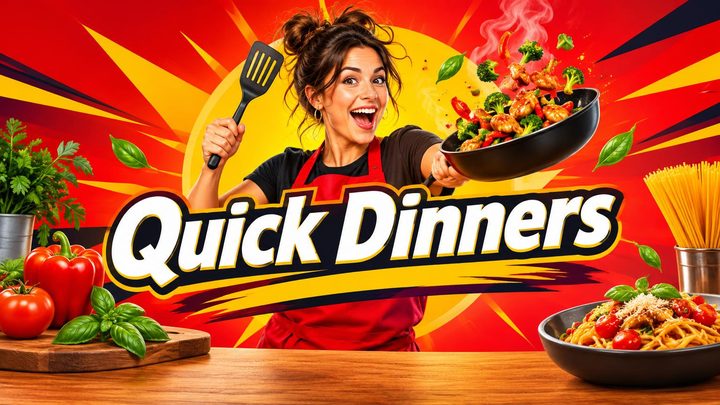
A cooking channel banner with the channel name in the center.
So verwenden Sie YouTube Banner Maker
Drei Schritte, am Computer oder auf dem Smartphone.
- 01
Write your what is your channel about
Type your what is your channel about, for example "a cooking channel about quick weeknight dinners", or tap one of the examples.
- 02
Choose style
Pick Style (Bold, Clean, Photographic or Playful), then select Make banner. A result usually takes about 15 seconds.
- 03
Review and download
Check the picture and read every word, then download a JPG. Example on this page: a cooking channel banner with the channel name in the center.
Weitere Beispiele
Mit diesem Tool erstellt, ohne manuelle Nachbearbeitung. Öffnen Sie eines, um mit dessen Einstellungen zu starten.
Beispiel Erstellen Sie Ihr eigenes
Beschreiben Sie, was Sie möchten, und erhalten Sie in Sekunden ein Ergebnis. Kostenlos, ohne Anmeldung, ohne Wasserzeichen.
Tool öffnen
Wofür es verwendet wird
New channels
A first banner without a designer.
Rebrands
Test new looks before you commit.
Streamers
Matching art for Twitch and YouTube.
Tipps für ein besseres Ergebnis
- Keep the channel name in the middle; edges are cut off on phones.
- Say what the channel is about in a few words.
- Clean suits tutorials; Playful suits kids and gaming.
Mehr Kontrolle nötig? Verwenden Sie die API
Dieses Tool läuft auf der SandBase-Bild-API. Die API gibt Ihnen jede Einstellung, die das kostenlose Tool für Sie festlegt.
- Höhere Qualität und Größequality=high, Größen bis zu 2K und transparente Hintergründe in einem Aufruf.
- Ihr eigener PromptÄndern Sie die Vorlage, fügen Sie Referenzbilder hinzu oder verarbeiten Sie Hunderte von Bildern stapelweise aus Ihrem Code oder Agent.
- Pro Bild bezahlenVerwenden Sie Ihr SandBase-Guthaben über das kostenlose Tool-Kontingent hinaus. Modellverfügbarkeit und API-Ratenlimits gelten weiterhin.
# Set SANDBASE_API_KEY first.
curl --fail-with-body https://api.sandbase.ai/v1/images/generations \
  -H "Authorization: Bearer $SANDBASE_API_KEY" \
  -H "Content-Type: application/json" \
  --data-binary @- <<'SANDBASE_JSON'
{
  "model": "gpt-image-2.6-flare",
  "prompt": "A YouTube channel banner for a cooking channel about quick weeknight dinners. Bold colors, strong shapes and a high-energy look. Wide composition with the key subject and any text inside the central safe area, extra background to the sides, Include the channel name \"Quick Dinners\" once, large and perfectly spelled, in the center. no other text, no watermark. Keep all lettering and the main subject inside the central 80% of the frame, with a wide empty margin on every side, because the image may be resized or cropped: no letter may touch or cross an edge.",
  "size": "1536x1024",
  "quality": "high"
}
SANDBASE_JSONFAQ
What size should my banner be?
YouTube asks for 2560 by 1440 pixels with a central safe area of 1546 by 423. Crop or resize the result to that size.
Ist YouTube Banner Maker kostenlos?
Ja, ohne Wasserzeichen und ohne Anmeldung. Ein Durchlauf von YouTube Banner Maker dauert etwa 15 Sekunden und liefert Ihnen ein JPG. Er nutzt einen Durchlauf des kostenlosen täglichen Kontingents für KI-Bilder, das für alle KI-Bild-Tools gemeinsam gilt: 10 Durchläufe pro Tag ohne Anmeldung und 30 mit einem kostenlosen SandBase-Konto. Das Tool zeigt Ihnen, wie viele noch übrig sind, und das Kontingent wird um Mitternacht UTC zurückgesetzt; es können außerdem Netzwerk- und seitenweite Limits gelten.
Was sendet YouTube Banner Maker, wenn ich es ausführe?
Nur der von Ihnen ausgewählte Text und die Optionen werden von SandBase und dem Bildanbieter verarbeitet, um dieses eine Ergebnis zu erstellen. YouTube Banner Maker veröffentlicht nichts in einer öffentlichen Galerie. Ergebnisse können bis zu 24 Stunden aus einem Cache wiederverwendet werden, sodass eine identische Anfrage keinen weiteren Durchlauf verbraucht; laden Sie jedes Ergebnis herunter, das Sie behalten möchten.
SandBase APIs für diese Aufgabe
Dieselben Daten in Ihrem eigenen Code oder Agent: ein API-Schlüssel, Abrechnung pro Aufruf.
Weitere Tools
YouTube Thumbnail Maker
Make a YouTube thumbnail from an idea or your own photo: big readable text, bold colors, 16:9.
AI iPhone Wallpaper Generator
Make iPhone lock screen wallpaper images from a description.
Zoom Background Generator
Make 16:9 virtual backgrounds for Zoom, Teams and Meet from a description.
AI Desktop Wallpaper Generator
Make desktop wallpaper images from a description.
Mothers Day Card Maker
Design a Mother's Day card in four themes and four styles.
Fathers Day Card Maker
Design a Father's Day card in four themes and four styles.