
Free magic eraser: paint over anything to erase it
GratisGambar AIBrush over what you want gone and watch it disappear: people, signs, wires, stains or clutter. Prefer words? Describe it instead.
- 100% free
- No sign-up
- No watermark
- Works on phone
Hasil contoh
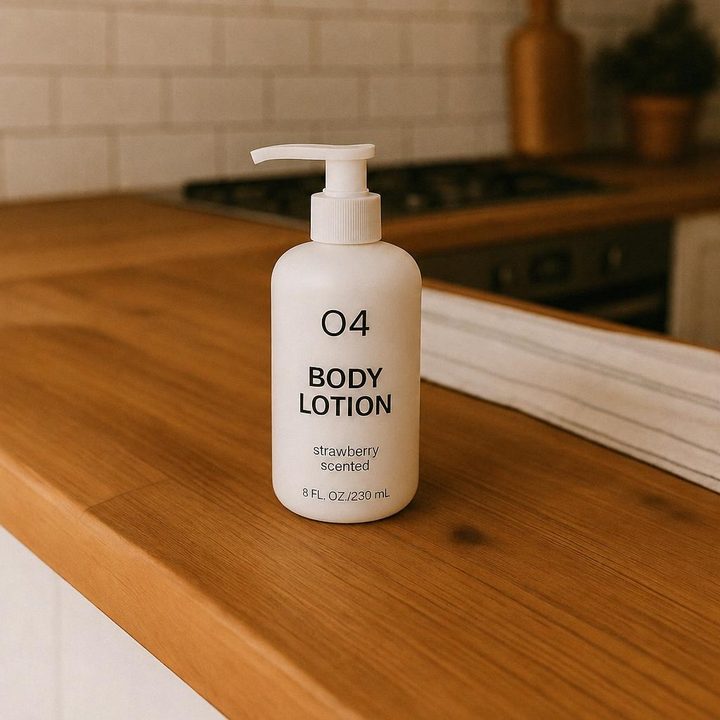
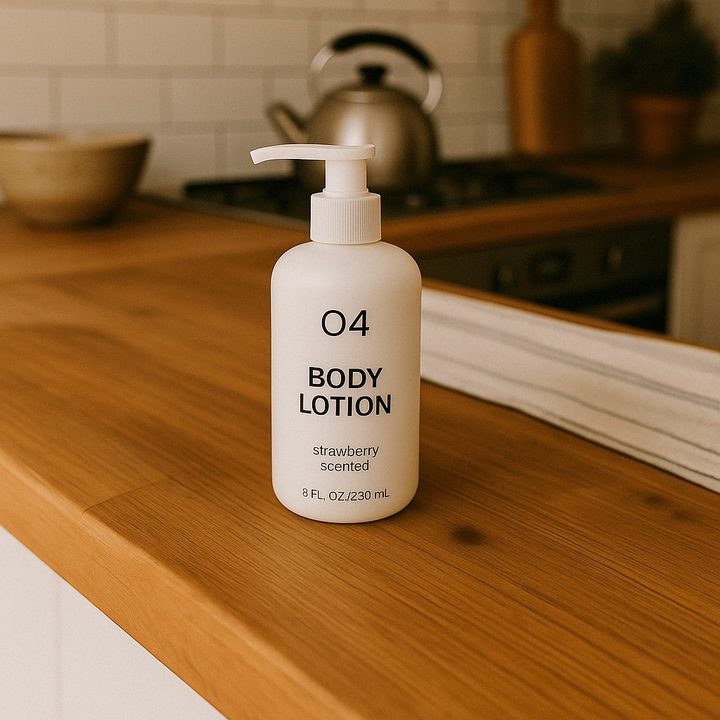 SebelumSesudah
The kettle and the bowl erased from a kitchen photo.
Cara menggunakan Magic Eraser
Tiga langkah, di komputer atau ponsel.
- 01
Upload a photo
Drop, paste or pick a JPG, PNG, WebP or HEIC image; on a phone you can take one with the camera. Then type your or describe it (optional), for example "the kettle and the bowl".
- 02
Run it
Select Erase (paint over anything to erase it). A result usually takes about 20 seconds.
- 03
Compare and download
Compare it with your original, then download a JPG. Example on this page: the kettle and the bowl erased from a kitchen photo.
Untuk apa orang menggunakannya
Clutter and wires
Take cables, cups and clutter out of a shot.
Strangers and signs
Remove a person, a sign or a car from a scene.
Blemishes and marks
Clean up stains, spots and small flaws.
Tips untuk hasil yang lebih baik
- Paint over the thing on the photo, or describe it in the text box.
- Small objects on simple backgrounds give the cleanest result.
- Erase one object at a time for busy scenes.
Perlu kontrol lebih? Gunakan API
Alat ini berjalan di SandBase image API. API memberi Anda setiap setelan yang dibekukan oleh alat gratis untuk Anda.
- Kualitas dan ukuran lebih tinggiquality=high, ukuran hingga 2K, dan latar belakang transparan dalam satu panggilan.
- Prompt Anda sendiriUbah template, tambahkan gambar referensi, atau proses ratusan gambar secara batch dari kode Anda atau Agent.
- Bayar per gambarGunakan saldo SandBase Anda setelah kuota alat gratis habis. Ketersediaan model dan batas laju API tetap berlaku.
# Set SANDBASE_API_KEY and choose your local image file.
IMAGE_FILE="photo.jpg"
curl --fail-with-body https://api.sandbase.ai/v1/images/edits \
  -H "Authorization: Bearer $SANDBASE_API_KEY" \
  --form-string 'model=gpt-image-2.6-flare' \
  --form "image=@${IMAGE_FILE}" \
  --form-string 'quality=high' \
  --form-string 'size=2048x2048' \
--form-string 'prompt=Remove the kettle and the bowl from this photo. Fill the removed areas with the background that would naturally be behind them, matching the surrounding texture, lighting, perspective and grain, so the photo looks untouched. Keep everything else exactly as it is: the same people, faces, identity, pose, clothing, text, logos, colors, lighting and framing.'FAQ
Should I paint or describe?
Paint is best for small or unusual things, or when there are several of the same kind and you only want one gone. Describing works well for clear things such as "the two people on the left".
Apakah Magic Eraser gratis?
Ya, tanpa watermark dan tanpa daftar. Satu kali menjalankan Magic Eraser memakan waktu sekitar 20 detik dan memberi Anda JPG. Ini menggunakan satu kali jatah harian gratis untuk image AI, yang dibagikan di semua alat AI image: 10 kali per hari tanpa login dan 30 kali dengan akun SandBase gratis. Alat menampilkan sisa jatah Anda, dan hitungan direset pada pukul 00.00 UTC; batas jaringan dan batas di seluruh situs juga dapat berlaku.
Apa yang terjadi pada foto yang saya unggah ke Magic Eraser?
Foto Anda dan setelan Anda diproses oleh SandBase dan penyedia image untuk menghasilkan satu hasil ini. Magic Eraser tidak memublikasikan apa pun ke galeri publik. Hasil dapat digunakan ulang dari cache hingga 24 jam, jadi permintaan yang identik tidak memakai satu kali run lagi; unduh hasil apa pun yang ingin Anda simpan.
SandBase APIs untuk tugas ini
Data yang sama di kode Anda sendiri atau Agent: satu API key, ditagih per panggilan.
Lebih banyak tools
AI Photo Editor
Edit any photo by describing the change in plain words: weather, outfit, light, background. Review the rest of the image for unintended changes.
AI Photo Restoration
Restore old photos with AI: remove scratches, creases and fading, and colorize black and white pictures.
AI Image Upscaler
Generate a 2K or 4K version of a photo or artwork with AI. Compare the result carefully: fine details and text may change.
AI Object Remover
Erase people, cars, wires, text and other objects from a photo by painting over them or describing them.
AI Photo Enhancer
Enhance photos with AI: sharpen detail, reduce noise, fix dark or faded shots and upscale to 2K or 4K.
Motion Blur Effect
Add speed with motion blur behind the subject, with the rest of the photo unchanged.