
Free rim visualizer
GratisImmagini AISee new rims on your car before you buy: bronze, black, chrome or gunmetal wheels, on a photo of your own car.
- 100% free
- No sign-up
- No watermark
- Works on phone
Risultato di esempio
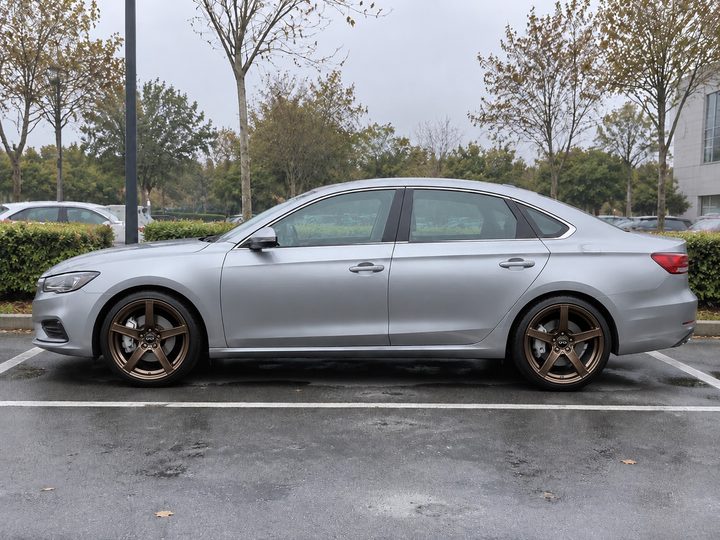
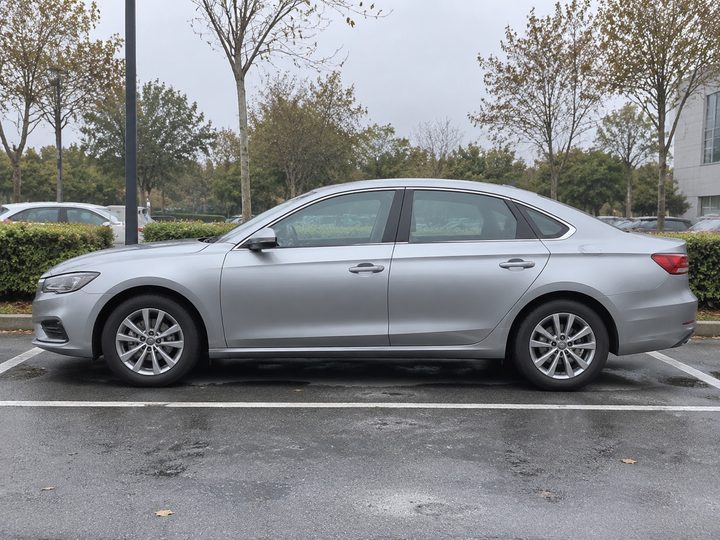 PrimaDopo
A car photo: see new rims on your car.
Come usare Rim Visualizer
Tre passaggi, da computer o da telefono.
- 01
Upload a photo
Drop, paste or pick a JPG, PNG, WebP or HEIC image; on a phone you can take one with the camera. Then type your anything to add (optional) (optional), for example "e.g. warmer light".
- 02
Choose rims
Pick Rims (Bronze, Black, Chrome or Gunmetal), then select Make image. A result usually takes about 20 seconds.
- 03
Compare and download
Compare it with your original, then download a JPG. Example on this page: a car photo: see new rims on your car.
Per cosa lo usano le persone
Before buying wheels
Compare styles on your car.
Car clubs
Share build ideas.
Sellers
Show customers wheel options.
Suggerimenti per ottenere un risultato migliore
- Use a side-on photo of the car.
- Black wheels suit light cars; chrome suits dark ones.
- Check fitment with a tire shop.
Ti serve più controllo? Usa l'API
Questo strumento si basa sull'API immagini di SandBase. L'API ti offre tutte le impostazioni che lo strumento gratuito configura per te.
- Qualità e dimensioni superioriquality=high, dimensioni fino a 2K e sfondi trasparenti in un'unica chiamata.
- Il tuo promptModifica il template, aggiungi immagini di riferimento o elabora in batch centinaia di immagini dal tuo codice o da Agent.
- Paga per immagineUsa il saldo SandBase oltre il limite consentito dallo strumento gratuito. Disponibilità del modello e limiti di rate dell'API continuano ad applicarsi.
# Set SANDBASE_API_KEY and choose your local image file.
IMAGE_FILE="photo.jpg"
curl --fail-with-body https://api.sandbase.ai/v1/images/edits \
  -H "Authorization: Bearer $SANDBASE_API_KEY" \
  --form-string 'model=gpt-image-2.6-flare' \
  --form "image=@${IMAGE_FILE}" \
  --form-string 'quality=high' \
  --form-string 'size=2048x2048' \
--form-string 'prompt=Replace all the wheels of the car in this photo with large, clearly different bronze five-spoke rims, with correct size, perspective and reflections. Keep the car body, color, background and camera angle exactly the same.'FAQ
Will they fit my car?
This is a visual preview; check size and fitment with a shop.
Can I change the tire too?
Tires stay the same to keep it realistic.
Will it change anything else?
The prompt asks to preserve details outside the edit, but AI can still alter faces, text or textures. Compare with the original before you download.
Rim Visualizer è gratuito?
Sì, senza watermark e senza registrazione. Un'esecuzione di Rim Visualizer richiede circa 20 secondi e ti dà un JPG. Usa una esecuzione dell'allocazione giornaliera gratuita per le immagini AI, condivisa tra tutti gli strumenti immagini AI: 10 esecuzioni al giorno senza accesso e 30 con un account SandBase gratuito. Lo strumento mostra quante ne hai ancora, e il conteggio si azzera a mezzanotte UTC; possono inoltre applicarsi limiti di rete e a livello di sito.
Cosa succede alla foto che carico su Rim Visualizer?
La tua foto e le tue impostazioni vengono elaborate da SandBase e dal fornitore di immagini per creare questo singolo risultato. Rim Visualizer non pubblica nulla in una galleria pubblica. I risultati possono essere riutilizzati da una cache per un massimo di 24 ore, quindi una richiesta identica non usa un'altra esecuzione; scarica qualsiasi risultato che vuoi conservare.
SandBase APIs per questo lavoro
Gli stessi dati nel tuo codice o in un Agent: una sola API key, fatturazione per chiamata.
Altri strumenti
Car Wrap Visualizer
Preview a vinyl wrap on your car.
Truck Lift Visualizer
See your truck with a lift kit.
Window Tint Visualizer
Preview window tint on your car.
Car Color Changer
See your car in a new color.
Car Dealer Photo Background
Make clean dealer listing photos.
Shoe Product Photography
Turn a phone photo of a shoe into a professional product shot.