
Flux Rotor: Cobalt Drive
- Lab Skill
- v0.1.0
- Education
Inspect an original motor with real winding groups, alternating magnet sectors and a keyed shaft. Balanced phase currents drive prescribed synchronous rotation, material colors and spatial harmonic markers. Open the actual cutaway and separate six components offline. This display does not solve torque, efficiency or magnetic finite elements.
例

Flux Rotor interactive synchronous motor workshop
この例はサンドボックス化されたフレームで実行され、このページにはアクセスできません。
オンラインで実行
SandBase sandbox で実行し、結果を Lab で確認できます。
Lab で開く ↗得られるもの
Bring an original motor, explanatory sequence and optional palette. The Skill returns a downloadable Skill, interactive demos and example videos.
仕組み
- 01
Describe the motor
Give your Agent the motor and explanatory sequence you want, or start from the bundled Cobalt Drive: a silver motor with copper windings, alternating rotor magnets, a keyed shaft and a finned housing. fill-prompt.mjs turns the slots in cobalt-drive.json into prompt.md, and new-project.mjs writes an editable project. The Skill calls no model at runtime and needs no API key.
- 02
Edit the motor data
In src/motor.json, set bilingual names of up to 40 characters, three palettes and bounded values: 1 to 3 pole pairs, length 2.2 to 3.4, housing radius 1.5 to 1.9, rotor radius 0.72 to 0.98 and a base electrical frequency of 0.3 to 1.2 Hz. A pole-pair change creates matching winding groups and magnet sectors. Invalid input returns a stable motor_* code with a localized explanation.
- 03
Build and verify
With Node 22.14.0, npm ci and npm run build:single inside the generated project give dist-single/index.html, one offline file. npm run shoot then checks actual meshes, materials, phase signals and native controls. Check it yourself: drag to orbit, Space runs or pauses, C opens the cutaway, E separates the six groups, F shows field markers and R resets.
FAQ
Does Flux Rotor need an API key or call a model?
No. Flux Rotor makes no runtime model calls and needs no key, external asset or persistence. npm ci installs pinned public build dependencies once, and the built HTML then runs offline. A coding agent may use its own authorized model to edit the project, but the Skill and the page call none.
Does Flux Rotor calculate torque or efficiency?
No. Flux Rotor drives a prescribed synchronous rotor angle from three balanced cosine currents; the rotor does not gain speed from solved magnetic torque. It computes no voltage, winding impedance, induction, load, efficiency, temperature, structural analysis or manufacturing tolerance. Add a separately validated solver if you need those quantities.
Why does the Flux Rotor rotor follow the field exactly?
In Flux Rotor synchronous motion is prescribed: the mechanical angle equals the electrical angle divided by the number of pole pairs. This is an explanatory construction, not a simulation, so the rotor never slips or lags. Reversing or changing speed changes the electrical rotation, and the rotor follows it.
What do the colours mean in Flux Rotor?
In Flux Rotor each winding has a phase and a sign, and its material colour and emission follow its signed phase current. The three phase traces show the same balanced currents over time, and the field markers show a spatial harmonic indicator. The arrows illustrate the prescribed field; they are not a solved magnetic field.
What does the Flux Rotor cutaway show?
The Flux Rotor cutaway hides real shell, endplate and outer stator sectors so you can see inside. Separation moves the six named component groups along the shaft as an inspection layout. The motor has simplified geometry and no product identity. With reduced motion it starts stationary and separation is immediate.
Can Flux Rotor model a different motor?
Yes, within its contracts. Change the motor and sequence prompt slots, keep the validated data, real geometry and capture verification, and stay inside the motor.json ranges, which cover pole count, length, radii and frequency. Larger mechanical changes mean editing world.ts and its verification together.
その他の Skills
すべての Education Skills →
Science MV
Explain science through visible causes, transformations and results.

Loop Story
Explain a cycle: build each stage, close the loop, then reveal the takeaway.

Voxel Paddock: Mint Apex
Inspect an original open-wheel vehicle built from procedural cubes. Spin actual wheels on a stationary display, turn nominal geometric steering and separate twelve component groups. Edit bounded dimensions, voxel density and three palettes offline. This is not a driving or aerodynamics simulation.

River Era: Valley Years
Scrub an authored river settlement timeline from camp and farms to town, workshops and speculative towers. Actual seeded geometry changes reversibly; boats and vehicles follow the same river and bank equations. This is an illustrative sequence rather than predictive history.

3D Mechanical Watch Explorer
Inspect a kinematic mechanical watch with actual meshed tooth ratios, 54 components, axial explosion, material cutaway and bilingual mouse/touch controls. One offline HTML with optional synthesized tones.
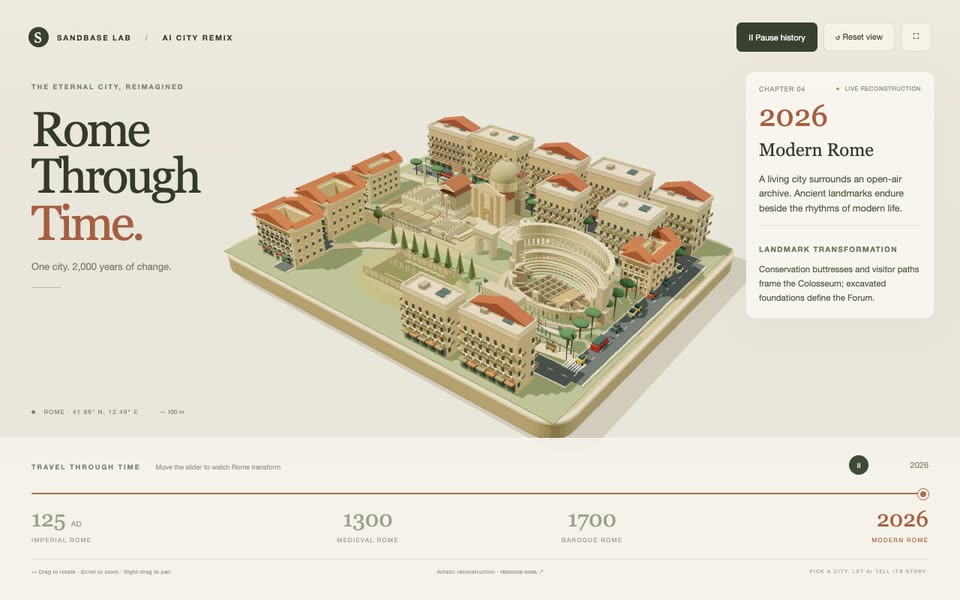
3D City Through Time
Watch one 3D city change year by year across two thousand years: ruins, reuse, rebuilding and modern streets, with a narration card and a matching 25-second film. Sample: Rome.