
Free AI flooring visualizer
무료AI 이미지Upload a photo of your room and try a new floor on it: oak, walnut, herringbone, tile, concrete or carpet, with walls and furniture kept.
- 100% free
- No sign-up
- No watermark
- Works on phone
샘플 결과
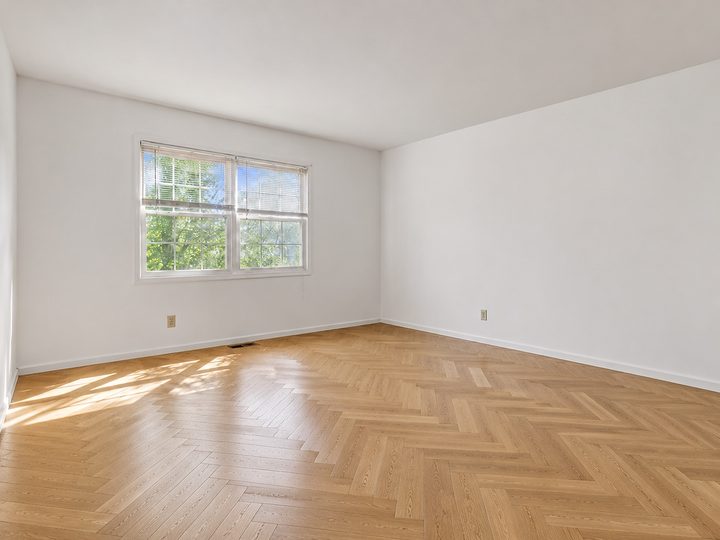
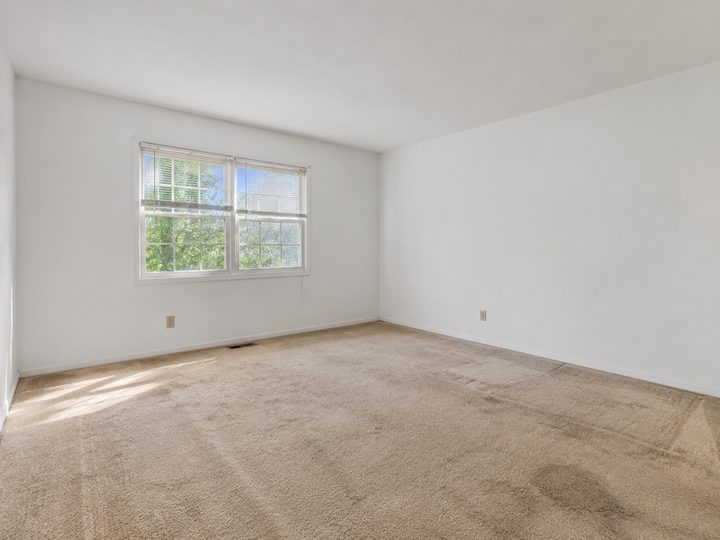 이전이후
Old carpet in an empty bedroom replaced with a herringbone floor.
AI Flooring Visualizer 사용 방법
컴퓨터나 휴대폰에서 3단계로 사용할 수 있어요.
- 01
Upload a photo
Drop, paste or pick a JPG, PNG, WebP or HEIC image; on a phone you can take one with the camera.
- 02
Choose flooring
Pick Flooring (Light oak planks, Dark walnut, Herringbone, Large tile or Polished concrete and 1 more), then select Try floor. A result usually takes about 20 seconds.
- 03
Compare and download
Compare it with your original, then download a JPG. Example on this page: old carpet in an empty bedroom replaced with a herringbone floor.
사람들이 이 도구를 사용하는 용도
Remodels
Compare floors before you order.
Floor shops
Show customers a floor in their room.
Landlords
Plan a refresh.
더 나은 결과를 위한 팁
- Shoot from a corner with lots of floor in view.
- Light oak makes small rooms look bigger.
- Large tile suits kitchens and bathrooms.
더 세밀한 제어가 필요하신가요? API를 사용하세요
이 도구는 SandBase 이미지 API로 실행됩니다. API를 사용하면 무료 도구가 대신 고정해 주는 모든 설정을 직접 지정할 수 있습니다.
- 더 높은 품질과 크기quality=high, 최대 2K 크기, 투명 배경을 한 번의 호출로 처리합니다.
- 나만의 프롬프트템플릿을 수정하고, 참조 이미지를 추가하고, 코드나 Agent에서 수백 장의 이미지를 일괄 생성할 수 있습니다.
- 이미지당 결제무료 도구 할당량을 초과해 SandBase 잔액을 사용하세요. 모델 제공 여부와 API 속도 제한은 여전히 적용됩니다.
# Set SANDBASE_API_KEY and choose your local image file.
IMAGE_FILE="photo.jpg"
curl --fail-with-body https://api.sandbase.ai/v1/images/edits \
  -H "Authorization: Bearer $SANDBASE_API_KEY" \
  --form-string 'model=gpt-image-2.6-flare' \
  --form "image=@${IMAGE_FILE}" \
  --form-string 'quality=high' \
  --form-string 'size=2048x2048' \
--form-string 'prompt=Replace the floor in this photo with a natural herringbone wood floor. Keep the walls, furniture, windows and camera angle, with realistic perspective, reflections and shadows. Photorealistic.'FAQ
Are the colors exact?
No. Colors depend on light. Ask for a real sample before you buy.
AI Flooring Visualizer은 무료인가요?
네, 워터마크도 없고 가입도 필요 없습니다. AI Flooring Visualizer 한 번 실행하는 데는 약 20초가 걸리며 JPG을 제공합니다. 이는 모든 AI 이미지 도구에서 공유되는 무료 일일 AI 이미지 할당량 1회를 사용합니다. 로그인하지 않으면 하루 10회, 무료 SandBase 계정이 있으면 30회 사용할 수 있습니다. 도구에서 남은 횟수를 표시하며, 횟수는 UTC 자정에 초기화됩니다. 네트워크 및 사이트 전체 제한이 적용될 수도 있습니다.
AI Flooring Visualizer에 업로드한 사진은 어떻게 되나요?
사진과 설정은 이 하나의 결과를 만들기 위해 SandBase와 이미지 제공업체에서 처리됩니다. AI Flooring Visualizer은 어떤 것도 공개 갤러리에 게시하지 않습니다. 결과는 최대 24시간 동안 캐시에서 재사용될 수 있으므로, 동일한 요청은 추가 실행을 사용하지 않습니다. 보관하려는 결과는 반드시 다운로드하세요.
이 작업에 적합한 SandBase API
같은 종류의 데이터를 자체 코드나 Agent에서 사용하세요: API 키 하나로, 호출당 과금됩니다.
더 많은 Tools
AI Outfit Changer
Try a new outfit on your photo: suit, streetwear, jacket, evening wear or your own idea.
AI Interior Design
Redesign a room from a photo in eight styles: the layout stays and the furniture and decor change.
AI Clothes Changer
Change one piece of clothing in a photo, such as a top, jacket or dress, to any color or style you type.
AI Floor Plan Renderer
Turn a 2D floor plan into a furnished 3D isometric view in four styles.
AI Architecture Render
Turn a building sketch or photo into a photoreal render with your light and materials.
AI Furniture Design Generator
Make furniture design images from a description, in several styles.