
Free bokeh effect online
무료AI 이미지Make a phone photo look like it came from a fast portrait lens: the subject stays sharp and the background melts into soft bokeh.
- 100% free
- No sign-up
- No watermark
- Works on phone
샘플 결과

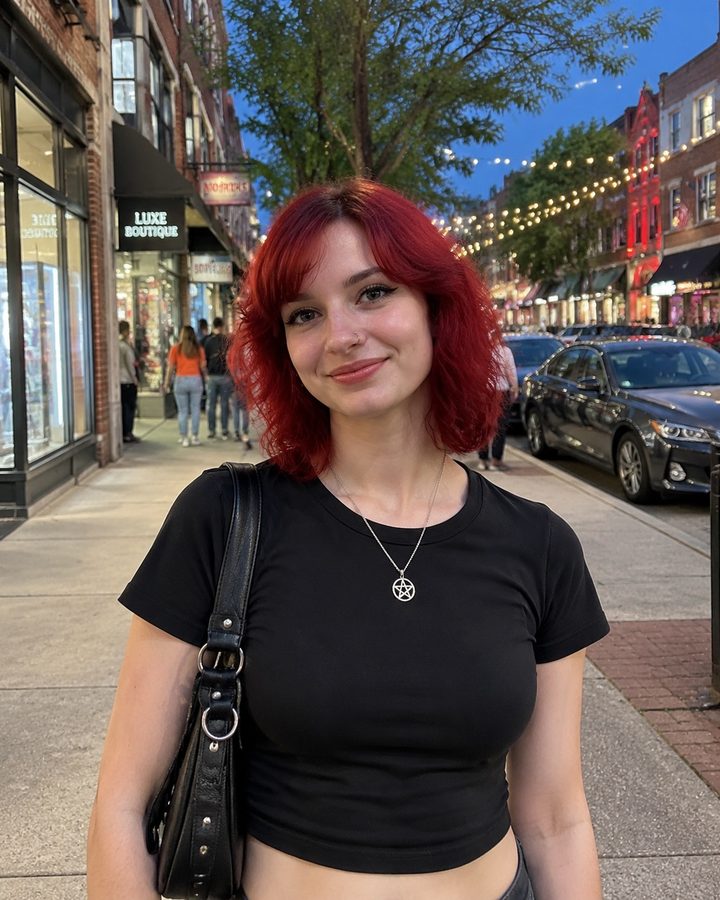 이전이후
A street portrait with creamy portrait-lens bokeh.
Bokeh Effect 사용 방법
컴퓨터나 휴대폰에서 3단계로 사용할 수 있어요.
- 01
Upload a photo
Drop, paste or pick a JPG, PNG, WebP or HEIC image; on a phone you can take one with the camera.
- 02
Choose strength and highlights
Pick Strength (Soft, Strong or Dreamy) and Highlights (Round, Hearts or Stars), then select Add bokeh. A result usually takes about 20 seconds.
- 03
Compare and download
Compare it with your original, then download a JPG. Example on this page: a street portrait with creamy portrait-lens bokeh.
더 많은 예시
다른 사진에 같은 도구를 적용한 예시예요. 손으로 편집하지 않았습니다. 하나를 열어 직접 사용해 보세요.
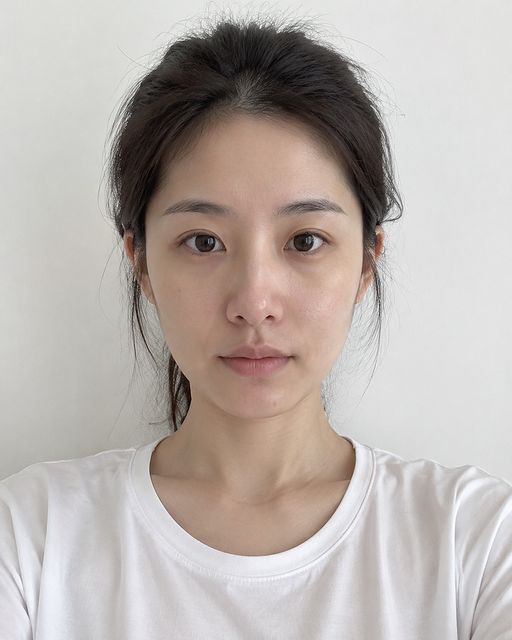
이전 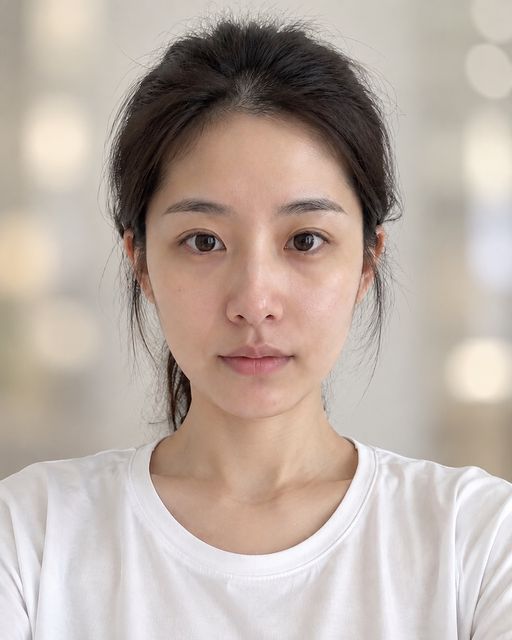
이후 
이전 
이후 사진으로 사용해 보기
사진을 업로드하면 몇 초 만에 결과를 얻을 수 있습니다. 무료, 가입 없음, 워터마크 없음.
사진 업로드
사람들이 이 도구를 사용하는 용도
Portraits
Separate a person from a busy background.
Product shots
Make the product pop.
Night photos
Turn city lights into soft circles.
더 나은 결과를 위한 팁
- Dreamy suits night lights and holiday photos.
- Hearts and Stars highlights work for Valentine’s and party pictures.
- A photo with lights behind the subject gives the best bokeh.
더 세밀한 제어가 필요하신가요? API를 사용하세요
이 도구는 SandBase 이미지 API로 실행됩니다. API를 사용하면 무료 도구가 대신 고정해 주는 모든 설정을 직접 지정할 수 있습니다.
- 더 높은 품질과 크기quality=high, 최대 2K 크기, 투명 배경을 한 번의 호출로 처리합니다.
- 나만의 프롬프트템플릿을 수정하고, 참조 이미지를 추가하고, 코드나 Agent에서 수백 장의 이미지를 일괄 생성할 수 있습니다.
- 이미지당 결제무료 도구 할당량을 초과해 SandBase 잔액을 사용하세요. 모델 제공 여부와 API 속도 제한은 여전히 적용됩니다.
# Set SANDBASE_API_KEY and choose your local image file.
IMAGE_FILE="photo.jpg"
curl --fail-with-body https://api.sandbase.ai/v1/images/edits \
  -H "Authorization: Bearer $SANDBASE_API_KEY" \
  --form-string 'model=gpt-image-2.6-flare' \
  --form "image=@${IMAGE_FILE}" \
  --form-string 'quality=high' \
  --form-string 'size=2048x2048' \
--form-string 'prompt=Add a strong, creamy f/1.4 bokeh effect to this photo, like a fast portrait lens with shallow depth of field: keep the main subject perfectly sharp and exactly as it is, and turn the background into smooth blur with soft round highlights. Keep the colors, lighting and framing. Keep everything else exactly as it is: the same people, faces, identity, pose, clothing, text, logos, colors, lighting and framing.'FAQ
How is this different from blur background?
Blur background only blurs. Bokeh also turns lights into lens-shaped highlights and adds the soft falloff of a real lens.
Bokeh Effect은 무료인가요?
네, 워터마크도 없고 가입도 필요 없습니다. Bokeh Effect 한 번 실행하는 데는 약 20초가 걸리며 JPG을 제공합니다. 이는 모든 AI 이미지 도구에서 공유되는 무료 일일 AI 이미지 할당량 1회를 사용합니다. 로그인하지 않으면 하루 10회, 무료 SandBase 계정이 있으면 30회 사용할 수 있습니다. 도구에서 남은 횟수를 표시하며, 횟수는 UTC 자정에 초기화됩니다. 네트워크 및 사이트 전체 제한이 적용될 수도 있습니다.
Bokeh Effect에 업로드한 사진은 어떻게 되나요?
사진과 설정은 이 하나의 결과를 만들기 위해 SandBase와 이미지 제공업체에서 처리됩니다. Bokeh Effect은 어떤 것도 공개 갤러리에 게시하지 않습니다. 결과는 최대 24시간 동안 캐시에서 재사용될 수 있으므로, 동일한 요청은 추가 실행을 사용하지 않습니다. 보관하려는 결과는 반드시 다운로드하세요.
이 작업에 적합한 SandBase API
같은 종류의 데이터를 자체 코드나 Agent에서 사용하세요: API 키 하나로, 호출당 과금됩니다.
더 많은 Tools
Motion Blur Effect
Add speed with motion blur behind the subject, with the rest of the photo unchanged.
AI Photo Editor
Edit any photo by describing the change in plain words: weather, outfit, light, background. Review the rest of the image for unintended changes.
Add Smoke Effect to Photo
Add smoke effect to a photo, blended in naturally.
AI Photo Restoration
Restore old photos with AI: remove scratches, creases and fading, and colorize black and white pictures.
AI Image Upscaler
Generate a 2K or 4K version of a photo or artwork with AI. Compare the result carefully: fine details and text may change.
Bottle Product Photography
Turn a phone photo of a bottle into a professional product shot.