
Free store banner maker
무료이커머스Make a banner for your online store with your brand, a tagline and your best product, for the shop header, social profiles and ads.
- 100% free
- No sign-up
- No watermark
- Any shape
샘플 결과
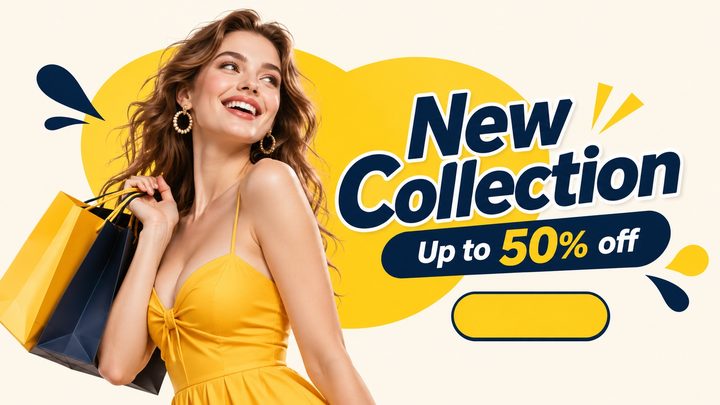 예시
A "New Collection" banner.
Store Banner Maker 사용 방법
컴퓨터나 휴대폰에서 3단계로 사용할 수 있어요.
- 01
Write your headline
Type your headline, for example "New Collection".
- 02
Choose style and shape
Pick Style (Bold, Minimal, Festive or Luxury) and a shape, from square to 16:9, then select Make banner. A result usually takes about 15 seconds.
- 03
Review and download
Check the picture and read every word, then download a JPG. Example on this page: a "New Collection" banner.
사람들이 이 도구를 사용하는 용도
Shopify and Etsy headers
A banner across the top of your shop.
Social profiles
Facebook and X headers.
Ads
Brand awareness creatives.
더 나은 결과를 위한 팁
- Keep the tagline under eight words.
- Show your best-selling product.
- Match the style to your brand.
더 세밀한 제어가 필요하신가요? API를 사용하세요
이 도구는 SandBase 이미지 API로 실행됩니다. API를 사용하면 무료 도구가 대신 고정해 주는 모든 설정을 직접 지정할 수 있습니다.
- 더 높은 품질과 크기quality=high, 최대 2K 크기, 투명 배경을 한 번의 호출로 처리합니다.
- 나만의 프롬프트템플릿을 수정하고, 참조 이미지를 추가하고, 코드나 Agent에서 수백 장의 이미지를 일괄 생성할 수 있습니다.
- 이미지당 결제무료 도구 할당량을 초과해 SandBase 잔액을 사용하세요. 모델 제공 여부와 API 속도 제한은 여전히 적용됩니다.
# Set SANDBASE_API_KEY first.
curl --fail-with-body https://api.sandbase.ai/v1/images/generations \
  -H "Authorization: Bearer $SANDBASE_API_KEY" \
  -H "Content-Type: application/json" \
  --data-binary @- <<'SANDBASE_JSON'
{
  "model": "gpt-image-2.6-flare",
  "prompt": "A wide e-commerce sale banner for an online store home page, with the headline \"New Collection\" as large, perfectly spelled lettering and the line \"Up to 50% off\" smaller below it. Bold modern design with big shapes and high contrast. Space for a button, no other text, no watermark. Keep all lettering and the main subject inside the central 80% of the frame, with a wide empty margin on every side, because the image may be resized or cropped: no letter may touch or cross an edge.",
  "size": "1536x1024",
  "quality": "high"
}
SANDBASE_JSONFAQ
What size should a store banner be?
Pick the size for where it goes; wide banners suit headers, square suits social.
Can I change the text later?
Make a new one in seconds with new text.
Which size should I use?
16:9 for website heroes and email headers, 1:1 or 4:5 for social posts, 9:16 for Stories.
How long can the text be?
Keep the headline short (2 to 4 words); short text is spelled most reliably.
Store Banner Maker은 무료인가요?
네, 워터마크도 없고 가입도 필요 없습니다. Store Banner Maker 한 번 실행하는 데는 약 15초가 걸리며 JPG을 제공합니다. 이는 모든 AI 이미지 도구에서 공유되는 무료 일일 AI 이미지 할당량 1회를 사용합니다. 로그인하지 않으면 하루 10회, 무료 SandBase 계정이 있으면 30회 사용할 수 있습니다. 도구에서 남은 횟수를 표시하며, 횟수는 UTC 자정에 초기화됩니다. 네트워크 및 사이트 전체 제한이 적용될 수도 있습니다.
실행할 때 Store Banner Maker이 무엇을 전송하나요?
선택한 텍스트와 옵션만 SandBase와 이미지 제공업체에서 처리되어 이 하나의 결과를 만듭니다. Store Banner Maker은 어떤 것도 공개 갤러리에 게시하지 않습니다. 결과는 최대 24시간 동안 캐시에서 재사용될 수 있으므로, 동일한 요청은 추가 실행을 사용하지 않습니다. 보관하려는 결과는 반드시 다운로드하세요.
이 작업에 적합한 SandBase API
같은 종류의 데이터를 자체 코드나 Agent에서 사용하세요: API 키 하나로, 호출당 과금됩니다.
더 많은 Tools
Grand Opening Banner Maker
Make a grand opening banner with your headline and offer.
Black Friday Banner Maker
Make a Black Friday banner with your headline and offer.
Discount Banner Maker
Make a discount banner with your headline and offer.
Etsy Banner Maker
Make a Etsy banner with your headline and offer.
Christmas Sale Banner Maker
Make a Christmas sale banner with your headline and offer.
Storefront Sign Mockup Generator
Show your design on a storefront sign mockup.