
Orbital Atlas: Solar Journeys
- Skill z Lab
- v0.1.0
- Education
Explore worlds and spacecraft missions in an interactive 3D atlas with focus cameras, orbital views and a launch timeline.
Przykład
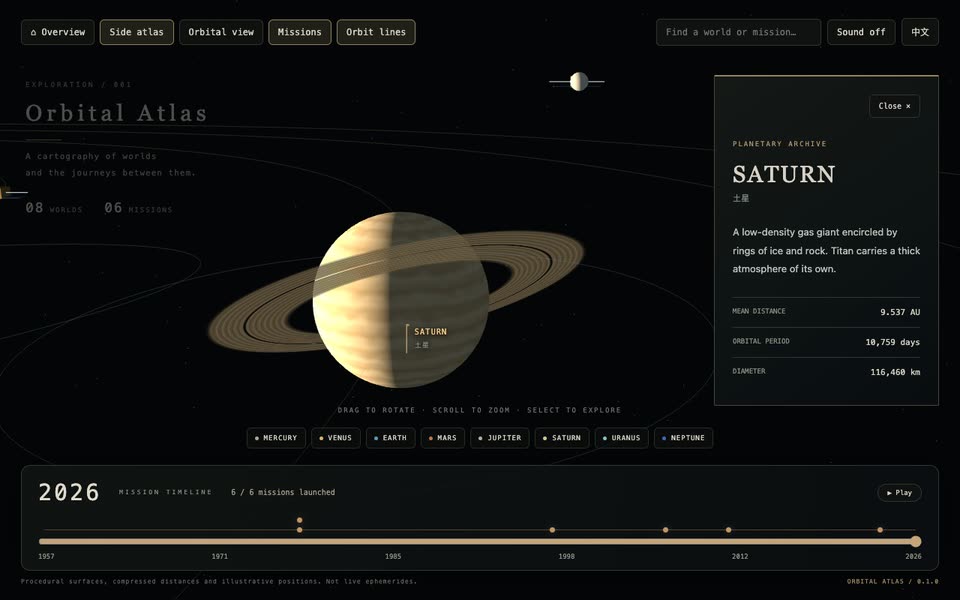
Orbital Atlas interactive demo
Przykład działa w odizolowanej ramce bez dostępu do tej strony.
Uruchom online
Uruchom w sandboxie SandBase i zobacz wyniki w Lab.
Otwórz w Lab ↗Co otrzymasz
Bring worlds, missions and bilingual descriptions; optionally a palette and camera preferences. The Skill returns a downloadable Skill, editable catalogs, verification scripts and a self-contained interactive HTML scene.
Jak to działa
- 01
Describe worlds and missions
Orbital Atlas needs two text slots, worlds and missions, with optional palette, interaction and camera slots. node <skill>/scripts/fill-prompt.mjs --slots <skill>/assets/prompts/examples/solar-journeys.json --lang en --out prompt.md writes the agent prompt. Catalogs hold 2 to 16 worlds and 0 to 32 missions, and the Solar Journeys example has eight planets and six exploration missions.
- 02
Edit and validate the catalog
node <skill>/scripts/new-project.mjs --out my-atlas copies the app, and --catalog <file> validates another catalog first, such as the fictional Ice Worlds survey. src/catalog.json holds bilingual names, descriptions, texture styles, scene radii, body sizes, mission links and year bounds. surface picks one of eight procedural materials independently of the id. The pinned Node toolchain is 22.14.0.
- 03
Build, verify and record
npm run build:single writes dist-single/index.html with code, styles and dependency notices embedded and no runtime network or storage. npm run shoot -- --file dist-single/index.html checks desktop, mobile and compact screenshots. Release 0.1.0 passed focus, orbit, search, timeline, view and zoom with the compact embed. npm run record captures an optional cover video with ffmpeg.
FAQ
What is Orbital Atlas for?
Orbital Atlas is for educational atlases of worlds and exploration missions, fictional star-system exhibits and interactive astronomy explainers. You drag to orbit, scroll or pinch to zoom, focus a world, search a mission, replay its launch timeline and switch between a side atlas and an orbital overview.
Are Orbital Atlas planet positions accurate?
No. Orbital Atlas surfaces, body scales, orbit phases and spacecraft markers are illustrative, and the scene keeps a disclaimer saying so. The Solar Journeys dates are launch years, not records of where spacecraft were. Real ephemerides would need a separate verified data pipeline.
Can I change the Orbital Atlas years and worlds?
Yes. Orbital Atlas reads startYear, endYear and each mission's launch year, and the timeline labels and counts derive from them. A new world needs a validated record in both languages in src/catalog.json and one of eight surface styles. Existing nonempty output folders are never overwritten.
Does Orbital Atlas need an API key?
No. Orbital Atlas draws procedural surfaces and spacecraft silhouettes in the built page and makes no model call, so exploring it costs nothing on SandBase. Its only sound is a short synthesised navigation tone, muted by default until you toggle it.
Can Orbital Atlas export video?
Yes. Orbital Atlas records its cover choreography with npm run record and ffmpeg, but the main output stays an interactive HTML scene. capture=1 exposes deterministic stepping for that recording.
Why does an Orbital Atlas build fail on external assets?
Orbital Atlas single-file checks deliberately reject any output that depends on the network, so textures and geometry must stay procedural. User content is plain text, never HTML. The page accepts lang, embed, quality, tune and capture parameters.
Więcej Skills
Wszystkie Skills dla Education →
Science MV
Explain science through visible causes, transformations and results.

Loop Story
Explain a cycle: build each stage, close the loop, then reveal the takeaway.

Flux Rotor: Cobalt Drive
Inspect an original motor with real winding groups, alternating magnet sectors and a keyed shaft. Balanced phase currents drive prescribed synchronous rotation, material colors and spatial harmonic markers. Open the actual cutaway and separate six components offline. This display does not solve torque, efficiency or magnetic finite elements.

Voxel Paddock: Mint Apex
Inspect an original open-wheel vehicle built from procedural cubes. Spin actual wheels on a stationary display, turn nominal geometric steering and separate twelve component groups. Edit bounded dimensions, voxel density and three palettes offline. This is not a driving or aerodynamics simulation.

River Era: Valley Years
Scrub an authored river settlement timeline from camp and farms to town, workshops and speculative towers. Actual seeded geometry changes reversibly; boats and vehicles follow the same river and bank equations. This is an illustrative sequence rather than predictive history.

3D Mechanical Watch Explorer
Inspect a kinematic mechanical watch with actual meshed tooth ratios, 54 components, axial explosion, material cutaway and bilingual mouse/touch controls. One offline HTML with optional synthesized tones.