
Free remove shadow from photo tool
GrátisImagem com IASoften or remove harsh shadows on faces, documents and products so the light looks even and natural, without changing the scene or colors.
- 100% free
- No sign-up
- No watermark
- Works on phone
Resultado de exemplo
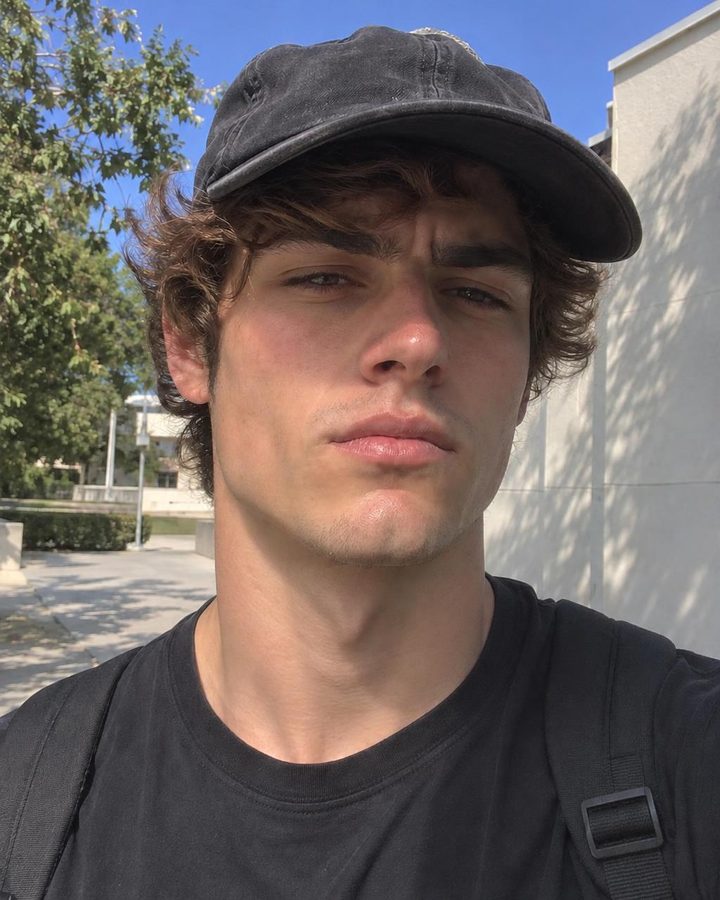
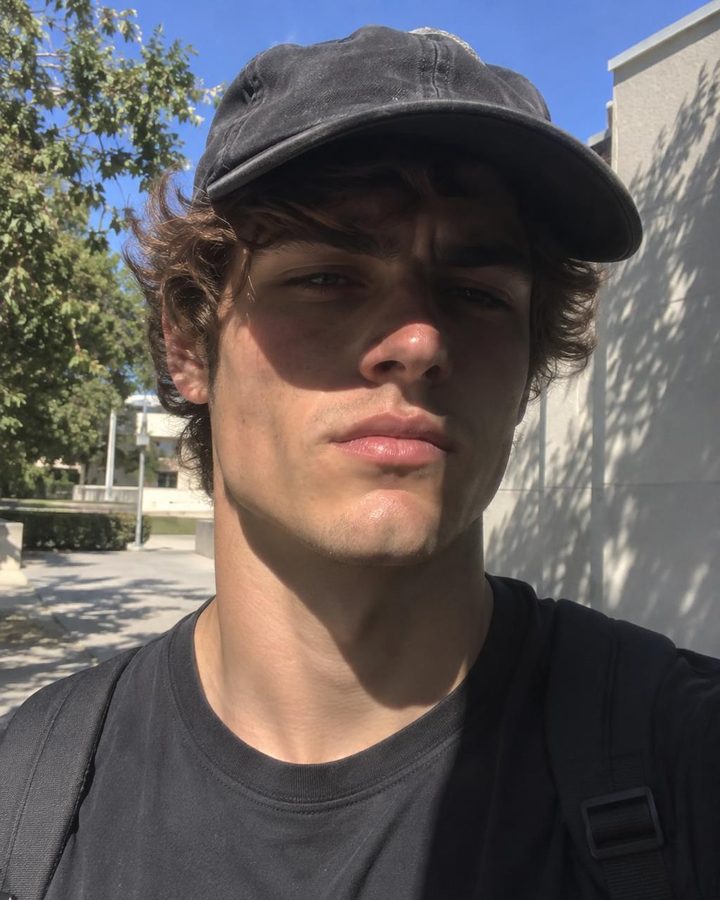 AntesDepois
A portrait with a hard shadow across one side, evened out.
Como usar o Remove Shadow from Photo
Três passos, no computador ou no celular.
- 01
Upload a photo
Drop, paste or pick a JPG, PNG, WebP or HEIC image; on a phone you can take one with the camera.
- 02
Choose shadows
Pick Shadows (Harsh shadows, On the face or All shadows), then select Remove shadows. A result usually takes about 20 seconds.
- 03
Compare and download
Compare it with your original, then download a JPG. Example on this page: a portrait with a hard shadow across one side, evened out.
Para que as pessoas usam
Portraits
Remove the hard shadow from a flash or midday sun.
Documents and scans
Lift the shadow of your hand or phone off a page.
Product photos
Clean, even light without a studio.
Dicas para um resultado melhor
- On the face fixes hat and hair shadows on portraits.
- Harsh shadows is the pick for noon sun and flash.
- All shadows suits documents and product shots on a table.
Precisa de mais controle? Use a API
Esta ferramenta roda na API de imagens da SandBase. A API oferece todas as configurações que a ferramenta gratuita ajusta para você.
- Mais qualidade e tamanhoquality=high, tamanhos de até 2K e fundos transparentes em uma única chamada.
- Seu próprio promptAltere o template, adicione imagens de referência ou processe centenas de imagens em lote a partir do seu código ou Agent.
- Pague por imagemUse seu saldo da SandBase além da cota da ferramenta gratuita. A disponibilidade dos modelos e os limites de taxa da API ainda se aplicam.
# Set SANDBASE_API_KEY and choose your local image file.
IMAGE_FILE="photo.jpg"
curl --fail-with-body https://api.sandbase.ai/v1/images/edits \
  -H "Authorization: Bearer $SANDBASE_API_KEY" \
  --form-string 'model=gpt-image-2.6-flare' \
  --form "image=@${IMAGE_FILE}" \
  --form-string 'quality=high' \
  --form-string 'size=2048x2048' \
--form-string 'prompt=Remove the harsh shadows, especially on faces and under objects from this photo and even out the light so it looks natural and soft. Keep the subject, the scene, the colors and the framing exactly as they are. Do not change the face or any feature.'Perguntas frequentes
Will it change how the face looks?
The AI is told to keep every feature and only even out the light. Compare with the slider, since big shadows hide detail that has to be guessed.
Remove Shadow from Photo é grátis?
Sim, sem marca d'água e sem cadastro. Uma execução de Remove Shadow from Photo leva cerca de 20 segundos e gera um JPG. Ela usa uma execução da cota diária gratuita de imagens de IA, compartilhada entre todas as ferramentas de imagem de IA: 10 execuções por dia sem entrar na conta e 30 com uma conta gratuita da SandBase. A ferramenta mostra quantas execuções ainda restam, e a contagem é redefinida à meia-noite UTC; limites de rede e do site também podem se aplicar.
O que acontece com a foto que envio para Remove Shadow from Photo?
Sua foto e suas configurações são processadas pela SandBase e pelo provedor de imagens para gerar este resultado. Remove Shadow from Photo não publica nada em uma galeria pública. Os resultados podem ser reutilizados de um cache por até 24 horas, então uma solicitação idêntica não usa outra execução; baixe qualquer resultado que você queira manter.
APIs da SandBase para este trabalho
O mesmo tipo de dado no seu próprio código ou Agent: uma chave de API, cobrança por chamada.
Mais ferramentas
Remove People from Photo
Remove tourists, strangers and photobombers from a photo; the scene behind them is rebuilt naturally.
Remove Text from Image
Remove captions, date stamps, subtitles and text overlays from an image; the background is rebuilt naturally.
AI Photo Editor
Edit any photo by describing the change in plain words: weather, outfit, light, background. Review the rest of the image for unintended changes.
AI Photo Restoration
Restore old photos with AI: remove scratches, creases and fading, and colorize black and white pictures.
AI Image Upscaler
Generate a 2K or 4K version of a photo or artwork with AI. Compare the result carefully: fine details and text may change.
AI Object Remover
Erase people, cars, wires, text and other objects from a photo by painting over them or describing them.