
Free AI clothes changer
БесплатноИзображения AIPick the piece to change, type what it should become, and see it on the same person: same face, pose and background, only that piece of clothing is new.
- 100% free
- No sign-up
- No watermark
- Works on phone
Пример результата
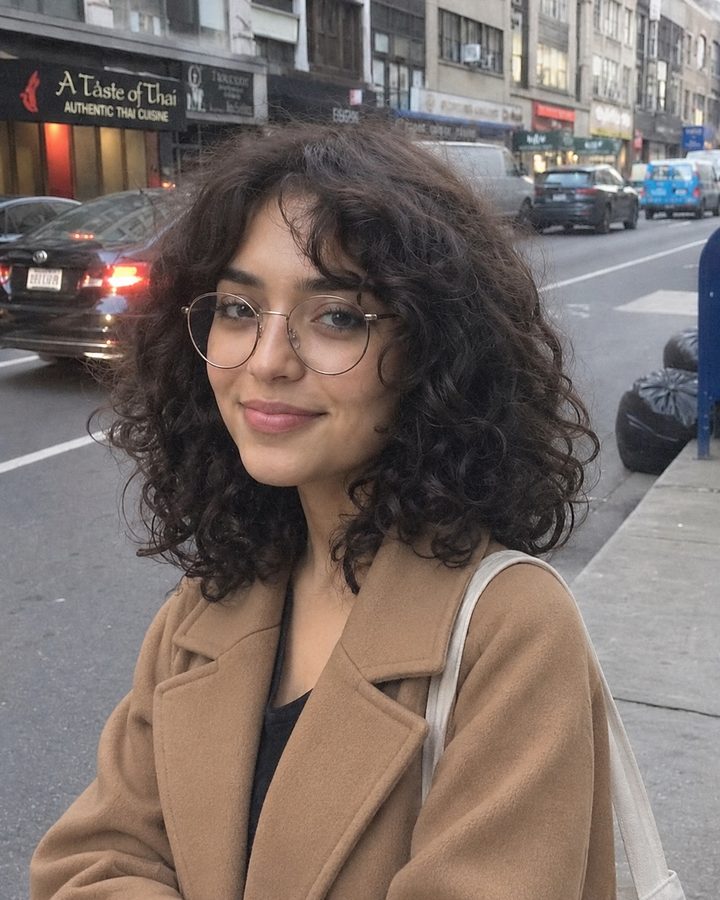
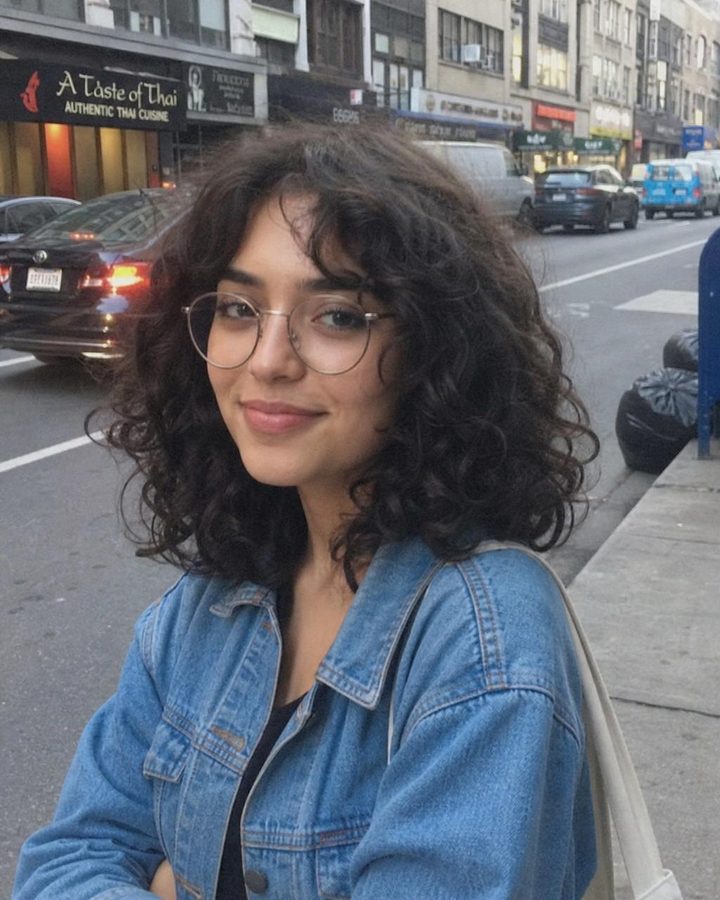 ДоПосле
A denim jacket changed to a camel wool coat; the face, hair and background stay the same.
Как использовать AI Clothes Changer
Три шага, на компьютере или телефоне.
- 01
Upload a photo
Drop, paste or pick a JPG, PNG, WebP or HEIC image; on a phone you can take one with the camera. Then type your change it to (optional), for example "a red knit sweater".
- 02
Choose what to change
Pick What to change (Top, Trousers or skirt, Jacket or coat, Dress or Shoes (full-body photo)), then select Change clothes. A result usually takes about 25 seconds.
- 03
Compare and download
Compare it with your original, then download a JPG. Example on this page: a denim jacket changed to a camel wool coat; the face, hair and background stay the same.
Для чего это используют
Shopping
See a color or style on yourself before you buy.
Fix a photo
Swap a stained, wrinkled or clashing top in a good photo.
Online stores and content
Show one product photo in other colors or fabrics.
Нужен больший контроль? Используйте API
Этот инструмент работает на базе SandBase image API. API даёт вам все настройки, которые в бесплатном инструменте фиксируются автоматически.
- Более высокое качество и размерquality=high, размеры до 2K и прозрачный фон в одном запросе.
- Ваш собственный promptИзмените шаблон, добавьте эталонные изображения или обрабатывайте сотни изображений из своего кода или Agent.
- Оплата за изображениеИспользуйте баланс SandBase сверх лимита бесплатного инструмента. Доступность моделей и ограничения API по частоте запросов по-прежнему действуют.
# Set SANDBASE_API_KEY and choose your local image file.
IMAGE_FILE="photo.jpg"
curl --fail-with-body https://api.sandbase.ai/v1/images/edits \
  -H "Authorization: Bearer $SANDBASE_API_KEY" \
  --form-string 'model=gpt-image-2.6-flare' \
  --form "image=@${IMAGE_FILE}" \
  --form-string 'quality=high' \
  --form-string 'size=2048x2048' \
--form-string 'prompt=Edit the clothing in this photo: replace the jacket or coat, or add one over the top if there is none. The new piece: a camel wool coat. Keep the face, identity, age, skin tone and facial features exactly the same; do not beautify, slim or change any feature. Keep every other piece of clothing, the pose, body shape, hands, hairstyle, accessories, background, lighting and the framing exactly as they are; do not zoom out, crop or reframe the photo. If that piece of clothing is not visible in the photo, leave the photo unchanged. The new garment fits the body naturally, with realistic fabric, seams, folds and shadows. One photorealistic photo, suitable for all audiences.'FAQ
How is this different from the AI outfit changer?
This tool changes one piece and keeps everything else you wear. The outfit changer restyles the whole look at once.
How do I describe the new clothes?
Name the type, color and fabric, like “a cream cable-knit cardigan” or “black leather trousers”. Leave it empty and the tool picks a piece that suits the person.
Why was my request refused?
The image model refuses swimwear, underwear, lingerie and see-through or very revealing clothes, and some requests on photos of children. Pick everyday clothes, or describe the piece differently, and try again. A refused run does not count as a free run.
Why did more of my photo change when I picked shoes?
Shoes and trousers can only be changed when the photo shows them. On a head-and-shoulders photo the model may redraw the whole picture to fit them in, or change something else. Use a full-body photo for shoes.
Can I change clothes on a photo of someone else?
Only on photos you have the right to use: of yourself, or of people who agreed. Do not use it to make revealing or misleading images of anyone.
AI Clothes Changer бесплатен?
Да, без водяного знака и без регистрации. Один запуск AI Clothes Changer занимает около 25 секунд и даёт вам JPG. Он использует один запуск дневного бесплатного лимита на AI images, который общий для всех AI image tools: 10 запусков в день без входа в систему и 30 — с бесплатным аккаунтом SandBase. Инструмент показывает, сколько запусков у вас осталось, а счётчик сбрасывается в полночь UTC; также могут действовать сетевые и общесистемные ограничения.
Что происходит с фото, которое я загружаю в AI Clothes Changer?
Ваше фото и ваши настройки обрабатываются SandBase и поставщиком изображений, чтобы создать этот результат. AI Clothes Changer не публикует ничего в публичной галерее. Результаты могут повторно использоваться из кэша до 24 часов, так что идентичный запрос не расходует ещё один запуск; скачайте любой результат, который хотите сохранить.
SandBase APIs для этой задачи
Тот же тип данных — в вашем собственном коде или Agent: один API-ключ, оплата за каждый вызов.
Больше инструментов
AI Outfit Changer
Try a new outfit on your photo: suit, streetwear, jacket, evening wear or your own idea.
AI Hairstyle Changer
Try new hairstyles and colors on your own photo: bob, pixie, fade, curls, braids and more.
AI Fashion Design Generator
Generate fashion concepts from a description: sketch, flat drawing, model photo or moodboard.
AI Photoshoot Generator
Turn one photo into a professional photoshoot in seven looks, with your face kept the same.
Face Swap
Swap a face from one photo into another, with a consent check before every run.
AI Photo Editor
Edit any photo by describing the change in plain words: weather, outfit, light, background. Review the rest of the image for unintended changes.