
Launch Physics Lab: Rocket Series
- Lab Skill
- v0.2.0
- Education
Fly three rocket missions in 3D with live physics: a crewed launch and parachute return, a first stage landing on a drone ship and a super-heavy booster caught by the tower. Change payload, reserve, engines or burn timing and watch each mission succeed or fail.
ตัวอย่าง · 3
ทำงานในเฟรมแบบ sandbox ที่ไม่มีสิทธิ์เข้าถึงหน้านี้
รันออนไลน์
รันใน SandBase sandbox และดูผลลัพธ์ของคุณใน Lab
เปิดใน Lab ↗สิ่งที่คุณจะได้รับ
Bring a mission, the physics to teach and an optional vehicle and palette. The Skill returns a downloadable Skill, an interactive demo and an example video.
วิธีการทำงาน
- 01
Fill the mission slots
Launch Physics Lab fills a prompt from slot files, for example node <skill>/scripts/fill-prompt.mjs --slots <skill>/assets/prompts/examples/crew-return.json --out prompt.md, then node <skill>/scripts/new-project.mjs --out my-mission. Use Node 22.14.0 and build only in a generated project. mission.json.profile picks crew, sea-landing or tower-catch, three missions that share the app, the simulator and the checks.
- 02
Edit stages, guidance and chapters
Your agent edits src/mission.json: bilingual names, Earth constants, vehicle stages with sea-level and vacuum thrust, specific impulse, propellant and dry mass, capsule and canopy data, slider ranges and eight chapters. Chapter ids and order are fixed. A different vehicle usually needs its own vehicleSpec.guidance. Formulas live in src/lesson.ts, meshes in src/models.ts and the renderer in src/world.ts.
- 03
Build and replay the telemetry
npm run build:single writes dist-single/index.html, which runs offline with no storage or external assets, and npm run shoot -- --file dist-single/index.html checks it. The default mission must reach orbit and land safely, and every what-if must change the outcome. Release 0.2.0 recorded a 196 by 207 km orbit, an 88.4 minute period, 3.39 g peak entry load and telemetry matching an independent replay.
คำถามที่พบบ่อย
What does Launch Physics Lab teach?
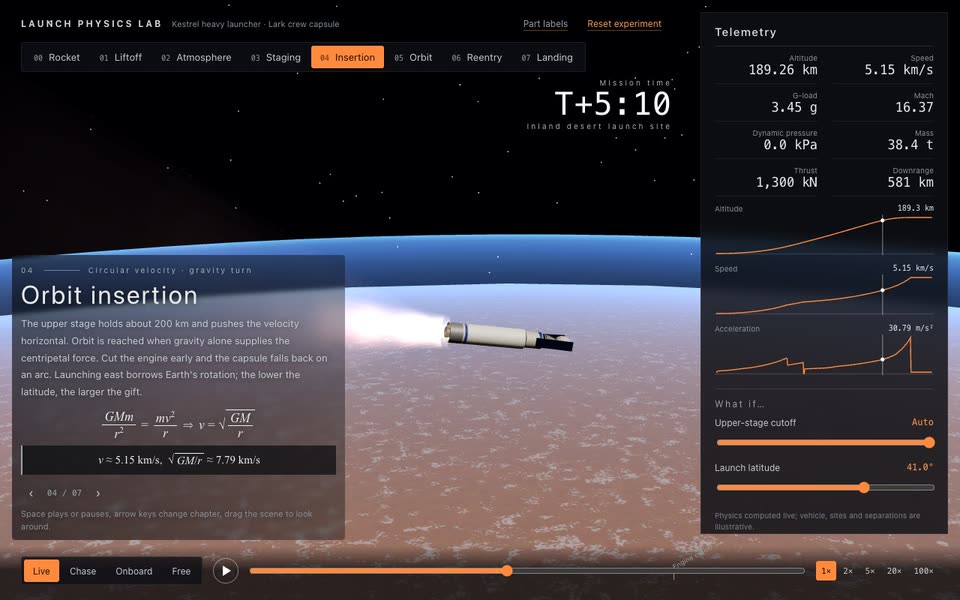
Launch Physics Lab teaches rocket physics through one crewed mission in eight chapters, from liftoff through the atmosphere, staging, orbit insertion, orbit and reentry to a parachute landing. Each chapter shows its formula, the same formula with live values, eight telemetry readings, live charts and the what-if controls that matter there.
Can a Launch Physics Lab mission fail?
Yes. Launch Physics Lab reruns the whole mission when you change a what-if. Too much payload or an early engine cutoff misses orbit, removing two core engines keeps the rocket on the pad, a steep entry overloads the crew and turning off the braking rockets gives a hard landing.
Are the Launch Physics Lab numbers realistic?
Launch Physics Lab numbers are realistic in scale but come from a planar point-mass model with a spherical Earth, exponential atmosphere, Mach-dependent drag, constant specific impulse and a simple guidance law. It is not a flight-dynamics tool, and its vehicles, sites, drone ship and tower are illustrative rather than a real programme or company.
How does the booster land in Launch Physics Lab?
Launch Physics Lab has two recovery missions. In sea-landing the first stage keeps a reserve, flips, burns back toward a drone ship, fires an entry burn, steers with grid fins and lands with a hoverslam. In tower-catch a super-heavy booster returns to the launch site and two tower arms catch it.
Does Launch Physics Lab need a key or a paid model?
No. Launch Physics Lab computes every number with a fixed-step simulator in the browser and calls no model at runtime, so a lesson costs nothing on SandBase. npm ci installs pinned public build dependencies, and the finished HTML uses no network. The page is silent.
Why won't my Launch Physics Lab rocket reach orbit after an edit?
Launch Physics Lab needs thrust-to-weight above 1.2 at liftoff, enough upper-stage propellant and a reachable target altitude. Check those three first; the shoot harness reports the outcome of each run. A black screen means the browser lacks WebGL2, and an invalid mission file shows a stable mission_ error code.
What controls does Launch Physics Lab offer?
Launch Physics Lab offers chapter tabs, previous and next, play and pause on Space, arrow keys, a scrubber with event ticks and 1x to 100x speeds. Cameras are Live, Chase, Onboard and Free, with drag or pinch in Free. On narrow screens the lesson and telemetry move into a Details sheet.
Skills เพิ่มเติม
Skills ทั้งหมดสำหรับ Education →
Science MV
Explain science through visible causes, transformations and results.

Loop Story
Explain a cycle: build each stage, close the loop, then reveal the takeaway.

Flux Rotor: Cobalt Drive
Inspect an original motor with real winding groups, alternating magnet sectors and a keyed shaft. Balanced phase currents drive prescribed synchronous rotation, material colors and spatial harmonic markers. Open the actual cutaway and separate six components offline. This display does not solve torque, efficiency or magnetic finite elements.

Voxel Paddock: Mint Apex
Inspect an original open-wheel vehicle built from procedural cubes. Spin actual wheels on a stationary display, turn nominal geometric steering and separate twelve component groups. Edit bounded dimensions, voxel density and three palettes offline. This is not a driving or aerodynamics simulation.

River Era: Valley Years
Scrub an authored river settlement timeline from camp and farms to town, workshops and speculative towers. Actual seeded geometry changes reversibly; boats and vehicles follow the same river and bank equations. This is an illustrative sequence rather than predictive history.

3D Mechanical Watch Explorer
Inspect a kinematic mechanical watch with actual meshed tooth ratios, 54 components, axial explosion, material cutaway and bilingual mouse/touch controls. One offline HTML with optional synthesized tones.