
Free sketch to image converter
ฟรีรูปภาพ AIDraw it rough, get it finished: upload a pencil sketch or a doodle and the AI adds color, materials, light and detail while keeping your shapes and layout.
- 100% free
- No sign-up
- No watermark
- Works on phone
ผลลัพธ์ตัวอย่าง
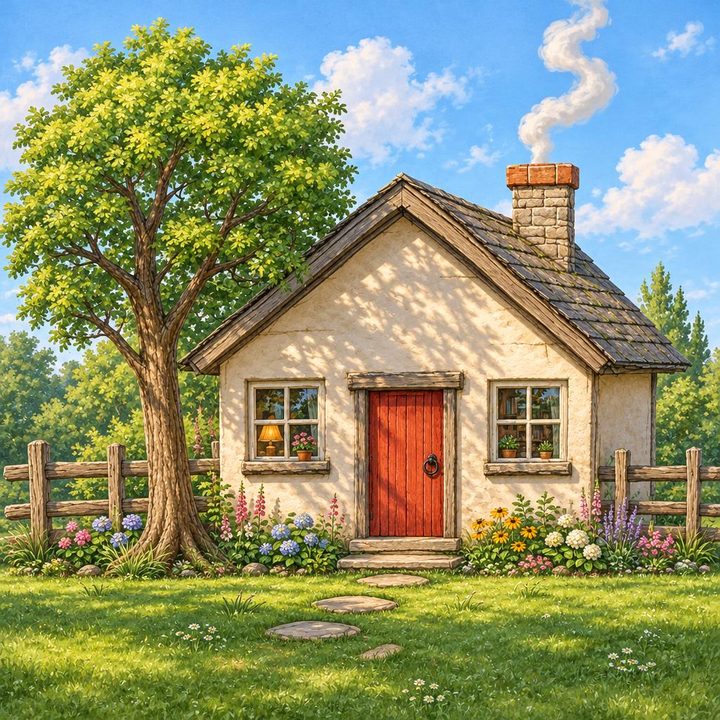
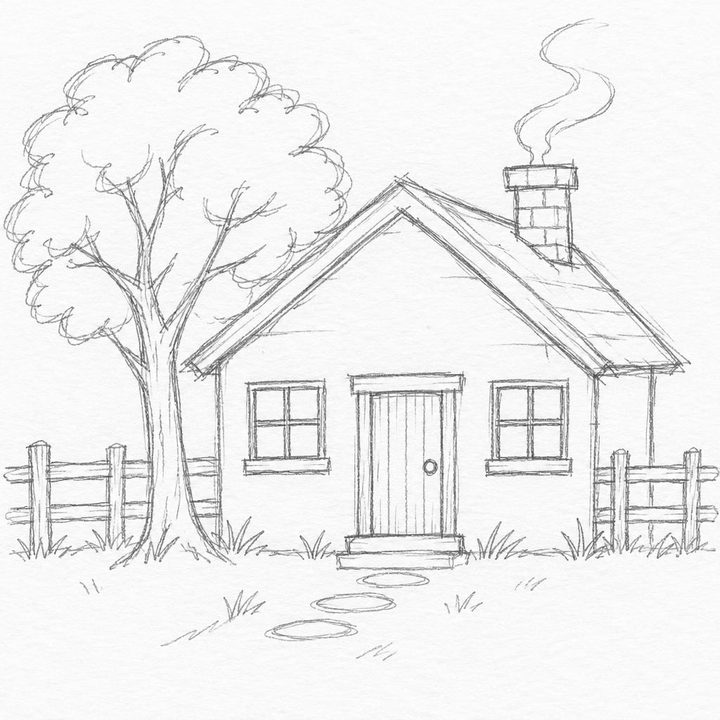 ก่อนหลัง
A pencil sketch of a cottage turned into a colorful illustration.
วิธีใช้ Sketch to Image
มี 3 ขั้นตอน ใช้ได้ทั้งบนคอมพิวเตอร์และโทรศัพท์
- 01
Upload a photo
Drop, paste or pick a JPG, PNG, WebP or HEIC image; on a phone you can take one with the camera. Then type your details (optional), for example "a cozy cottage with a red door and a garden".
- 02
Choose result
Pick Result (Photorealistic, 3D render, Illustration, Anime or Watercolor), then select Finish sketch. A result usually takes about 20 seconds.
- 03
Compare and download
Compare it with your original, then download a JPG. Example on this page: a pencil sketch of a cottage turned into a colorful illustration.
ผู้คนใช้ทำอะไร
Concept art
Quick explorations from thumbnail sketches.
Kids' drawings
See a child's drawing as a finished picture.
Design drafts
Product and scene ideas from a few lines.
เคล็ดลับเพื่อให้ได้ผลลัพธ์ที่ดียิ่งขึ้น
- Draw with dark lines on white paper.
- Add colors and materials in Details: “red brick, green door”.
- Photorealistic suits product and building sketches.
ต้องการควบคุมมากขึ้นใช่ไหม ใช้ API
เครื่องมือนี้ทำงานบน SandBase image API API ให้ทุกการตั้งค่าที่เครื่องมือฟรีกำหนดไว้ให้คุณ
- คุณภาพและขนาดที่สูงขึ้นquality=high, ขนาดสูงสุด 2K และพื้นหลังโปร่งใสได้ในครั้งเดียว
- พรอมต์ของคุณเองเปลี่ยนเทมเพลต เพิ่มภาพอ้างอิง หรือประมวลผลภาพหลายร้อยภาพจากโค้ดหรือ Agent ของคุณ
- จ่ายต่อภาพใช้ยอดคงเหลือ SandBase ของคุณได้เกินวงเงินของเครื่องมือฟรี ทั้งนี้ยังคงมีข้อจำกัดด้านความพร้อมใช้งานของโมเดลและ rate limit ของ API
# Set SANDBASE_API_KEY and choose your local image file.
IMAGE_FILE="photo.jpg"
curl --fail-with-body https://api.sandbase.ai/v1/images/edits \
  -H "Authorization: Bearer $SANDBASE_API_KEY" \
  --form-string 'model=gpt-image-2.6-flare' \
  --form "image=@${IMAGE_FILE}" \
  --form-string 'quality=high' \
  --form-string 'size=2048x2048' \
--form-string 'prompt=Turn this sketch into a finished colorful illustration. Keep the composition, shapes and proportions exactly as drawn; add color, material, light and detail. Details: a cozy cottage with a red door and a garden.'คำถามที่พบบ่อย
Does it follow my lines?
Yes. The prompt keeps the composition, shapes and proportions as drawn. The clearer the lines, the closer the result.
Sketch to Image ฟรีไหม
ใช่ ไม่มีลายน้ำและไม่ต้องสมัครใช้งาน หนึ่งรอบของ Sketch to Image ใช้เวลาประมาณ 20 วินาทีและให้ JPG โดยใช้โควต้ารูปภาพ AI ฟรีรายวันหนึ่งครั้ง ซึ่งแชร์ร่วมกันกับเครื่องมือรูปภาพ AI ทั้งหมด: 10 ครั้งต่อวันโดยไม่ต้องลงชื่อเข้าใช้ และ 30 ครั้งเมื่อมีบัญชี SandBase ฟรี เครื่องมือจะแสดงจำนวนที่คุณเหลืออยู่ และตัวนับจะรีเซ็ตเวลาเที่ยงคืน UTC; อาจมีข้อจำกัดของเครือข่ายและระดับเว็บไซต์ด้วย
เกิดอะไรขึ้นกับรูปที่ฉันอัปโหลดไปยัง Sketch to Image
รูปภาพของคุณและการตั้งค่าของคุณจะถูกประมวลผลโดย SandBase และผู้ให้บริการภาพเพื่อสร้างผลลัพธ์นี้ Sketch to Image จะไม่เผยแพร่อะไรไปยังแกลเลอรีสาธารณะ ผลลัพธ์อาจถูกนำกลับมาใช้จากแคชได้นานถึง 24 ชั่วโมง ดังนั้นคำขอที่เหมือนกันจะไม่ใช้รอบเพิ่มอีก; หากต้องการเก็บผลลัพธ์ใดไว้ ให้ดาวน์โหลดไว้
SandBase APIs สำหรับงานนี้
ข้อมูลแบบเดียวกันในโค้ดของคุณหรือ Agent: ใช้ API key เดียว คิดค่าบริการตามจำนวนครั้งที่เรียก
เครื่องมือเพิ่มเติม
AI Image to Image
Transform an image with a text prompt: change the style, season or mood while keeping the composition.
AI Comic Generator
Turn a short story into a comic page with panels and speech bubbles, in four styles.
AI Anime Art Generator
Generate anime art from text in modern, retro, pastel or dark fantasy looks.
AI Image Generator
Turn a text description into an image. Ten styles and nine shapes, no watermark.
Charcuterie Board Ideas Generator
Make a charcuterie board from a description.
Smoothie Image Generator
Make a smoothie from a description.