
Free tilt shift effect online
ฟรีรูปภาพ AITilt-shift makes real places look like toy models. Upload a photo taken from above and get the miniature look in about 20 seconds.
- 100% free
- No sign-up
- No watermark
- Works on phone
ผลลัพธ์ตัวอย่าง

 ก่อนหลัง
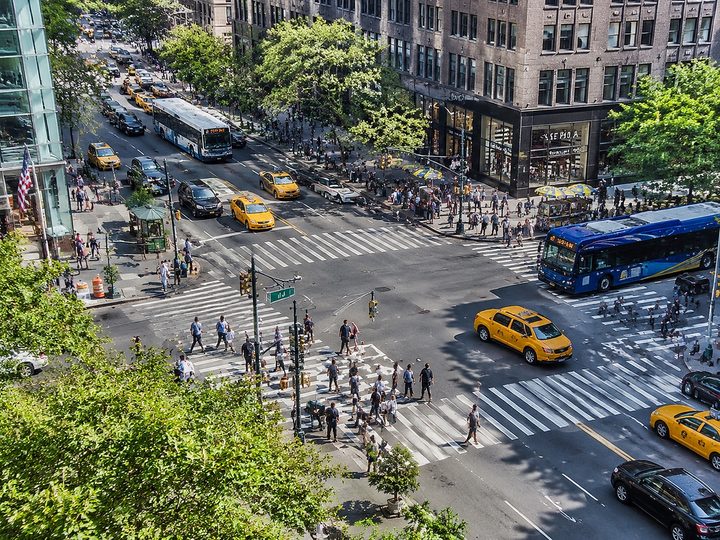
A city street from above made to look like a miniature model.
วิธีใช้ Tilt Shift Effect
มี 3 ขั้นตอน ใช้ได้ทั้งบนคอมพิวเตอร์และโทรศัพท์
- 01
Upload a photo
Drop, paste or pick a JPG, PNG, WebP or HEIC image; on a phone you can take one with the camera.
- 02
Choose look
Pick Look (Classic, Toy town or Subtle), then select Make miniature. A result usually takes about 20 seconds.
- 03
Compare and download
Compare it with your original, then download a JPG. Example on this page: a city street from above made to look like a miniature model.
ผู้คนใช้ทำอะไร
Travel photos
A playful take on city views.
Real estate
Make a neighborhood look charming.
Social posts
A look people stop scrolling for.
เคล็ดลับเพื่อให้ได้ผลลัพธ์ที่ดียิ่งขึ้น
- Shoot from high up, like a balcony or a hill.
- Toy town brightens colors for the miniature look.
- Busy streets, harbors and trains work best.
ต้องการควบคุมมากขึ้นใช่ไหม ใช้ API
เครื่องมือนี้ทำงานบน SandBase image API API ให้ทุกการตั้งค่าที่เครื่องมือฟรีกำหนดไว้ให้คุณ
- คุณภาพและขนาดที่สูงขึ้นquality=high, ขนาดสูงสุด 2K และพื้นหลังโปร่งใสได้ในครั้งเดียว
- พรอมต์ของคุณเองเปลี่ยนเทมเพลต เพิ่มภาพอ้างอิง หรือประมวลผลภาพหลายร้อยภาพจากโค้ดหรือ Agent ของคุณ
- จ่ายต่อภาพใช้ยอดคงเหลือ SandBase ของคุณได้เกินวงเงินของเครื่องมือฟรี ทั้งนี้ยังคงมีข้อจำกัดด้านความพร้อมใช้งานของโมเดลและ rate limit ของ API
# Set SANDBASE_API_KEY and choose your local image file.
IMAGE_FILE="photo.jpg"
curl --fail-with-body https://api.sandbase.ai/v1/images/edits \
  -H "Authorization: Bearer $SANDBASE_API_KEY" \
  --form-string 'model=gpt-image-2.6-flare' \
  --form "image=@${IMAGE_FILE}" \
  --form-string 'quality=high' \
  --form-string 'size=2048x2048' \
--form-string 'prompt=Apply a classic tilt-shift miniature effect to this photo: a sharp horizontal band of focus across the middle and strong blur toward the top and bottom, with slightly boosted saturation and contrast so the scene looks like a tiny model. Keep the scene and every object exactly as it is.'คำถามที่พบบ่อย
Which photos work best?
Photos taken from high up, looking down at streets, cars, people or houses. Close-ups do not look like miniatures.
Tilt Shift Effect ฟรีไหม
ใช่ ไม่มีลายน้ำและไม่ต้องสมัครใช้งาน หนึ่งรอบของ Tilt Shift Effect ใช้เวลาประมาณ 20 วินาทีและให้ JPG โดยใช้โควต้ารูปภาพ AI ฟรีรายวันหนึ่งครั้ง ซึ่งแชร์ร่วมกันกับเครื่องมือรูปภาพ AI ทั้งหมด: 10 ครั้งต่อวันโดยไม่ต้องลงชื่อเข้าใช้ และ 30 ครั้งเมื่อมีบัญชี SandBase ฟรี เครื่องมือจะแสดงจำนวนที่คุณเหลืออยู่ และตัวนับจะรีเซ็ตเวลาเที่ยงคืน UTC; อาจมีข้อจำกัดของเครือข่ายและระดับเว็บไซต์ด้วย
เกิดอะไรขึ้นกับรูปที่ฉันอัปโหลดไปยัง Tilt Shift Effect
รูปภาพของคุณและการตั้งค่าของคุณจะถูกประมวลผลโดย SandBase และผู้ให้บริการภาพเพื่อสร้างผลลัพธ์นี้ Tilt Shift Effect จะไม่เผยแพร่อะไรไปยังแกลเลอรีสาธารณะ ผลลัพธ์อาจถูกนำกลับมาใช้จากแคชได้นานถึง 24 ชั่วโมง ดังนั้นคำขอที่เหมือนกันจะไม่ใช้รอบเพิ่มอีก; หากต้องการเก็บผลลัพธ์ใดไว้ ให้ดาวน์โหลดไว้
SandBase APIs สำหรับงานนี้
ข้อมูลแบบเดียวกันในโค้ดของคุณหรือ Agent: ใช้ API key เดียว คิดค่าบริการตามจำนวนครั้งที่เรียก
เครื่องมือเพิ่มเติม
VHS Effect
Turn a photo into a VHS tape frame.
Mosaic Effect
Turn a photo into a tile mosaic.
Stained Glass Effect
Turn a photo into a stained glass window.
3D Cartoon Filter
Turn a selfie into a 3D animated movie character.
Anime PFP Maker
Turn a selfie into an anime profile picture, centered for small circles.
Tintype Photo Filter
Turn a selfie into a tintype photo.