
Free Zoom background generator
ฟรีรูปภาพ AIDescribe the room you want behind you and get a 16:9 background for Zoom, Microsoft Teams or Meet, with space for you in the middle.
- 100% free
- No sign-up
- No watermark
- Any shape
ผลลัพธ์ตัวอย่าง
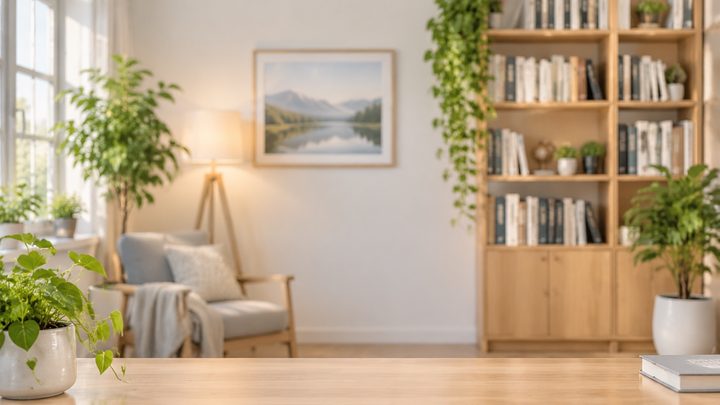 ตัวอย่าง
A bright Scandinavian home office as a call background.
วิธีใช้ Zoom Background Generator
มี 3 ขั้นตอน ใช้ได้ทั้งบนคอมพิวเตอร์และโทรศัพท์
- 01
Write your describe the room or place
Type your describe the room or place, for example "a bright Scandinavian home office with plants and a bookshelf", or tap one of the examples.
- 02
Choose look
Pick Look (Realistic, Soft focus, Illustrated or Fun), then select Make background. A result usually takes about 15 seconds.
- 03
Review and download
Check the picture, then download a JPG. Example on this page: a bright Scandinavian home office as a call background.
ตัวอย่างเพิ่มเติม
สร้างด้วยเครื่องมือนี้ โดยไม่ต้องแก้ไขเอง เปิดอันใดอันหนึ่งเพื่อเริ่มจากการตั้งค่าของมัน

ตัวอย่าง สร้างของคุณเอง
บอกสิ่งที่คุณต้องการ แล้วรับผลลัพธ์ในไม่กี่วินาที ฟรี ไม่ต้องสมัคร ไม่ติดลายน้ำ
เปิดเครื่องมือ
ผู้คนใช้ทำอะไร
Work calls
A tidy office instead of your kitchen.
Teams and brands
Matching backgrounds for a company.
Fun meetings
Beaches, spaceships and themed days.
เคล็ดลับเพื่อให้ได้ผลลัพธ์ที่ดียิ่งขึ้น
- Keep the middle calm, where your head will be.
- Soft focus looks the most natural on calls.
- Fun suits team socials, not client calls.
ต้องการควบคุมมากขึ้นใช่ไหม ใช้ API
เครื่องมือนี้ทำงานบน SandBase image API API ให้ทุกการตั้งค่าที่เครื่องมือฟรีกำหนดไว้ให้คุณ
- คุณภาพและขนาดที่สูงขึ้นquality=high, ขนาดสูงสุด 2K และพื้นหลังโปร่งใสได้ในครั้งเดียว
- พรอมต์ของคุณเองเปลี่ยนเทมเพลต เพิ่มภาพอ้างอิง หรือประมวลผลภาพหลายร้อยภาพจากโค้ดหรือ Agent ของคุณ
- จ่ายต่อภาพใช้ยอดคงเหลือ SandBase ของคุณได้เกินวงเงินของเครื่องมือฟรี ทั้งนี้ยังคงมีข้อจำกัดด้านความพร้อมใช้งานของโมเดลและ rate limit ของ API
# Set SANDBASE_API_KEY first.
curl --fail-with-body https://api.sandbase.ai/v1/images/generations \
  -H "Authorization: Bearer $SANDBASE_API_KEY" \
  -H "Content-Type: application/json" \
  --data-binary @- <<'SANDBASE_JSON'
{
  "model": "gpt-image-2.6-flare",
  "prompt": "A virtual background for video calls: a bright Scandinavian home office with plants and a bookshelf. A realistic photo with a soft blurred background. 16:9, eye-level camera, with the middle third calm and slightly out of focus so a person can sit in front, no people, no text, no watermark.",
  "size": "1536x1024",
  "quality": "high"
}
SANDBASE_JSONคำถามที่พบบ่อย
How do I add it to Zoom?
Download the image, then in Zoom go to Settings > Backgrounds and effects > Virtual backgrounds and press +.
Does it work in Teams and Meet?
Yes. Both accept 16:9 images: Teams under Background effects > Add new, Meet under Apply visual effects.
Zoom Background Generator ฟรีไหม
ใช่ ไม่มีลายน้ำและไม่ต้องสมัครใช้งาน หนึ่งรอบของ Zoom Background Generator ใช้เวลาประมาณ 15 วินาทีและให้ JPG โดยใช้โควต้ารูปภาพ AI ฟรีรายวันหนึ่งครั้ง ซึ่งแชร์ร่วมกันกับเครื่องมือรูปภาพ AI ทั้งหมด: 10 ครั้งต่อวันโดยไม่ต้องลงชื่อเข้าใช้ และ 30 ครั้งเมื่อมีบัญชี SandBase ฟรี เครื่องมือจะแสดงจำนวนที่คุณเหลืออยู่ และตัวนับจะรีเซ็ตเวลาเที่ยงคืน UTC; อาจมีข้อจำกัดของเครือข่ายและระดับเว็บไซต์ด้วย
เมื่อฉันรัน Zoom Background Generator ระบบส่งอะไรบ้าง
เฉพาะข้อความและตัวเลือกที่คุณเลือกเท่านั้นที่จะถูกประมวลผลโดย SandBase และผู้ให้บริการภาพเพื่อสร้างผลลัพธ์นี้ Zoom Background Generator จะไม่เผยแพร่อะไรไปยังแกลเลอรีสาธารณะ ผลลัพธ์อาจถูกนำกลับมาใช้จากแคชได้นานถึง 24 ชั่วโมง ดังนั้นคำขอที่เหมือนกันจะไม่ใช้รอบเพิ่มอีก; หากต้องการเก็บผลลัพธ์ใดไว้ ให้ดาวน์โหลดไว้
SandBase APIs สำหรับงานนี้
ข้อมูลแบบเดียวกันในโค้ดของคุณหรือ Agent: ใช้ API key เดียว คิดค่าบริการตามจำนวนครั้งที่เรียก
เครื่องมือเพิ่มเติม
Teams Background Generator
Make Microsoft Teams video call background images from a description.
AI iPhone Wallpaper Generator
Make iPhone lock screen wallpaper images from a description.
AI Desktop Wallpaper Generator
Make desktop wallpaper images from a description.
Mothers Day Card Maker
Design a Mother's Day card in four themes and four styles.
Fathers Day Card Maker
Design a Father's Day card in four themes and four styles.
3D Text Generator
Turn a word into 3D letters in chrome, gold, balloon, clay, glass or wood.