
Gantt Chart Maker
ฟรีแผนภูมิและไดอะแกรมType each task with when it starts and ends: week or day numbers ("Design, 4, 7") or dates ("Design, 2027-03-01, 2027-03-19"). Use one format throughout. Both start and end are included, so a task starting and ending on the same date lasts one day. Up to 40 tasks are drawn on a shared timeline; invalid dates and reversed ranges are rejected.
- ตัวเลขที่แม่นยำของคุณ
- ดาวน์โหลด PNG
- ไม่ได้อัปโหลดอะไร
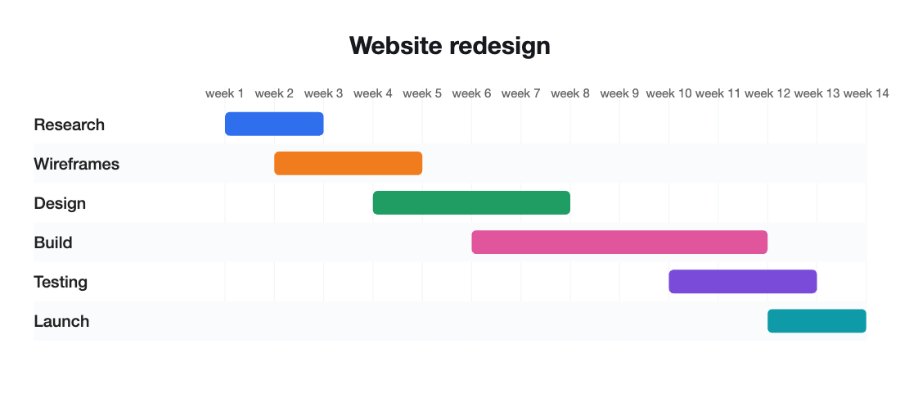
View schedule data (6 rows)
Start and end units are both included. Rows stay in input order. Short tasks may be less than one pixel on very long schedules; exact dates and durations are listed below.
| Task | Start | End (inclusive) | Duration (weeks) |
|---|---|---|---|
| Research | 1 | 2 | 2 |
| Wireframes | 2 | 4 | 3 |
| Design | 4 | 7 | 4 |
| Build | 6 | 11 | 6 |
| Testing | 10 | 12 | 3 |
| Launch | 12 | 13 | 2 |
ตัวอย่าง
สร้างด้วยเครื่องมือนี้ เปิดตัวอย่างหนึ่งเพื่อเริ่มจากตรงนั้นและแก้ไขได้ทุกอย่าง.
วิธีใช้ Gantt Chart Maker
- 01
Type each task as "task, start, end" with dates or week numbers.
- 02
Pick colors; the diagram redraws as you type.
- 03
Download it as a PNG.
ผู้คนใช้ทำอะไร
Project plans
Show a client or team what happens when.
Events
Plan weddings, launches and conferences backwards from the date.
School projects
Break a big assignment into steps with deadlines.
เคล็ดลับเพื่อผลลัพธ์ที่ดีกว่า
- Use week numbers for rough plans and real dates for fixed ones.
- List tasks in the order they start.
- Overlap tasks only when they can really run at the same time.
- Keep 5 to 15 tasks per chart.
คำถามที่พบบ่อย
How many tasks fit?
Up to 40 tasks. The image grows vertically to keep rows readable. Task names can be up to 100 characters, and the title up to 120.
Can I use dates?
Yes. Use valid YYYY-MM-DD dates on every row, or whole day, week or month numbers from 0 to 1,000,000 on every row. Do not mix formats. Quote task names that contain commas.
Is the end date included?
Yes. A task from March 1 through March 3 spans three days. A same-day task spans one day. View schedule data below the preview to check exact dates and durations.
Does it show dependencies?
No arrows are drawn; set start dates after the tasks they depend on.
Is my diagram generated locally?
Your inputs are drawn in your browser, and the PNG is created locally. No diagram-generation API is used.
เครื่องมือเพิ่มเติม
Comparison Chart Maker
Compare products or plans in a table with check marks.
Height Chart Maker
Line people up by height using centimeters, inches or decimal feet.
Org Chart Maker
Turn an indented list of people and titles into an org chart.
Bracket Maker
Make a printable single-elimination bracket for 2 to 64 teams.
Family Tree Maker
Draw a family tree from an indented list of names and dates.
Flowchart Maker
Turn a list of steps into a flowchart with decisions.