
Bio Lesson 3D: Immune Defense
- Lab Skill
- v0.2.0
- Education
Step through the immune system at cell scale in 3D and switch off a cell type or signal to see the process fail.
示例
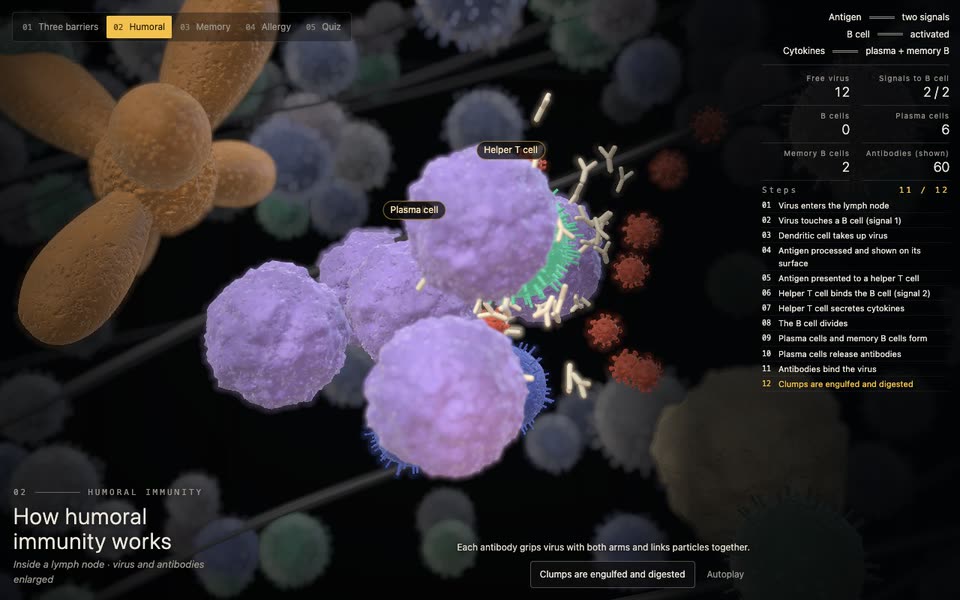
Bio Lesson 3D interactive immune system classroom
该示例在沙盒化的框架中运行,无法访问此页面。
在线运行
在 SandBase sandbox 中运行,并在 Lab 中查看结果。
在 Lab 中打开 ↗你将获得什么
Bring a topic, its chapters with steps and conditions, and an optional palette. The Skill returns a downloadable Skill, an interactive demo and an example video.
工作原理
- 01
Fill the lesson prompt slots
Bio Lesson 3D starts from a slot file such as assets/prompts/examples/immune-defense.json. Run node scripts/fill-prompt.mjs --slots with it and --out prompt.md, then node scripts/new-project.mjs --out my-lesson. Hand the prompt and project to a coding agent. All text, including chapters, steps, captions, conditions, counters, failure messages and quiz, lives in src/lesson.json in English and Simplified Chinese.
- 02
Write chapters as cell simulations
Each 3D chapter is a class in src/, such as barriers.ts, humoral.ts, recall.ts and allergy.ts, built on the Chapter contract in src/chapter.ts. Cells come from src/cells.ts and moving pools from src/kit.ts. Antibodies and virus spikes are coarse surfaces from Protein Data Bank entries 1IGT and 6VXX, built by scripts/molecules.mjs. A removed condition must change what the cells do.
- 03
Build and check each chapter
npm ci needs Node 22.4, then npm run build:single writes dist-single/index.html, one offline file. npm run shoot -- --file dist-single/index.html needs local Chrome and checks the lesson logic of every chapter, writing bilingual verification reports. Confirm that removing the helper T cell or cytokines makes the humoral chain fail and that the memory chapter shows a faster second response.
常见问题
What does the Bio Lesson 3D Immune Defense example teach?
Bio Lesson 3D ships an Immune Defense lesson with five chapters. They cover the three lines of defense in a skin cross-section, humoral immunity in a lymph node in 12 steps, immune memory and vaccines on a timeline with a log-scale antibody chart, allergy with mast cell degranulation and an antihistamine run, and a five-question quiz with explanations.
Is Bio Lesson 3D a recorded animation?
No. Bio Lesson 3D moves every cell through a small simulation in the browser, so switching off a condition changes the outcome. Without a helper T cell, for example, the B cell never gets its second signal and the virus keeps spreading. Pools and actors rewind on reset, so the recorded cover replays identically.
Are the Bio Lesson 3D numbers clinically accurate?
No. Bio Lesson 3D counters count the cells on screen. The memory chapter uses a simple two-strain kinetics model in src/memory.mjs with relative units, so it shows the shape of first and second responses, including a variant that escapes. It does not give clinical values.
Can Bio Lesson 3D teach photosynthesis or another topic?
Yes, with code work. Bio Lesson 3D lets you change text, steps, conditions and the quiz of an existing chapter in lesson.json alone. A new process, such as photosynthesis, a nerve impulse or mitosis, needs a new chapter class copied from the closest one and registered by its kind in src/main.ts. Add a shoot check for its cause and effect.
Does Bio Lesson 3D need a model key or internet?
No. Bio Lesson 3D needs no keys, model calls, external assets or storage, so classroom use is free of usage charges. It does need WebGL 2. Without it the page shows a message and an embedding page receives bio-lesson-3d:error with the code webgl.
How do students control Bio Lesson 3D?
Bio Lesson 3D uses chapter tabs or keys 1 to 5, the step button or N and the right arrow, Autoplay with P, condition buttons, Labels with L and Restart with R. The step caption is a live region. On phones the 3D view stays on top, and the 345 by 345 embed keeps only the view, a chapter menu and the step and Autoplay buttons.
Why is Bio Lesson 3D silent?
Bio Lesson 3D is silent because it is meant to be projected in a classroom while the teacher talks. Captions carry the explanation for each step instead of narration.
更多 Skills
所有 Education Skills →
Science MV
Explain science through visible causes, transformations and results.

Loop Story
Explain a cycle: build each stage, close the loop, then reveal the takeaway.

Flux Rotor: Cobalt Drive
Inspect an original motor with real winding groups, alternating magnet sectors and a keyed shaft. Balanced phase currents drive prescribed synchronous rotation, material colors and spatial harmonic markers. Open the actual cutaway and separate six components offline. This display does not solve torque, efficiency or magnetic finite elements.

Voxel Paddock: Mint Apex
Inspect an original open-wheel vehicle built from procedural cubes. Spin actual wheels on a stationary display, turn nominal geometric steering and separate twelve component groups. Edit bounded dimensions, voxel density and three palettes offline. This is not a driving or aerodynamics simulation.

River Era: Valley Years
Scrub an authored river settlement timeline from camp and farms to town, workshops and speculative towers. Actual seeded geometry changes reversibly; boats and vehicles follow the same river and bank equations. This is an illustrative sequence rather than predictive history.

3D Mechanical Watch Explorer
Inspect a kinematic mechanical watch with actual meshed tooth ratios, 54 components, axial explosion, material cutaway and bilingual mouse/touch controls. One offline HTML with optional synthesized tones.