
Progress Bar Maker
免费图表和示意图Type a label, the amount so far and the goal ("Books, 3400, 5000"), or just a percent. Each line becomes a bar filled to its percent, with the numbers next to it.
- 精确数值
- PNG 下载
- 无需上传任何内容
Input formats and limits
No header row. Plain decimals and scientific notation are supported. Histograms accept up to 10,000 numbers; scatter plots 2,000 points; pie, donut, radar, funnel, progress and pictogram charts 12 rows; other charts 40 rows and up to 6 series. Nonzero values must be between 1e-100 and 1e100 in magnitude.
View chart data (3 rows)
Unit: $
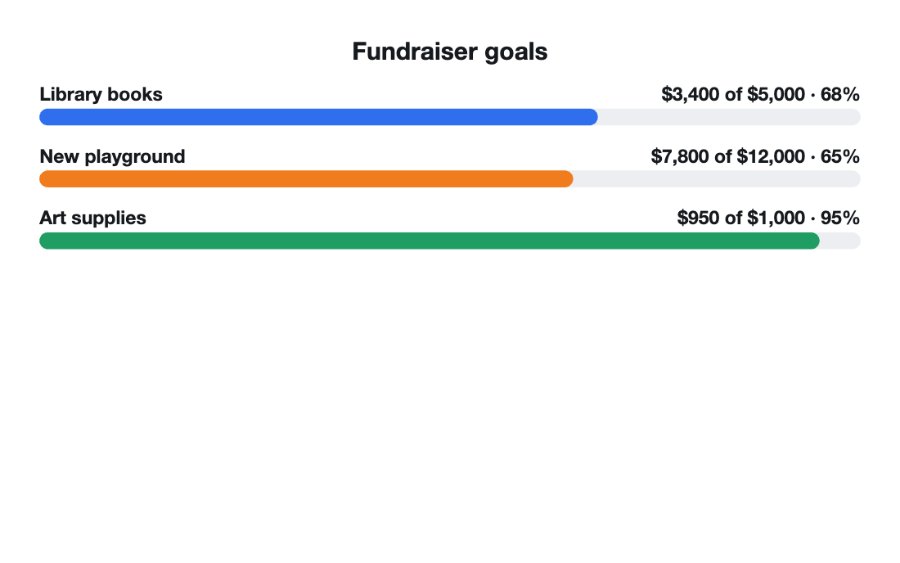
| Category | Value | Goal | Progress |
|---|---|---|---|
| Library books | 3400 | 5000 | 68% |
| New playground | 7800 | 12000 | 65% |
| Art supplies | 950 | 1000 | 95% |
如何使用 Progress Bar Maker
- 01
Type each goal as a label, the amount so far and the target.
- 02
Pick the chart type, colors and size; the chart redraws as you type.
- 03
Download the chart as a PNG for slides, docs or posts.
大家用它来做什么
Fundraising
Share how close a school or charity drive is to its goal.
Project status
Show progress of several tasks in one picture.
Personal goals
Track reading, savings or training targets.
提升效果的小贴士
- Type "label, amount, goal" for each bar; percents are worked out.
- Use the same unit across bars so they compare fairly.
- Update and repost weekly to keep people engaged.
- Pick bright colors for social posts, grays for reports.
常见问题
Can I use percents only?
Yes. Type a label and a percentage, such as "Reading, 75", on each line and leave the goal at 100.
Can I make a fundraising thermometer?
A single progress bar does the same job and reads more clearly; type one line with the amount raised and the goal.
Can a bar go past 100%?
The bar stops full at 100%, and the label shows the real percent, like 120%.
Does Progress Bar Maker upload my chart values?
No. Progress Bar Maker parses and draws your values in your browser, and the PNG is made from the same data as the preview; no chart API or account is needed.
更多工具
Bar Graph Maker
Make a bar or column graph from labels and numbers, with grouped bars to compare.
Area Chart Maker
Make an area graph that fills under the line to show volume over time.
Chart and Graph Maker
Turn a list of numbers into a bar, line, pie or 11 other kinds of chart, ready to download.
Donut Chart Maker
Make a doughnut chart with percentages and the total in the center.
Funnel Chart Maker
Make a funnel chart that shows how many people reach each step.
Radar Chart Maker
Compare scores on several axes with a radar (spider) chart.