
imagesarrayerforderlich
List of URLs of input reference images. Up to 10 images are supported; if more are sent, only the last 10 are used.
bytedance/seedream/5.5/editSeedream 5.5 Edit by ByteDance edits images with text instructions and up to 10 reference images. It keeps unedited regions stable across many rounds of editing and can return transparent-background (RGBA) PNGs.
Modell testen
PNG, JPEG, WebP, or GIF · 20 MiB maximum each · up to 10
Was möchten Sie als Nächstes tun?
Wählen Sie ein Beispiel aus, um seine Eingaben und das Ergebnis in den Playground zu laden.
{
  "aspect_ratio": "16:9",
  "background": "opaque",
  "images": [
    "https://static.sandbase.ai/examples/49b822da-45bc-4cde-8457-340038e2e462/input/ef7b2adc-6272-4a5e-807f-5cbb86b8d6e2.png"
  ],
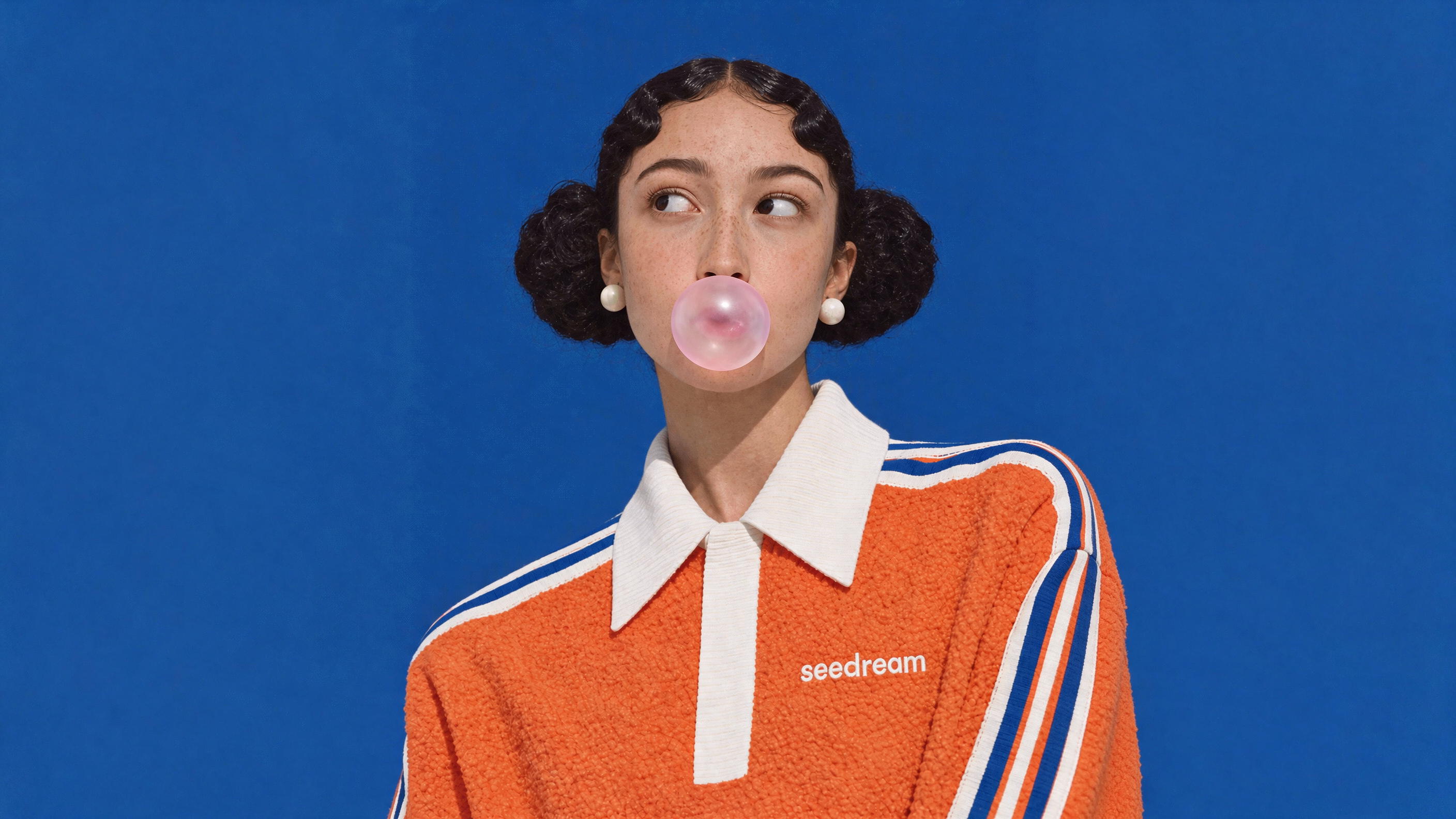
  "prompt": "Have the person blow a round, semi-transparent pink bubblegum bubble. Preserve the identity, facial features, gaze, hairstyle, pearl earrings, clothing, pose, blue background, composition, and visual style of the person."
}{
"aspect_ratio": "16:9",
"images": [
"https://static.sandbase.ai/examples/0ecef5f9-55bb-42fc-8a0d-db2a30890c97/input/113c7716-c857-4ff3-886c-1e568ed83ce5.png",
"https://static.sandbase.ai/examples/0ecef5f9-55bb-42fc-8a0d-db2a30890c97/input/df42a4ca-9f9a-4f3b-90a2-cce916dc0d90.png"
],
"prompt": "Replace the clothing in image 1 with the outfit from image 2."
}{
"aspect_ratio": "16:9",
"background": "transparent",
"images": [
"https://static.sandbase.ai/examples/1b40c47b-476c-4367-b682-ae7d485f3e37/input/aa700d14-0936-4de4-b67d-33f7ee3c87f3.png",
"https://static.sandbase.ai/examples/1b40c47b-476c-4367-b682-ae7d485f3e37/input/29b7966a-8b23-4ab0-8a2c-fddb835bf8b5.png"
],
"output_format": "png",
"prompt": "Extract the sticker elements from Image 1 and Image 2 separately, then place all extracted stickers in one transparent-background image. Preserve the original text, colors, shapes, and details of each sticker; remove all background content other than the stickers. Arrange the stickers separately without overlap, with sharp and intact edges."
}Seedream 5.5 Edit changes or combines up to 10 images with a text instruction. It keeps unedited regions stable across many rounds of editing and can return transparent-background (RGBA) PNGs.
| Field | Type | Default | Notes |
|---|---|---|---|
prompt | string, required | — | Text instruction. |
images | image URL[] (≤10), required | — | Images to edit or combine, Image 1, Image 2, … |
aspect_ratio | 21:9 / 16:9 / 3:2 / 4:3 / 5:4 / 1:1 / 4:5 / 3:4 / 2:3 / 9:16 | — | Omit to follow the input image. |
resolution | 1K / 1.5K / 2K | 2K | Output resolution tier. |
background | auto / transparent / opaque | auto | transparent returns a PNG with an alpha channel; opaque keeps multi-round edits most consistent. |
num_images | integer 1–1 | 1 | Fixed at 1. |
output_format | png / jpeg | png | Use png for transparent backgrounds. |
$0.035 per output image at 2K ($0.02 at 1K or 1.5K), plus $0.008 for each input image.
| Inputs | 1K / 1.5K | 2K |
|---|---|---|
| 1 input image | $0.028 | $0.043 |
| 3 input images | $0.044 | $0.059 |
| 10 input images | $0.10 | $0.115 |
Failed runs are not charged.
Other Seedream endpoints: bytedance/seedream/5.5, bytedance/seedream/5.0/pro, bytedance/seedream/5.0/pro/edit, bytedance/seedream/5.0/flash, bytedance/seedream/5.0/flash/edit, bytedance/seedream/5.0/lite/edit, bytedance/seedream/4.5/edit.
Jetzt loslegen
Senden Sie dieses Modell über die SandBase Unified Run API.
# The quoted heredoc keeps Unicode and shell metacharacters unchanged.
result=$(curl --fail-with-body --silent \
  -X POST "https://api.sandbase.ai/v1/run" \
  -H "Authorization: Bearer $SANDBASE_API_KEY" \
  -H "Content-Type: application/json" \
  --data-binary @- <<'SANDBASE_JSON'
{
  "model": "bytedance/seedream/5.5/edit",
  "images": [
    "https://static.sandbase.ai/examples/bytedance/seedream/5.0/pro/edit/input_images_0.png",
    "https://static.sandbase.ai/examples/bytedance/seedream/5.0/pro/edit/input_images_1.png",
    "https://static.sandbase.ai/examples/bytedance/seedream/5.0/pro/edit/input_images_2.png"
  ],
  "prompt": "Replace the product in Figure 1 with that in Figure 2. Seamlessly render the logo in Figure 3 into the product design, in a frosted glass texture.",
  "background": "auto",
  "num_images": 1,
  "resolution": "2K",
  "output_format": "png"
}
SANDBASE_JSON
)
run_id=$(printf '%s' "$result" | jq -r .id)
for attempt in $(seq 1 120); do
  status=$(printf '%s' "$result" | jq -r .status)
  case "$status" in completed|failed|timeout) break ;; esac
  sleep 2
  result=$(curl --fail-with-body --silent \
    -H "Authorization: Bearer $SANDBASE_API_KEY" \
    "https://api.sandbase.ai/v1/run/$run_id")
done
status=$(printf '%s' "$result" | jq -r .status)
[ "$status" = completed ] || { echo "Generation ended: $status" >&2; exit 1; }
printf '%s\n' "$result"Erstellen Sie einen SandBase API-Schlüssel und legen Sie ihn in Ihrer Serverumgebung fest. Alle Anfragen verwenden Bearer-Authentifizierung.
export SANDBASE_API_KEY="YOUR_API_KEY"Bewahren Sie den Schlüssel auf dem Server auf. Geben Sie ihn nicht in Browser-Code preis und committen Sie ihn nicht in ein Repository.
POST an /v1/run mit dieser Modell-ID und ihren Eingaben. Das obige Anfragebeispiel umfasst Übermittlung und Polling.
Verwenden Sie die zurückgegebene Run-ID zum Polling, bis der Status completed, failed oder timeout ist. Lesen Sie die Ausgabe erst nach completed.
curl "https://api.sandbase.ai/v1/run/$RUN_ID" \
-H "Authorization: Bearer $SANDBASE_API_KEY"Übergeben Sie eine öffentlich zugängliche Date-URL im Bild-, Video- oder Audiofeld des Modells. Unterstützte Formate und Limits werden neben jedem Playground-Eingabefeld angezeigt.
Verwenden Sie im Playground bei unterstützten Bildfeldern die Steuerung zum Hochladen oder Ersetzen. Video-URL-Felder akzeptieren ein gehostetes Fahrvideo; sie implizieren keine Unterstützung für Video-Uploads.
imagesarrayerforderlichList of URLs of input reference images. Up to 10 images are supported; if more are sent, only the last 10 are used.
promptstringerforderlichThe text prompt used to edit the image.
backgroundstringauto lets the model decide; transparent returns a PNG with an alpha channel (requires png output); opaque never adds transparency.
Standard: "auto"
Mögliche Werte: "auto", "transparent", "opaque"
num_imagesintegerThe number of edited images to generate. Currently limited to 1.
Standard: 1
Minimum: 1
Maximum: 1
resolutionstringOutput resolution tier. 1K and 1.5K cost less; 2K is the highest quality.
Standard: "2K"
Mögliche Werte: "1K", "1.5K", "2K"
aspect_ratiostringThe aspect ratio of the edited image. Leave unset to follow the reference image.
Mögliche Werte: "21:9", "16:9", "3:2", "4:3", "5:4", "1:1", "4:5", "3:4", "2:3", "9:16"
output_formatstringThe file format of the generated image. Use png for transparent backgrounds.
Standard: "png"
Mögliche Werte: "jpeg", "png"
{
  "model": "bytedance/seedream/5.5/edit",
  "images": [
    "https://static.sandbase.ai/examples/bytedance/seedream/5.0/pro/edit/input_images_0.png",
    "https://static.sandbase.ai/examples/bytedance/seedream/5.0/pro/edit/input_images_1.png",
    "https://static.sandbase.ai/examples/bytedance/seedream/5.0/pro/edit/input_images_2.png"
  ],
  "prompt": "Replace the product in Figure 1 with that in Figure 2. Seamlessly render the logo in Figure 3 into the product design, in a frosted glass texture.",
  "background": "auto",
  "num_images": 1,
  "resolution": "2K",
  "output_format": "png"
}Ein abgeschlossener Run stellt sein Ergebnis in der Ausgabe bereit. Das Folgende ist das gespeicherte Beispiel des Modells, keine neue Generierung.
[
  {
    "url": "https://static.sandbase.ai/examples/49b822da-45bc-4cde-8457-340038e2e462/output/2c41712f-d80b-47a4-a4c3-ca4e8297776e.png"
  }
]