
Comparison Chart Maker
KostenlosDiagramme und GrafikenEnter a feature heading and 2–6 option headings, then 1–40 feature rows. Use the same separator throughout and quote text containing commas. Only "yes" and "no" in option cells become check marks and crosses; all other text and blank cells are preserved. Inspect the original data below the preview before downloading.
- Ihre exakten Zahlen
- PNG-Download
- Nichts hochgeladen
View comparison data (5 rows)
Original cell text is shown below, including yes and no. Blank cells stay blank and do not mean “no”. Only yes/no in option cells become marks in the image. No winner is calculated.
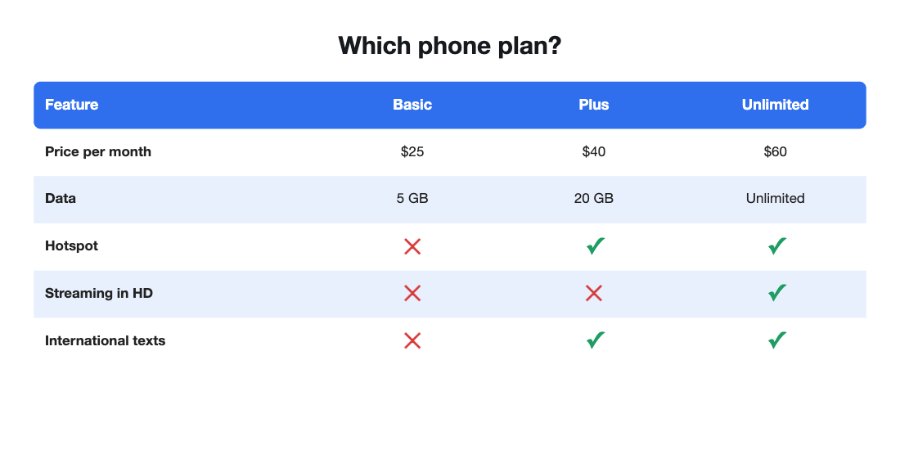
| Feature | Basic | Plus | Unlimited |
|---|---|---|---|
| Price per month | $25 | $40 | $60 |
| Data | 5 GB | 20 GB | Unlimited |
| Hotspot | no | yes | yes |
| Streaming in HD | no | no | yes |
| International texts | no | yes | yes |
Beispiele
Mit diesem Tool erstellt. Öffnen Sie eines, um davon auszugehen und alles anzupassen.
So verwenden Sie Comparison Chart Maker
- 01
Type the options on the first line, then one feature per line.
- 02
Pick colors; the diagram redraws as you type.
- 03
Download it as a PNG.
Wofür es verwendet wird
Buying decisions
Compare phones, plans or cars before you choose.
Sales pages
Show how your product stacks up.
Team choices
Compare vendors or tools with your team.
Tipps für ein besseres Ergebnis
- Put the options across the first line.
- Write yes or no to get check marks and crosses.
- Put the deciding factor, often price, first.
- Keep each cell short; two or three words.
FAQ
How much text fits?
Use headings up to 80 characters and cells up to 160 characters. Longer rows grow and text wraps or reduces in size to fit; shorter cells are easier to read on a slide.
Can I use text instead of check marks?
Yes. Only yes or no in option cells becomes a symbol. Feature names and values such as x, a dash, true or false remain text.
How many options fit?
Compare 2–6 options across 1–40 feature rows. The PNG grows with the table. Wide or long tables need a larger display or print size.
Can I bold the winner?
There is no separate winner or bold control. You can add a ★ to an option heading; the chart does not score options or choose a winner.
How do I include commas in a cell?
Enclose the whole cell in double quotes, such as "$1,200". Double a quote inside a quoted cell. Keep one record per line; commas, tabs or pipes may separate columns, but do not mix separators.
Is my diagram generated locally?
Your inputs are drawn in your browser, and the PNG is created locally. No diagram-generation API is used.
Weitere Tools
Gantt Chart Maker
Turn tasks with start and end dates into a Gantt chart.
Height Chart Maker
Line people up by height using centimeters, inches or decimal feet.
Org Chart Maker
Turn an indented list of people and titles into an org chart.
Bracket Maker
Make a printable single-elimination bracket for 2 to 64 teams.
Family Tree Maker
Draw a family tree from an indented list of names and dates.
Donut Chart Maker
Make a doughnut chart with percentages and the total in the center.