
imagestringrequerido
Photo to turn into a relief. Works best with one clear subject on a plain background. JPG, PNG or WebP up to 20 MB.
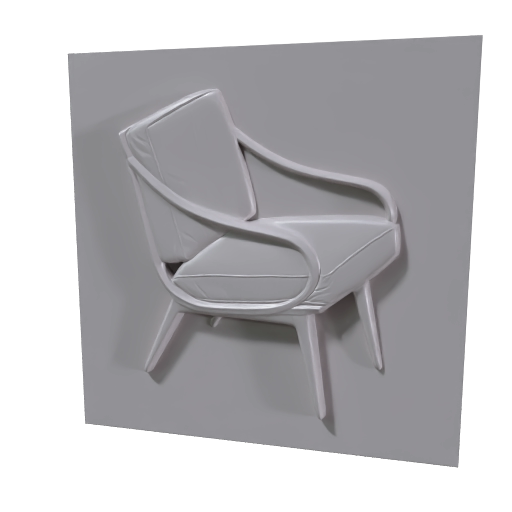
meshy/reliefMeshy Relief turns a photo into a printable 3D relief (GLB and STL) with emboss or engrave carving and an optional curved bend.
Probar el modelo
PNG, JPEG, WebP o GIF · máximo 20 MiB
¿Qué le gustaría hacer después?
Seleccione un ejemplo para cargar sus entradas y el resultado en el playground.
{
  "image": "https://static.sandbase.ai/examples/4c94005b-9c2a-44cc-abe7-337094aa34eb/input/dfd2b1f1-42c5-46c5-92e6-a9fc9ac0c350.png"
}Meshy Relief turns a photo into a printable 3D relief (GLB and STL) with emboss or engrave carving and an optional curved bend.
| Field | Type | Default | Notes |
|---|---|---|---|
image | image URL, required | — | Photo to turn into a relief. Works best with one clear subject on a plain background. JPG, PNG or WebP up to 20 MB. |
variant | low / high | low | 'low' gives slight depth and finer detail (patterns, badges, seals); 'high' gives bold, sculptural depth (pets, portraits, characters). |
carving_mode | emboss / engrave | emboss | 'emboss' makes nearer parts stand out; 'engrave' cuts them in. |
size_mm | number 20–250 | 60 | Length of the photo's long side in millimeters, measured flat before any bend. |
carving_depth_mm | number 0–60 | — | Carving depth in millimeters. Defaults to 3 for 'low' and 6 for 'high'. |
base_thickness_mm | number 0.1–10 | — | Base plate thickness in millimeters (default 1). Not allowed with remove_base. |
remove_base | boolean | false | Cut away the background and build no base plate. |
bend_mode | off / convex / concave | off | Bend the relief into a convex or concave curve. |
bend_axis | xz / yz | xz | 'xz' curls the left and right edges, 'yz' the top and bottom. |
bend_angle | number 0–360 | 60 | Bend angle in degrees when bending is on. |
mesh_resolution | integer 512–2048 | 1024 | Mesh points along the long side. At 2048 the GLB reaches about 150 MB and the STL about 300 MB. |
color_mapping | boolean | false | Also produce a colored relief from the photo. |
url: Main 3D file (GLB unless another export format is selected).thumbnail: Preview image rendered by the provider.stl: Additional file returned by the provider.depth_map: Additional file returned by the provider.$0.80 per request. Failed runs are not charged.
Other Meshy 3D endpoints: meshy/6.0-lite/retexture, meshy/6.0/retexture, meshy/7.0/image-to-3d, meshy/7.0/multi-image-to-3d.
Empiece a construir
Envíe este modelo a través de la API de ejecución unificada de SandBase.
# The quoted heredoc keeps Unicode and shell metacharacters unchanged.
result=$(curl --fail-with-body --silent \
  -X POST "https://api.sandbase.ai/v1/run" \
  -H "Authorization: Bearer $SANDBASE_API_KEY" \
  -H "Content-Type: application/json" \
  --data-binary @- <<'SANDBASE_JSON'
{
  "model": "meshy/relief",
  "image": "https://static.sandbase.ai/examples/meshy/relief/input_image_0.png",
  "size_mm": 60,
  "variant": "low",
  "bend_axis": "xz",
  "bend_mode": "off",
  "bend_angle": 60,
  "remove_base": false,
  "carving_mode": "emboss",
  "color_mapping": false,
  "mesh_resolution": 1024
}
SANDBASE_JSON
)
run_id=$(printf '%s' "$result" | jq -r .id)
for attempt in $(seq 1 120); do
  status=$(printf '%s' "$result" | jq -r .status)
  case "$status" in completed|failed|timeout) break ;; esac
  sleep 2
  result=$(curl --fail-with-body --silent \
    -H "Authorization: Bearer $SANDBASE_API_KEY" \
    "https://api.sandbase.ai/v1/run/$run_id")
done
status=$(printf '%s' "$result" | jq -r .status)
[ "$status" = completed ] || { echo "Generation ended: $status" >&2; exit 1; }
printf '%s\n' "$result"Cree una clave de API de SandBase y configúrela en el entorno de su servidor. Todas las solicitudes usan autenticación Bearer.
export SANDBASE_API_KEY="YOUR_API_KEY"Conserve la clave en el servidor. No la exponga en código del navegador ni la confirme en un repositorio.
Haga un POST a /v1/run con este ID de modelo y sus entradas. El ejemplo de solicitud anterior incluye el envío y el sondeo.
Use el ID de ejecución devuelto para sondear hasta que el estado sea completed, failed o timeout. Lea la salida solo después de completed.
curl "https://api.sandbase.ai/v1/run/$RUN_ID" \
-H "Authorization: Bearer $SANDBASE_API_KEY"Proporcione una URL de archivo accesible públicamente en el campo de imagen, video o audio del modelo. Los formatos y límites admitidos se muestran junto a cada entrada de Playground.
Use el control de subir o reemplazar en los campos de imagen admitidos en Playground. Los campos de URL de video aceptan un video de conducción alojado; no implican compatibilidad con la subida de video.
imagestringrequeridoPhoto to turn into a relief. Works best with one clear subject on a plain background. JPG, PNG or WebP up to 20 MB.
size_mmnumberLength of the photo's long side in millimeters, measured flat before any bend.
Valor predeterminado: 60
Mínimo: 20
Máximo: 250
variantstring'low' gives slight depth and finer detail (patterns, badges, seals); 'high' gives bold, sculptural depth (pets, portraits, characters).
Valor predeterminado: "low"
Valores posibles: "low", "high"
bend_axisstring'xz' curls the left and right edges, 'yz' the top and bottom.
Valor predeterminado: "xz"
Valores posibles: "xz", "yz"
bend_modestringBend the relief into a convex or concave curve.
Valor predeterminado: "off"
Valores posibles: "off", "convex", "concave"
bend_anglenumberBend angle in degrees when bending is on.
Valor predeterminado: 60
Mínimo: 0
Máximo: 360
remove_basebooleanCut away the background and build no base plate.
Valor predeterminado: false
carving_modestring'emboss' makes nearer parts stand out; 'engrave' cuts them in.
Valor predeterminado: "emboss"
Valores posibles: "emboss", "engrave"
color_mappingbooleanAlso produce a colored relief from the photo.
Valor predeterminado: false
mesh_resolutionintegerMesh points along the long side. At 2048 the GLB reaches about 150 MB and the STL about 300 MB.
Valor predeterminado: 1024
Mínimo: 512
Máximo: 2048
carving_depth_mmnumberCarving depth in millimeters. Defaults to 3 for 'low' and 6 for 'high'.
Mínimo: 0
Máximo: 60
base_thickness_mmnumberBase plate thickness in millimeters (default 1). Not allowed with remove_base.
Mínimo: 0.1
Máximo: 10
{
  "model": "meshy/relief",
  "image": "https://static.sandbase.ai/examples/meshy/relief/input_image_0.png",
  "size_mm": 60,
  "variant": "low",
  "bend_axis": "xz",
  "bend_mode": "off",
  "bend_angle": 60,
  "remove_base": false,
  "carving_mode": "emboss",
  "color_mapping": false,
  "mesh_resolution": 1024
}Una ejecución completada expone su resultado en la salida. Lo siguiente es el ejemplo guardado del modelo, no una nueva generación.
[
  {
    "depth_map": "https://static.sandbase.ai/examples/4c94005b-9c2a-44cc-abe7-337094aa34eb/output/7046e3e3-aee4-400e-bc54-e8019df43447.png",
    "poster": "https://static.sandbase.ai/examples/4c94005b-9c2a-44cc-abe7-337094aa34eb/output/9cb0fdcd-7683-4f25-a9c5-c9bbde4d62f6.png",
    "stl": "https://static.sandbase.ai/examples/4c94005b-9c2a-44cc-abe7-337094aa34eb/output/e6dc3755-f5be-4f86-a1a2-7f300bc07186.stl",
    "thumbnail": "https://static.sandbase.ai/examples/4c94005b-9c2a-44cc-abe7-337094aa34eb/output/9cb0fdcd-7683-4f25-a9c5-c9bbde4d62f6.png",
    "url": "https://static.sandbase.ai/examples/4c94005b-9c2a-44cc-abe7-337094aa34eb/output/2295cb5f-74d9-47cf-b445-b8dbe52a9ae4.glb"
  }
]