
Free increase image resolution tool
GratisImagen IAMake an image bigger without it going soft: the AI rebuilds detail as it adds pixels, so a small file becomes a 2K or 4K image that holds up on print and big screens.
- 100% free
- No sign-up
- No watermark
- Works on phone
Resultado de muestra

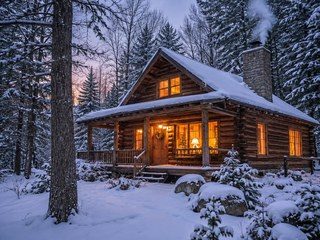 AntesDespués
A 320 px cabin photo rebuilt at 2K.
Cómo usar el Increase Image Resolution
Tres pasos, en un ordenador o un móvil.
- 01
Upload a photo
Drop, paste or pick a JPG, PNG, WebP or HEIC image; on a phone you can take one with the camera.
- 02
Choose image type and output size
Pick Image type (Photo, Art / anime or Text) and Output size (2K or 4K), then select Increase resolution. A result usually takes about 35 seconds.
- 03
Compare and download
Compare it with your original, then download a JPG. Example on this page: a 320 px cabin photo rebuilt at 2K.
Para qué lo usa la gente
Print
Enough pixels for posters, canvases and photo books.
Banners and slides
Sharp images on big screens and wide layouts.
Old and small files
Thumbnails and early digital photos made usable.
Consejos para un mejor resultado
- Pick Art / anime for drawings so lines stay crisp.
- Pick Text for screenshots and scans so letters stay readable.
- Use 4K for prints and large screens, 2K for the web.
¿Necesitas más control? Usa la API
Esta herramienta funciona con la API de imágenes de SandBase. La API te da todos los ajustes que la herramienta gratuita fija por ti.
- Mayor calidad y tamañoSalida de hasta 4K y cualquier relación de aspecto, incluso ultraancha y vertical.
- Tu propio promptCambia la plantilla, añade imágenes de referencia o procesa cientos de imágenes por lotes desde tu código o Agent.
- Paga por imagenUsa tu saldo de SandBase más allá del límite de uso gratuito de la herramienta. La disponibilidad del modelo y los límites de la API siguen aplicando.
# Set SANDBASE_API_KEY first.
# Replace photo.jpg with your local JPEG file.
IMAGE_FILE="photo.jpg"
python3 - "$IMAGE_FILE" <<'SANDBASE_PY' > request.json
import base64, json, pathlib, sys
payload = json.loads("{\"contents\":[{\"role\":\"user\",\"parts\":[{\"text\":\"Increase the resolution of this image and rebuild fine detail: sharp natural detail, no blur or noise. Keep the content, composition, identity, text, colors and lighting exactly the same. Do not add, remove or restyle anything.\"},{\"inline_data\":{\"mime_type\":\"image/jpeg\",\"data\":\"\"}}]}],\"generationConfig\":{\"responseModalities\":[\"IMAGE\"],\"imageConfig\":{\"imageSize\":\"4K\"}}}")
payload["contents"][0]["parts"][1]["inline_data"]["data"] = base64.b64encode(pathlib.Path(sys.argv[1]).read_bytes()).decode("ascii")
print(json.dumps(payload))
SANDBASE_PY
curl --fail-with-body https://api.sandbase.ai/v1beta/models/google/gemini-nano-banana-2.1:generateContent \
  -H "Authorization: Bearer $SANDBASE_API_KEY" \
  -H "Content-Type: application/json" \
--data-binary @request.jsonPreguntas frecuentes
How is this different from resizing?
Resizing stretches the pixels you have, so the image gets soft. This rebuilds detail while it adds pixels, so edges, hair and texture stay sharp.
¿Increase Image Resolution es gratis?
Sí, sin marca de agua y sin registro. Una ejecución de Increase Image Resolution tarda unos 35 segundos y te da un JPG. Usa una ejecución de la asignación diaria gratuita de imágenes con IA, que se comparte entre todas las herramientas de imágenes con IA: 10 ejecuciones al día sin iniciar sesión y 30 con una cuenta gratuita de SandBase. La herramienta muestra cuántas te quedan, y el contador se restablece a medianoche UTC; también pueden aplicarse límites de red y del sitio.
¿Qué pasa con la foto que subo a Increase Image Resolution?
Tu foto y tus ajustes son procesados por SandBase y el proveedor de imágenes para generar este resultado. Increase Image Resolution no publica nada en una galería pública. Los resultados pueden reutilizarse desde una caché durante hasta 24 horas, así que una solicitud idéntica no usa otra ejecución; descarga cualquier resultado que quieras conservar.
SandBase APIs para este trabajo
El mismo tipo de datos en tu propio código o Agent: una sola API key, cobro por llamada.
Más herramientas
AI Photo Editor
Edit any photo by describing the change in plain words: weather, outfit, light, background. Review the rest of the image for unintended changes.
AI Photo Restoration
Restore old photos with AI: remove scratches, creases and fading, and colorize black and white pictures.
AI Image Upscaler
Generate a 2K or 4K version of a photo or artwork with AI. Compare the result carefully: fine details and text may change.
AI Object Remover
Erase people, cars, wires, text and other objects from a photo by painting over them or describing them.
Magic Eraser
Paint over anything you want gone and the magic eraser rebuilds the background behind it.
Jewelry Product Photography
Turn a phone photo of a piece of jewelry into a professional product shot.