
seedinteger
The same seed and the same prompt given to the same version of the model will output the same image every time.
bfl/flux-2/kontext/devFlux 2 Kontext Dev by BFL - AI-powered image editing, style transfer, and transformation. Edit photos with natural language instructions, remove backgrounds, change styles, and enhance images effortlessly.
Essayer le modèle
PNG, JPEG, WebP ou GIF · 20 MiB maximum
Que souhaitez-vous faire ensuite ?
Sélectionnez un exemple pour charger ses entrées et son résultat dans le playground.
{
  "image": "https://static.sandbase.ai/examples/d4b6c66d-af5e-4af7-9d4e-4d82e9f249ac/input/8fde3e25-c086-4505-bd6d-4b7c824136b5.webp",
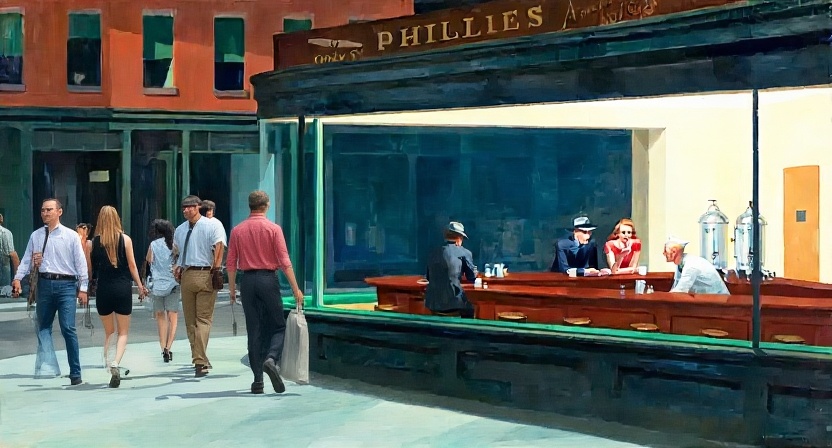
  "prompt": "Change the setting to a day time, add a lot of people walking the sidewalk while maintaining the same style of the painting"
}Préférence humaine
Scores Elo issus de votes comparatifs anonymes côte à côte, comparés à d’autres modèles d’image et de vidéo.
Classements provenant de Artificial Analysis Arena
Arena d’édition d’image : les personnes choisissent la meilleure de deux modifications de la même image et de la même instruction, sans voir les noms des modèles.
FLUX.1 Kontext [dev] edits a single image from an instruction: change objects, text, or style while keeping the rest consistent.
| Field | Type | Default | Notes |
|---|---|---|---|
prompt | string, required | — | Text instruction. |
image | image URL, required | — | Image to edit. JPEG, PNG, or WebP URL. |
guidance_scale | number 1–20 | 2.5 | How strictly to follow the prompt. |
num_inference_steps | integer 10–50 | 28 | More steps add detail and time. |
output_format | jpeg / png | jpeg | Output file format. |
resolution_mode | auto / match_input / 1:1 / 16:9 / 21:9 / 3:2 / 2:3 / 4:5 / 5:4 / 3:4 / 4:3 / 9:16 / 9:21 | match_input | match_input keeps the input size; or choose a ratio. |
seed | integer | random | Fix it to compare prompt changes. |
$0.025 per image.
| Request | Price |
|---|---|
| One image | $0.025 |
Failed runs are not charged.
Related: bfl/flux-2/dev/edit (FLUX.2, multi-image).
Commencer à construire
Soumettez ce modèle via l'API Unified Run de SandBase.
# The quoted heredoc keeps Unicode and shell metacharacters unchanged.
result=$(curl --fail-with-body --silent \
  -X POST "https://api.sandbase.ai/v1/run" \
  -H "Authorization: Bearer $SANDBASE_API_KEY" \
  -H "Content-Type: application/json" \
  --data-binary @- <<'SANDBASE_JSON'
{
  "model": "bfl/flux-2/kontext/dev",
  "image": "https://static.sandbase.ai/examples/bfl/flux-2/kontext/dev/input_image_0.webp",
  "prompt": "Change the setting to a day time, add a lot of people walking the sidewalk while maintaining the same style of the painting",
  "output_format": "jpeg",
  "guidance_scale": 2.5,
  "resolution_mode": "match_input",
  "num_inference_steps": 28
}
SANDBASE_JSON
)
run_id=$(printf '%s' "$result" | jq -r .id)
for attempt in $(seq 1 120); do
  status=$(printf '%s' "$result" | jq -r .status)
  case "$status" in completed|failed|timeout) break ;; esac
  sleep 2
  result=$(curl --fail-with-body --silent \
    -H "Authorization: Bearer $SANDBASE_API_KEY" \
    "https://api.sandbase.ai/v1/run/$run_id")
done
status=$(printf '%s' "$result" | jq -r .status)
[ "$status" = completed ] || { echo "Generation ended: $status" >&2; exit 1; }
printf '%s\n' "$result"Créez une clé API SandBase et définissez-la dans l'environnement de votre serveur. Toutes les requêtes utilisent l'authentification Bearer.
export SANDBASE_API_KEY="YOUR_API_KEY"Conservez la clé sur votre serveur. Ne l'exposez pas dans le code du navigateur et ne la committez pas dans un dépôt.
Faites un POST sur /v1/run avec cet ID de modèle et ses entrées. L'exemple de requête ci-dessus inclut la soumission et le polling.
Utilisez l'ID d'exécution renvoyé pour interroger jusqu'à ce que le statut soit completed, failed ou timeout. Ne lisez la sortie qu'une fois completed.
curl "https://api.sandbase.ai/v1/run/$RUN_ID" \
-H "Authorization: Bearer $SANDBASE_API_KEY"Passez une URL de fichier accessible publiquement dans le champ image, video ou audio du modèle. Les formats pris en charge et les limites sont indiqués à côté de chaque entrée du Playground.
Utilisez le contrôle upload ou replace sur les champs image pris en charge dans le Playground. Les champs URL vidéo acceptent une vidéo de conduite hébergée ; cela n'implique pas la prise en charge de l'importation vidéo.
seedintegerThe same seed and the same prompt given to the same version of the model will output the same image every time.
imagestringobligatoireThe URL of the image to edit. Max width: 14142px, Max height: 14142px, Timeout: 20s
promptstringobligatoireThe prompt to edit the image.
output_formatstringOutput format
Par défaut : "jpeg"
Valeurs possibles : "jpeg", "png"
guidance_scalenumberThe CFG (Classifier Free Guidance) scale is a measure of how close you want the model to stick to your prompt when looking for a related image to show you.
Par défaut : 2.5
Minimum : 1
Maximum : 20
resolution_modestringDetermines how the output resolution is set for image editing. - `auto`: The model selects an optimal resolution from a predefined set that best matches the input image's aspect ratio. This is the recommended setting for most use cases as it's what the model was trained on. - `match_input`: The model will attempt to use the same resolution as the input image. The resolution will be adjusted to be compatible with the model's requirements (e.g. dimensions must be multiples of 16 and within supported limits). Apart from these, a few aspect ratios are also supported.
Par défaut : "match_input"
Valeurs possibles : "auto", "match_input", "1:1", "16:9", "21:9", "3:2", "2:3", "4:5", "5:4", "3:4", "4:3", "9:16", "9:21"
num_inference_stepsintegerThe number of inference steps to perform.
Par défaut : 28
Minimum : 10
Maximum : 50
{
  "model": "bfl/flux-2/kontext/dev",
  "image": "https://static.sandbase.ai/examples/bfl/flux-2/kontext/dev/input_image_0.webp",
  "prompt": "Change the setting to a day time, add a lot of people walking the sidewalk while maintaining the same style of the painting",
  "output_format": "jpeg",
  "guidance_scale": 2.5,
  "resolution_mode": "match_input",
  "num_inference_steps": 28
}Une exécution terminée expose son résultat dans output. Ce qui suit est l'exemple enregistré du modèle, et non une nouvelle génération.
[
  {
    "source": "BFL/FLUX schema mirror",
    "source_url": "https://docs.bfl.ai/flux_2/flux2_overview",
    "url": "https://static.sandbase.ai/examples/d4b6c66d-af5e-4af7-9d4e-4d82e9f249ac/output/4f32256b-22fa-4ee3-8a38-31d0fa466211.jpeg"
  }
]