
imagestringobligatoire
Photo to turn into a relief. Works best with one clear subject on a plain background. JPG, PNG or WebP up to 20 MB.
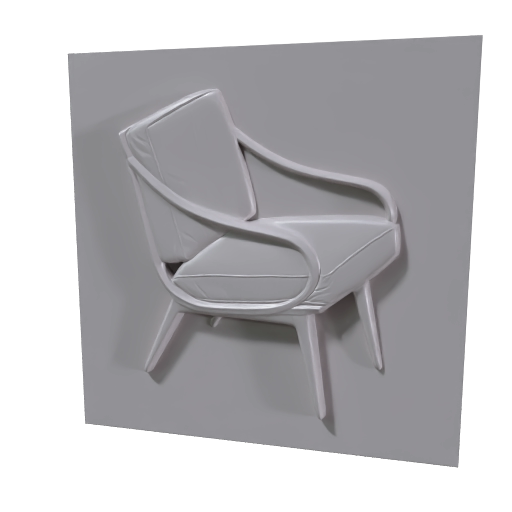
meshy/reliefMeshy Relief turns a photo into a printable 3D relief (GLB and STL) with emboss or engrave carving and an optional curved bend.
Essayer le modèle
PNG, JPEG, WebP ou GIF · 20 MiB maximum
Que souhaitez-vous faire ensuite ?
Sélectionnez un exemple pour charger ses entrées et son résultat dans le playground.
{
  "image": "https://static.sandbase.ai/examples/4c94005b-9c2a-44cc-abe7-337094aa34eb/input/dfd2b1f1-42c5-46c5-92e6-a9fc9ac0c350.png"
}Meshy Relief turns a photo into a printable 3D relief (GLB and STL) with emboss or engrave carving and an optional curved bend.
| Field | Type | Default | Notes |
|---|---|---|---|
image | image URL, required | — | Photo to turn into a relief. Works best with one clear subject on a plain background. JPG, PNG or WebP up to 20 MB. |
variant | low / high | low | 'low' gives slight depth and finer detail (patterns, badges, seals); 'high' gives bold, sculptural depth (pets, portraits, characters). |
carving_mode | emboss / engrave | emboss | 'emboss' makes nearer parts stand out; 'engrave' cuts them in. |
size_mm | number 20–250 | 60 | Length of the photo's long side in millimeters, measured flat before any bend. |
carving_depth_mm | number 0–60 | — | Carving depth in millimeters. Defaults to 3 for 'low' and 6 for 'high'. |
base_thickness_mm | number 0.1–10 | — | Base plate thickness in millimeters (default 1). Not allowed with remove_base. |
remove_base | boolean | false | Cut away the background and build no base plate. |
bend_mode | off / convex / concave | off | Bend the relief into a convex or concave curve. |
bend_axis | xz / yz | xz | 'xz' curls the left and right edges, 'yz' the top and bottom. |
bend_angle | number 0–360 | 60 | Bend angle in degrees when bending is on. |
mesh_resolution | integer 512–2048 | 1024 | Mesh points along the long side. At 2048 the GLB reaches about 150 MB and the STL about 300 MB. |
color_mapping | boolean | false | Also produce a colored relief from the photo. |
url: Main 3D file (GLB unless another export format is selected).thumbnail: Preview image rendered by the provider.stl: Additional file returned by the provider.depth_map: Additional file returned by the provider.$0.80 per request. Failed runs are not charged.
Other Meshy 3D endpoints: meshy/6.0-lite/retexture, meshy/6.0/retexture, meshy/7.0/image-to-3d, meshy/7.0/multi-image-to-3d.
Commencer à construire
Soumettez ce modèle via l'API Unified Run de SandBase.
# The quoted heredoc keeps Unicode and shell metacharacters unchanged.
result=$(curl --fail-with-body --silent \
  -X POST "https://api.sandbase.ai/v1/run" \
  -H "Authorization: Bearer $SANDBASE_API_KEY" \
  -H "Content-Type: application/json" \
  --data-binary @- <<'SANDBASE_JSON'
{
  "model": "meshy/relief",
  "image": "https://static.sandbase.ai/examples/meshy/relief/input_image_0.png",
  "size_mm": 60,
  "variant": "low",
  "bend_axis": "xz",
  "bend_mode": "off",
  "bend_angle": 60,
  "remove_base": false,
  "carving_mode": "emboss",
  "color_mapping": false,
  "mesh_resolution": 1024
}
SANDBASE_JSON
)
run_id=$(printf '%s' "$result" | jq -r .id)
for attempt in $(seq 1 120); do
  status=$(printf '%s' "$result" | jq -r .status)
  case "$status" in completed|failed|timeout) break ;; esac
  sleep 2
  result=$(curl --fail-with-body --silent \
    -H "Authorization: Bearer $SANDBASE_API_KEY" \
    "https://api.sandbase.ai/v1/run/$run_id")
done
status=$(printf '%s' "$result" | jq -r .status)
[ "$status" = completed ] || { echo "Generation ended: $status" >&2; exit 1; }
printf '%s\n' "$result"Créez une clé API SandBase et définissez-la dans l'environnement de votre serveur. Toutes les requêtes utilisent l'authentification Bearer.
export SANDBASE_API_KEY="YOUR_API_KEY"Conservez la clé sur votre serveur. Ne l'exposez pas dans le code du navigateur et ne la committez pas dans un dépôt.
Faites un POST sur /v1/run avec cet ID de modèle et ses entrées. L'exemple de requête ci-dessus inclut la soumission et le polling.
Utilisez l'ID d'exécution renvoyé pour interroger jusqu'à ce que le statut soit completed, failed ou timeout. Ne lisez la sortie qu'une fois completed.
curl "https://api.sandbase.ai/v1/run/$RUN_ID" \
-H "Authorization: Bearer $SANDBASE_API_KEY"Passez une URL de fichier accessible publiquement dans le champ image, video ou audio du modèle. Les formats pris en charge et les limites sont indiqués à côté de chaque entrée du Playground.
Utilisez le contrôle upload ou replace sur les champs image pris en charge dans le Playground. Les champs URL vidéo acceptent une vidéo de conduite hébergée ; cela n'implique pas la prise en charge de l'importation vidéo.
imagestringobligatoirePhoto to turn into a relief. Works best with one clear subject on a plain background. JPG, PNG or WebP up to 20 MB.
size_mmnumberLength of the photo's long side in millimeters, measured flat before any bend.
Par défaut : 60
Minimum : 20
Maximum : 250
variantstring'low' gives slight depth and finer detail (patterns, badges, seals); 'high' gives bold, sculptural depth (pets, portraits, characters).
Par défaut : "low"
Valeurs possibles : "low", "high"
bend_axisstring'xz' curls the left and right edges, 'yz' the top and bottom.
Par défaut : "xz"
Valeurs possibles : "xz", "yz"
bend_modestringBend the relief into a convex or concave curve.
Par défaut : "off"
Valeurs possibles : "off", "convex", "concave"
bend_anglenumberBend angle in degrees when bending is on.
Par défaut : 60
Minimum : 0
Maximum : 360
remove_basebooleanCut away the background and build no base plate.
Par défaut : false
carving_modestring'emboss' makes nearer parts stand out; 'engrave' cuts them in.
Par défaut : "emboss"
Valeurs possibles : "emboss", "engrave"
color_mappingbooleanAlso produce a colored relief from the photo.
Par défaut : false
mesh_resolutionintegerMesh points along the long side. At 2048 the GLB reaches about 150 MB and the STL about 300 MB.
Par défaut : 1024
Minimum : 512
Maximum : 2048
carving_depth_mmnumberCarving depth in millimeters. Defaults to 3 for 'low' and 6 for 'high'.
Minimum : 0
Maximum : 60
base_thickness_mmnumberBase plate thickness in millimeters (default 1). Not allowed with remove_base.
Minimum : 0.1
Maximum : 10
{
  "model": "meshy/relief",
  "image": "https://static.sandbase.ai/examples/meshy/relief/input_image_0.png",
  "size_mm": 60,
  "variant": "low",
  "bend_axis": "xz",
  "bend_mode": "off",
  "bend_angle": 60,
  "remove_base": false,
  "carving_mode": "emboss",
  "color_mapping": false,
  "mesh_resolution": 1024
}Une exécution terminée expose son résultat dans output. Ce qui suit est l'exemple enregistré du modèle, et non une nouvelle génération.
[
  {
    "depth_map": "https://static.sandbase.ai/examples/4c94005b-9c2a-44cc-abe7-337094aa34eb/output/7046e3e3-aee4-400e-bc54-e8019df43447.png",
    "poster": "https://static.sandbase.ai/examples/4c94005b-9c2a-44cc-abe7-337094aa34eb/output/9cb0fdcd-7683-4f25-a9c5-c9bbde4d62f6.png",
    "stl": "https://static.sandbase.ai/examples/4c94005b-9c2a-44cc-abe7-337094aa34eb/output/e6dc3755-f5be-4f86-a1a2-7f300bc07186.stl",
    "thumbnail": "https://static.sandbase.ai/examples/4c94005b-9c2a-44cc-abe7-337094aa34eb/output/9cb0fdcd-7683-4f25-a9c5-c9bbde4d62f6.png",
    "url": "https://static.sandbase.ai/examples/4c94005b-9c2a-44cc-abe7-337094aa34eb/output/2295cb5f-74d9-47cf-b445-b8dbe52a9ae4.glb"
  }
]