
imagestringwajib
Photo to turn into a relief. Works best with one clear subject on a plain background. JPG, PNG or WebP up to 20 MB.
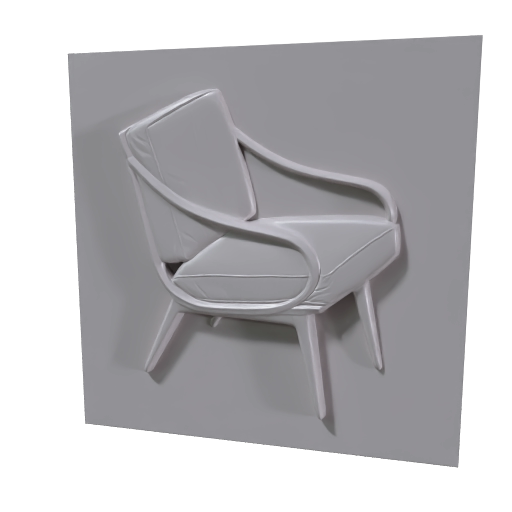
meshy/reliefMeshy Relief turns a photo into a printable 3D relief (GLB and STL) with emboss or engrave carving and an optional curved bend.
Coba model ini
PNG, JPEG, WebP, atau GIF · maksimum 20 MiB
Pilih contoh untuk memuat input dan hasilnya ke playground.
{
  "image": "https://static.sandbase.ai/examples/4c94005b-9c2a-44cc-abe7-337094aa34eb/input/dfd2b1f1-42c5-46c5-92e6-a9fc9ac0c350.png"
}Meshy Relief turns a photo into a printable 3D relief (GLB and STL) with emboss or engrave carving and an optional curved bend.
| Field | Type | Default | Notes |
|---|---|---|---|
image | image URL, required | — | Photo to turn into a relief. Works best with one clear subject on a plain background. JPG, PNG or WebP up to 20 MB. |
variant | low / high | low | 'low' gives slight depth and finer detail (patterns, badges, seals); 'high' gives bold, sculptural depth (pets, portraits, characters). |
carving_mode | emboss / engrave | emboss | 'emboss' makes nearer parts stand out; 'engrave' cuts them in. |
size_mm | number 20–250 | 60 | Length of the photo's long side in millimeters, measured flat before any bend. |
carving_depth_mm | number 0–60 | — | Carving depth in millimeters. Defaults to 3 for 'low' and 6 for 'high'. |
base_thickness_mm | number 0.1–10 | — | Base plate thickness in millimeters (default 1). Not allowed with remove_base. |
remove_base | boolean | false | Cut away the background and build no base plate. |
bend_mode | off / convex / concave | off | Bend the relief into a convex or concave curve. |
bend_axis | xz / yz | xz | 'xz' curls the left and right edges, 'yz' the top and bottom. |
bend_angle | number 0–360 | 60 | Bend angle in degrees when bending is on. |
mesh_resolution | integer 512–2048 | 1024 | Mesh points along the long side. At 2048 the GLB reaches about 150 MB and the STL about 300 MB. |
color_mapping | boolean | false | Also produce a colored relief from the photo. |
url: Main 3D file (GLB unless another export format is selected).thumbnail: Preview image rendered by the provider.stl: Additional file returned by the provider.depth_map: Additional file returned by the provider.$0.80 per request. Failed runs are not charged.
Other Meshy 3D endpoints: meshy/6.0-lite/retexture, meshy/6.0/retexture, meshy/7.0/image-to-3d, meshy/7.0/multi-image-to-3d.
Mulai membangun
Kirim model ini melalui SandBase Unified Run API.
# The quoted heredoc keeps Unicode and shell metacharacters unchanged.
result=$(curl --fail-with-body --silent \
  -X POST "https://api.sandbase.ai/v1/run" \
  -H "Authorization: Bearer $SANDBASE_API_KEY" \
  -H "Content-Type: application/json" \
  --data-binary @- <<'SANDBASE_JSON'
{
  "model": "meshy/relief",
  "image": "https://static.sandbase.ai/examples/meshy/relief/input_image_0.png",
  "size_mm": 60,
  "variant": "low",
  "bend_axis": "xz",
  "bend_mode": "off",
  "bend_angle": 60,
  "remove_base": false,
  "carving_mode": "emboss",
  "color_mapping": false,
  "mesh_resolution": 1024
}
SANDBASE_JSON
)
run_id=$(printf '%s' "$result" | jq -r .id)
for attempt in $(seq 1 120); do
  status=$(printf '%s' "$result" | jq -r .status)
  case "$status" in completed|failed|timeout) break ;; esac
  sleep 2
  result=$(curl --fail-with-body --silent \
    -H "Authorization: Bearer $SANDBASE_API_KEY" \
    "https://api.sandbase.ai/v1/run/$run_id")
done
status=$(printf '%s' "$result" | jq -r .status)
[ "$status" = completed ] || { echo "Generation ended: $status" >&2; exit 1; }
printf '%s\n' "$result"Buat SandBase API key dan atur di environment server Anda. Semua permintaan menggunakan autentikasi Bearer.
export SANDBASE_API_KEY="YOUR_API_KEY"Simpan key di server. Jangan tampilkan di kode browser atau commit ke repository.
POST ke /v1/run dengan ID model ini dan inputnya. Contoh permintaan di atas mencakup pengiriman dan polling.
Gunakan run ID yang dikembalikan untuk polling sampai status completed, failed, atau timeout. Baca output hanya setelah completed.
curl "https://api.sandbase.ai/v1/run/$RUN_ID" \
-H "Authorization: Bearer $SANDBASE_API_KEY"Kirim URL file yang dapat diakses publik di field image, video, atau audio model. Format dan batas yang didukung ditampilkan di samping setiap input Playground.
Gunakan kontrol upload atau replace pada field gambar yang didukung di Playground. Field URL video menerima video driving yang di-host; ini tidak berarti dukungan upload video.
imagestringwajibPhoto to turn into a relief. Works best with one clear subject on a plain background. JPG, PNG or WebP up to 20 MB.
size_mmnumberLength of the photo's long side in millimeters, measured flat before any bend.
Default: 60
Minimum: 20
Maksimum: 250
variantstring'low' gives slight depth and finer detail (patterns, badges, seals); 'high' gives bold, sculptural depth (pets, portraits, characters).
Default: "low"
Nilai yang mungkin: "low", "high"
bend_axisstring'xz' curls the left and right edges, 'yz' the top and bottom.
Default: "xz"
Nilai yang mungkin: "xz", "yz"
bend_modestringBend the relief into a convex or concave curve.
Default: "off"
Nilai yang mungkin: "off", "convex", "concave"
bend_anglenumberBend angle in degrees when bending is on.
Default: 60
Minimum: 0
Maksimum: 360
remove_basebooleanCut away the background and build no base plate.
Default: false
carving_modestring'emboss' makes nearer parts stand out; 'engrave' cuts them in.
Default: "emboss"
Nilai yang mungkin: "emboss", "engrave"
color_mappingbooleanAlso produce a colored relief from the photo.
Default: false
mesh_resolutionintegerMesh points along the long side. At 2048 the GLB reaches about 150 MB and the STL about 300 MB.
Default: 1024
Minimum: 512
Maksimum: 2048
carving_depth_mmnumberCarving depth in millimeters. Defaults to 3 for 'low' and 6 for 'high'.
Minimum: 0
Maksimum: 60
base_thickness_mmnumberBase plate thickness in millimeters (default 1). Not allowed with remove_base.
Minimum: 0.1
Maksimum: 10
{
  "model": "meshy/relief",
  "image": "https://static.sandbase.ai/examples/meshy/relief/input_image_0.png",
  "size_mm": 60,
  "variant": "low",
  "bend_axis": "xz",
  "bend_mode": "off",
  "bend_angle": 60,
  "remove_base": false,
  "carving_mode": "emboss",
  "color_mapping": false,
  "mesh_resolution": 1024
}Run yang selesai menampilkan hasilnya di output. Berikut adalah contoh tersimpan model ini, bukan generasi baru.
[
  {
    "depth_map": "https://static.sandbase.ai/examples/4c94005b-9c2a-44cc-abe7-337094aa34eb/output/7046e3e3-aee4-400e-bc54-e8019df43447.png",
    "poster": "https://static.sandbase.ai/examples/4c94005b-9c2a-44cc-abe7-337094aa34eb/output/9cb0fdcd-7683-4f25-a9c5-c9bbde4d62f6.png",
    "stl": "https://static.sandbase.ai/examples/4c94005b-9c2a-44cc-abe7-337094aa34eb/output/e6dc3755-f5be-4f86-a1a2-7f300bc07186.stl",
    "thumbnail": "https://static.sandbase.ai/examples/4c94005b-9c2a-44cc-abe7-337094aa34eb/output/9cb0fdcd-7683-4f25-a9c5-c9bbde4d62f6.png",
    "url": "https://static.sandbase.ai/examples/4c94005b-9c2a-44cc-abe7-337094aa34eb/output/2295cb5f-74d9-47cf-b445-b8dbe52a9ae4.glb"
  }
]