
seedinteger
The same seed and the same prompt given to the same version of the model will output the same image every time.
alibaba/qwen-image-editQwen Image Edit is Alibaba's intelligent image editing model. Transform, retouch, and reimagine existing images using text prompts - from background replacement to artistic style conversion.
Prova il modello
PNG, JPEG, WebP o GIF · massimo 20 MiB
Cosa vuoi fare dopo?
Seleziona un esempio per caricare i suoi input e il risultato nel playground.
{
  "image": "https://static.sandbase.ai/examples/69e64dd1-c75f-49b4-a0e5-675d63145694/input/4195cebd-2577-49d0-a51c-97e0fece877c.png",
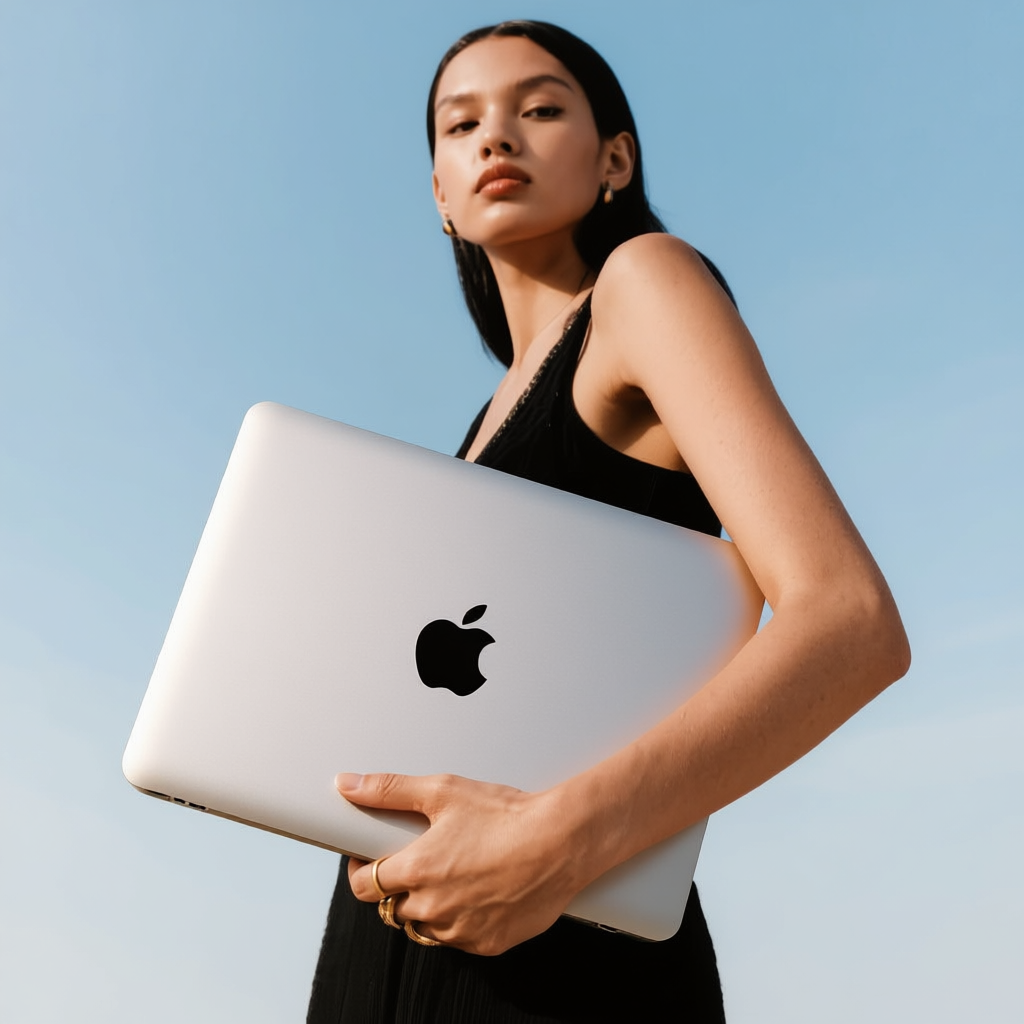
  "prompt": "Change bag to apple macbook"
}Preferenza umana
Punteggi Elo da voti anonimi affiancati, confrontati con altri modelli di immagini e video.
Classifiche tratte da Artificial Analysis Arena
Arena di image editing: le persone scelgono la migliore di due modifiche della stessa immagine e istruzione, senza vedere i nomi dei modelli.
The original Qwen Image Edit: change one image with an instruction, including Chinese and English text edits. strength controls how far the result may move from the input.
| Field | Type | Default | Notes |
|---|---|---|---|
prompt | string, required | — | Text instruction. |
image | image URL, required | — | Image to edit. JPEG, PNG, or WebP URL. |
strength | number 0.01–1 | 0.94 | How much the output may differ from the input (0.01–1). |
output_format | jpeg / png | png | Output file format. |
aspect_ratio | 21:9 / 16:9 / 3:2 / 4:3 / 5:4 / 1:1 / 4:5 / 3:4 / 2:3 / 9:16 | — | Omit to follow the input image. |
seed | integer | random | Fix it to compare prompt changes. |
$0.045 per output image, Alibaba's list price.
| Request | Price |
|---|---|
| One image | $0.045 |
Failed runs are not charged.
strength for subtle edits.Related: alibaba/qwen-image-edit/2511, alibaba/qwen-image-edit/2511/multiple-angles, alibaba/qwen-image-3/edit (newer).
Inizia a costruire
Invia questo modello tramite la SandBase Unified Run API.
# The quoted heredoc keeps Unicode and shell metacharacters unchanged.
result=$(curl --fail-with-body --silent \
  -X POST "https://api.sandbase.ai/v1/run" \
  -H "Authorization: Bearer $SANDBASE_API_KEY" \
  -H "Content-Type: application/json" \
  --data-binary @- <<'SANDBASE_JSON'
{
  "model": "alibaba/qwen-image-edit",
  "image": "https://static.sandbase.ai/examples/alibaba/qwen-image-edit/input_image_0.png",
  "prompt": "Change bag to apple macbook",
  "strength": 0.94,
  "output_format": "png"
}
SANDBASE_JSON
)
run_id=$(printf '%s' "$result" | jq -r .id)
for attempt in $(seq 1 120); do
  status=$(printf '%s' "$result" | jq -r .status)
  case "$status" in completed|failed|timeout) break ;; esac
  sleep 2
  result=$(curl --fail-with-body --silent \
    -H "Authorization: Bearer $SANDBASE_API_KEY" \
    "https://api.sandbase.ai/v1/run/$run_id")
done
status=$(printf '%s' "$result" | jq -r .status)
[ "$status" = completed ] || { echo "Generation ended: $status" >&2; exit 1; }
printf '%s\n' "$result"Crea una SandBase API key e impostala nell'ambiente del server. Tutte le richieste usano l'autenticazione Bearer.
export SANDBASE_API_KEY="YOUR_API_KEY"Conserva la key sul server. Non esporla nel codice del browser né committarla in un repository.
Esegui POST su /v1/run con questo ID modello e i relativi input. L'esempio di richiesta sopra include invio e polling.
Usa il run ID restituito per fare polling finché lo stato non è completed, failed o timeout. Leggi l'output solo dopo completed.
curl "https://api.sandbase.ai/v1/run/$RUN_ID" \
-H "Authorization: Bearer $SANDBASE_API_KEY"Passa un URL di file accessibile pubblicamente nel campo image, video o audio del modello. I formati supportati e i limiti sono mostrati accanto a ciascun input del Playground.
Usa il controllo upload o replace sui campi immagine supportati nel Playground. I campi URL video accettano un video di driving ospitato; non implicano il supporto al caricamento video.
seedintegerThe same seed and the same prompt given to the same version of the model will output the same image every time.
imagestringobbligatorioThe URL of the image to edit.
promptstringobbligatorioThe prompt to generate the image with
strengthnumberStrength of the image-to-image transformation. Lower values preserve more of the original image.
Predefinito: 0.94
Minimo: 0.01
Massimo: 1
aspect_ratiostringThe aspect ratio of the generated image.
Valori possibili: "21:9", "16:9", "3:2", "4:3", "5:4", "1:1", "4:5", "3:4", "2:3", "9:16"
output_formatstringThe format of the generated image.
Predefinito: "png"
Valori possibili: "jpeg", "png"
{
  "model": "alibaba/qwen-image-edit",
  "image": "https://static.sandbase.ai/examples/alibaba/qwen-image-edit/input_image_0.png",
  "prompt": "Change bag to apple macbook",
  "strength": 0.94,
  "output_format": "png"
}Un run completato espone il risultato in output. Quanto segue è l'esempio salvato del modello, non una nuova generazione.
[
  {
    "source": "Alibaba Model Studio schema mirror",
    "source_url": "https://www.alibabacloud.com/help/en/model-studio/",
    "url": "https://static.sandbase.ai/examples/69e64dd1-c75f-49b4-a0e5-675d63145694/output/e781f31d-d23b-4821-8955-084dfdd76da6.png"
  }
]