
seedinteger
The same seed and the same prompt given to the same version of the model will output the same image every time.
alibaba/qwen-image-editQwen Image Edit is Alibaba's intelligent image editing model. Transform, retouch, and reimagine existing images using text prompts - from background replacement to artistic style conversion.
モデルを試す
PNG、JPEG、WebP、GIF · 最大 20 MiB
次に何をしますか?
例を選択すると、その入力と結果がプレイグラウンドに読み込まれます。
{
  "image": "https://static.sandbase.ai/examples/69e64dd1-c75f-49b4-a0e5-675d63145694/input/4195cebd-2577-49d0-a51c-97e0fece877c.png",
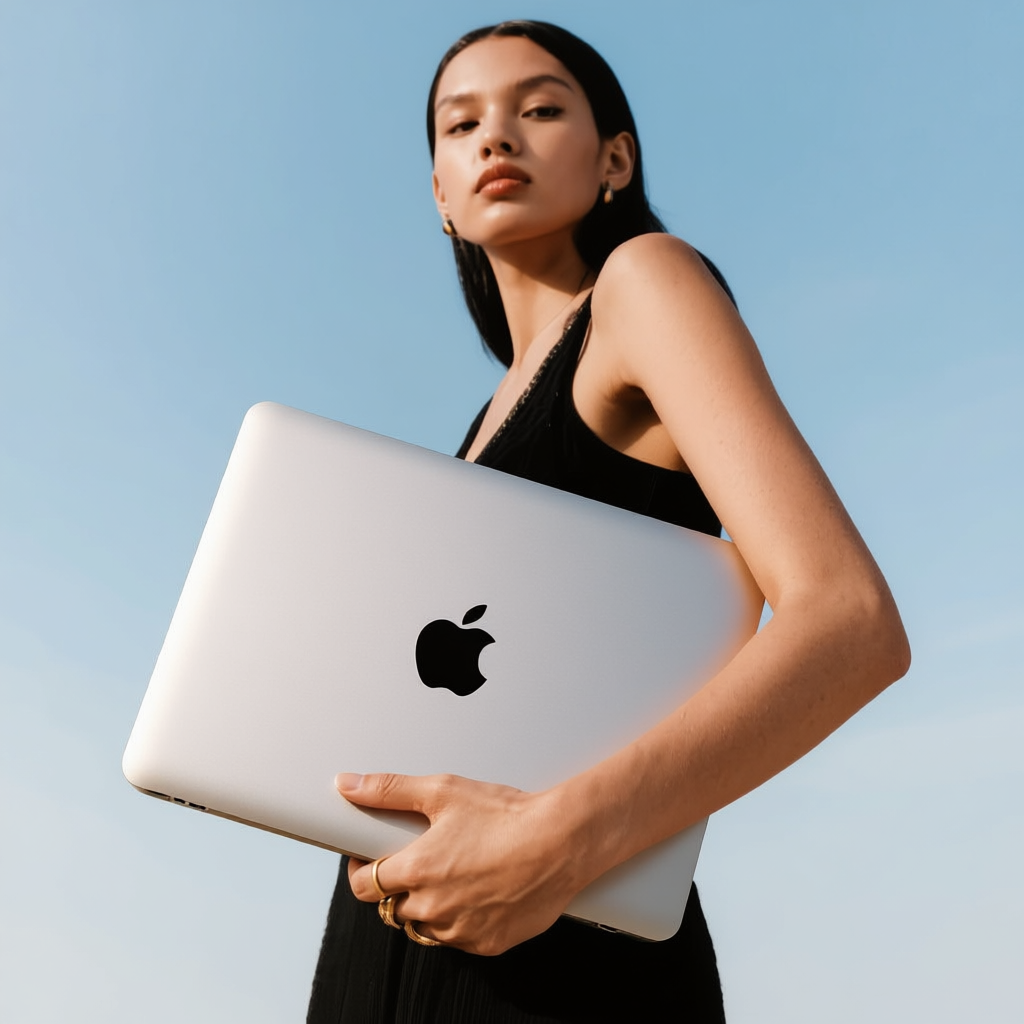
  "prompt": "Change bag to apple macbook"
}人の選好
同じ条件での左右比較投票に基づく Elo レーティングを、他の画像・動画モデルと比較しています。
ランキングの出典: Artificial Analysis Arena
画像編集の arena です。同じ画像と指示に対する 2 つの編集を、モデル名を見ずに比較して、より良いほうを選びます。
The original Qwen Image Edit: change one image with an instruction, including Chinese and English text edits. strength controls how far the result may move from the input.
| Field | Type | Default | Notes |
|---|---|---|---|
prompt | string, required | — | Text instruction. |
image | image URL, required | — | Image to edit. JPEG, PNG, or WebP URL. |
strength | number 0.01–1 | 0.94 | How much the output may differ from the input (0.01–1). |
output_format | jpeg / png | png | Output file format. |
aspect_ratio | 21:9 / 16:9 / 3:2 / 4:3 / 5:4 / 1:1 / 4:5 / 3:4 / 2:3 / 9:16 | — | Omit to follow the input image. |
seed | integer | random | Fix it to compare prompt changes. |
$0.045 per output image, Alibaba's list price.
| Request | Price |
|---|---|
| One image | $0.045 |
Failed runs are not charged.
strength for subtle edits.Related: alibaba/qwen-image-edit/2511, alibaba/qwen-image-edit/2511/multiple-angles, alibaba/qwen-image-3/edit (newer).
開発を始める
このモデルをSandBase Unified Run API経由で送信します。
# The quoted heredoc keeps Unicode and shell metacharacters unchanged.
result=$(curl --fail-with-body --silent \
  -X POST "https://api.sandbase.ai/v1/run" \
  -H "Authorization: Bearer $SANDBASE_API_KEY" \
  -H "Content-Type: application/json" \
  --data-binary @- <<'SANDBASE_JSON'
{
  "model": "alibaba/qwen-image-edit",
  "image": "https://static.sandbase.ai/examples/alibaba/qwen-image-edit/input_image_0.png",
  "prompt": "Change bag to apple macbook",
  "strength": 0.94,
  "output_format": "png"
}
SANDBASE_JSON
)
run_id=$(printf '%s' "$result" | jq -r .id)
for attempt in $(seq 1 120); do
  status=$(printf '%s' "$result" | jq -r .status)
  case "$status" in completed|failed|timeout) break ;; esac
  sleep 2
  result=$(curl --fail-with-body --silent \
    -H "Authorization: Bearer $SANDBASE_API_KEY" \
    "https://api.sandbase.ai/v1/run/$run_id")
done
status=$(printf '%s' "$result" | jq -r .status)
[ "$status" = completed ] || { echo "Generation ended: $status" >&2; exit 1; }
printf '%s\n' "$result"SandBaseのAPIキーを作成し、サーバー環境に設定してください。すべてのリクエストはBearer認証を使用します。
export SANDBASE_API_KEY="YOUR_API_KEY"キーはサーバー側で管理してください。ブラウザコードに公開したり、リポジトリにコミットしたりしないでください。
このモデルIDと入力を使って /v1/run にPOSTしてください。上のリクエスト例には送信とポーリングが含まれています。
返されたrun IDを使って、ステータスがcompleted、failed、timeoutになるまでポーリングしてください。出力はcompleted後にのみ読み取ってください。
curl "https://api.sandbase.ai/v1/run/$RUN_ID" \
-H "Authorization: Bearer $SANDBASE_API_KEY"モデルのimage、video、またはaudioフィールドに、公開アクセス可能なファイルURLを指定してください。対応形式と制限は各Playground入力の横に表示されます。
Playgroundの対応する画像フィールドでアップロードまたは置換を使用してください。video URLフィールドはホストされたドライビング動画を受け付けますが、動画アップロード対応を意味するものではありません。
seedintegerThe same seed and the same prompt given to the same version of the model will output the same image every time.
imagestring必須The URL of the image to edit.
promptstring必須The prompt to generate the image with
strengthnumberStrength of the image-to-image transformation. Lower values preserve more of the original image.
デフォルト: 0.94
最小: 0.01
最大: 1
aspect_ratiostringThe aspect ratio of the generated image.
指定可能な値: "21:9", "16:9", "3:2", "4:3", "5:4", "1:1", "4:5", "3:4", "2:3", "9:16"
output_formatstringThe format of the generated image.
デフォルト: "png"
指定可能な値: "jpeg", "png"
{
  "model": "alibaba/qwen-image-edit",
  "image": "https://static.sandbase.ai/examples/alibaba/qwen-image-edit/input_image_0.png",
  "prompt": "Change bag to apple macbook",
  "strength": 0.94,
  "output_format": "png"
}完了したrunの結果は出力に表示されます。以下はモデルに保存されたサンプルであり、新規生成ではありません。
[
  {
    "source": "Alibaba Model Studio schema mirror",
    "source_url": "https://www.alibabacloud.com/help/en/model-studio/",
    "url": "https://static.sandbase.ai/examples/69e64dd1-c75f-49b4-a0e5-675d63145694/output/e781f31d-d23b-4821-8955-084dfdd76da6.png"
  }
]