
imagestring필수
Photo to turn into a relief. Works best with one clear subject on a plain background. JPG, PNG or WebP up to 20 MB.
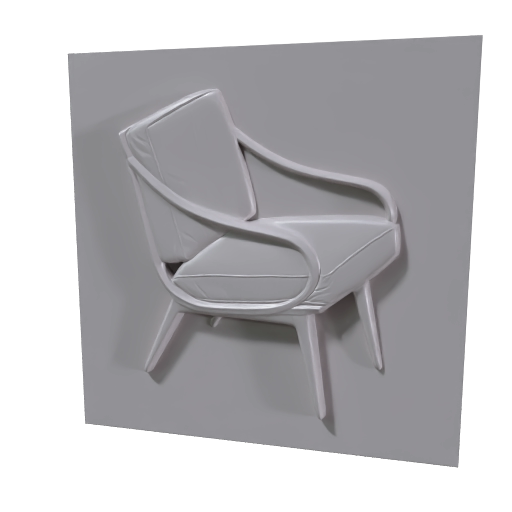
meshy/reliefMeshy Relief turns a photo into a printable 3D relief (GLB and STL) with emboss or engrave carving and an optional curved bend.
모델 사용해 보기
PNG, JPEG, WebP 또는 GIF · 최대 20 MiB
예시를 선택하면 입력값과 결과가 플레이그라운드에 로드됩니다.
{
  "image": "https://static.sandbase.ai/examples/4c94005b-9c2a-44cc-abe7-337094aa34eb/input/dfd2b1f1-42c5-46c5-92e6-a9fc9ac0c350.png"
}Meshy Relief turns a photo into a printable 3D relief (GLB and STL) with emboss or engrave carving and an optional curved bend.
| Field | Type | Default | Notes |
|---|---|---|---|
image | image URL, required | — | Photo to turn into a relief. Works best with one clear subject on a plain background. JPG, PNG or WebP up to 20 MB. |
variant | low / high | low | 'low' gives slight depth and finer detail (patterns, badges, seals); 'high' gives bold, sculptural depth (pets, portraits, characters). |
carving_mode | emboss / engrave | emboss | 'emboss' makes nearer parts stand out; 'engrave' cuts them in. |
size_mm | number 20–250 | 60 | Length of the photo's long side in millimeters, measured flat before any bend. |
carving_depth_mm | number 0–60 | — | Carving depth in millimeters. Defaults to 3 for 'low' and 6 for 'high'. |
base_thickness_mm | number 0.1–10 | — | Base plate thickness in millimeters (default 1). Not allowed with remove_base. |
remove_base | boolean | false | Cut away the background and build no base plate. |
bend_mode | off / convex / concave | off | Bend the relief into a convex or concave curve. |
bend_axis | xz / yz | xz | 'xz' curls the left and right edges, 'yz' the top and bottom. |
bend_angle | number 0–360 | 60 | Bend angle in degrees when bending is on. |
mesh_resolution | integer 512–2048 | 1024 | Mesh points along the long side. At 2048 the GLB reaches about 150 MB and the STL about 300 MB. |
color_mapping | boolean | false | Also produce a colored relief from the photo. |
url: Main 3D file (GLB unless another export format is selected).thumbnail: Preview image rendered by the provider.stl: Additional file returned by the provider.depth_map: Additional file returned by the provider.$0.80 per request. Failed runs are not charged.
Other Meshy 3D endpoints: meshy/6.0-lite/retexture, meshy/6.0/retexture, meshy/7.0/image-to-3d, meshy/7.0/multi-image-to-3d.
빌드를 시작하세요
SandBase Unified Run API를 통해 이 모델을 제출하세요.
# The quoted heredoc keeps Unicode and shell metacharacters unchanged.
result=$(curl --fail-with-body --silent \
  -X POST "https://api.sandbase.ai/v1/run" \
  -H "Authorization: Bearer $SANDBASE_API_KEY" \
  -H "Content-Type: application/json" \
  --data-binary @- <<'SANDBASE_JSON'
{
  "model": "meshy/relief",
  "image": "https://static.sandbase.ai/examples/meshy/relief/input_image_0.png",
  "size_mm": 60,
  "variant": "low",
  "bend_axis": "xz",
  "bend_mode": "off",
  "bend_angle": 60,
  "remove_base": false,
  "carving_mode": "emboss",
  "color_mapping": false,
  "mesh_resolution": 1024
}
SANDBASE_JSON
)
run_id=$(printf '%s' "$result" | jq -r .id)
for attempt in $(seq 1 120); do
  status=$(printf '%s' "$result" | jq -r .status)
  case "$status" in completed|failed|timeout) break ;; esac
  sleep 2
  result=$(curl --fail-with-body --silent \
    -H "Authorization: Bearer $SANDBASE_API_KEY" \
    "https://api.sandbase.ai/v1/run/$run_id")
done
status=$(printf '%s' "$result" | jq -r .status)
[ "$status" = completed ] || { echo "Generation ended: $status" >&2; exit 1; }
printf '%s\n' "$result"SandBase API 키를 생성해 서버 환경에 설정하세요. 모든 요청에는 Bearer 인증이 사용됩니다.
export SANDBASE_API_KEY="YOUR_API_KEY"키는 서버에 보관하세요. 브라우저 코드에 노출하거나 저장소에 커밋하지 마세요.
이 모델 ID와 입력값을 사용해 /v1/run로 POST하세요. 위의 요청 예시에는 제출과 폴링이 포함되어 있습니다.
반환된 실행 ID를 사용해 상태가 completed, failed 또는 timeout이 될 때까지 폴링하세요. completed 이후에만 출력을 읽으세요.
curl "https://api.sandbase.ai/v1/run/$RUN_ID" \
-H "Authorization: Bearer $SANDBASE_API_KEY"모델의 이미지, 비디오 또는 오디오 필드에 공개적으로 접근 가능한 파일 URL을 전달하세요. 지원 형식과 제한은 각 Playground 입력 옆에 표시됩니다.
Playground의 지원되는 이미지 필드에서 업로드 또는 교체 컨트롤을 사용하세요. 비디오 URL 필드는 호스팅된 driving video를 받으며, 비디오 업로드 지원을 의미하지는 않습니다.
imagestring필수Photo to turn into a relief. Works best with one clear subject on a plain background. JPG, PNG or WebP up to 20 MB.
size_mmnumberLength of the photo's long side in millimeters, measured flat before any bend.
기본값: 60
최소값: 20
최대값: 250
variantstring'low' gives slight depth and finer detail (patterns, badges, seals); 'high' gives bold, sculptural depth (pets, portraits, characters).
기본값: "low"
가능한 값: "low", "high"
bend_axisstring'xz' curls the left and right edges, 'yz' the top and bottom.
기본값: "xz"
가능한 값: "xz", "yz"
bend_modestringBend the relief into a convex or concave curve.
기본값: "off"
가능한 값: "off", "convex", "concave"
bend_anglenumberBend angle in degrees when bending is on.
기본값: 60
최소값: 0
최대값: 360
remove_basebooleanCut away the background and build no base plate.
기본값: false
carving_modestring'emboss' makes nearer parts stand out; 'engrave' cuts them in.
기본값: "emboss"
가능한 값: "emboss", "engrave"
color_mappingbooleanAlso produce a colored relief from the photo.
기본값: false
mesh_resolutionintegerMesh points along the long side. At 2048 the GLB reaches about 150 MB and the STL about 300 MB.
기본값: 1024
최소값: 512
최대값: 2048
carving_depth_mmnumberCarving depth in millimeters. Defaults to 3 for 'low' and 6 for 'high'.
최소값: 0
최대값: 60
base_thickness_mmnumberBase plate thickness in millimeters (default 1). Not allowed with remove_base.
최소값: 0.1
최대값: 10
{
  "model": "meshy/relief",
  "image": "https://static.sandbase.ai/examples/meshy/relief/input_image_0.png",
  "size_mm": 60,
  "variant": "low",
  "bend_axis": "xz",
  "bend_mode": "off",
  "bend_angle": 60,
  "remove_base": false,
  "carving_mode": "emboss",
  "color_mapping": false,
  "mesh_resolution": 1024
}완료된 실행의 결과는 출력에 표시됩니다. 아래 내용은 새 생성 결과가 아니라 모델에 저장된 예시입니다.
[
  {
    "depth_map": "https://static.sandbase.ai/examples/4c94005b-9c2a-44cc-abe7-337094aa34eb/output/7046e3e3-aee4-400e-bc54-e8019df43447.png",
    "poster": "https://static.sandbase.ai/examples/4c94005b-9c2a-44cc-abe7-337094aa34eb/output/9cb0fdcd-7683-4f25-a9c5-c9bbde4d62f6.png",
    "stl": "https://static.sandbase.ai/examples/4c94005b-9c2a-44cc-abe7-337094aa34eb/output/e6dc3755-f5be-4f86-a1a2-7f300bc07186.stl",
    "thumbnail": "https://static.sandbase.ai/examples/4c94005b-9c2a-44cc-abe7-337094aa34eb/output/9cb0fdcd-7683-4f25-a9c5-c9bbde4d62f6.png",
    "url": "https://static.sandbase.ai/examples/4c94005b-9c2a-44cc-abe7-337094aa34eb/output/2295cb5f-74d9-47cf-b445-b8dbe52a9ae4.glb"
  }
]