
imagesarrayrequired
The URLs of the images to use for image-to-image generation or image editing.
openai/gpt-image-2/editGPT Image 2 Editing supports image editing and multi-image synthesis with high-quality results.
Try the model
PNG, JPEG, WebP, or GIF · 20 MiB maximum each
What would you like to do next?
Select an example to load its inputs and result into the playground.
{
  "aspect_ratio": "16:9",
  "images": [
    "https://static.sandbase.ai/examples/a7f81ef8-3f1e-4f19-bc04-fd6d801c7bcb/input/d0f4c379-791c-4bbe-a195-d89e5c9ff18a.png"
  ],
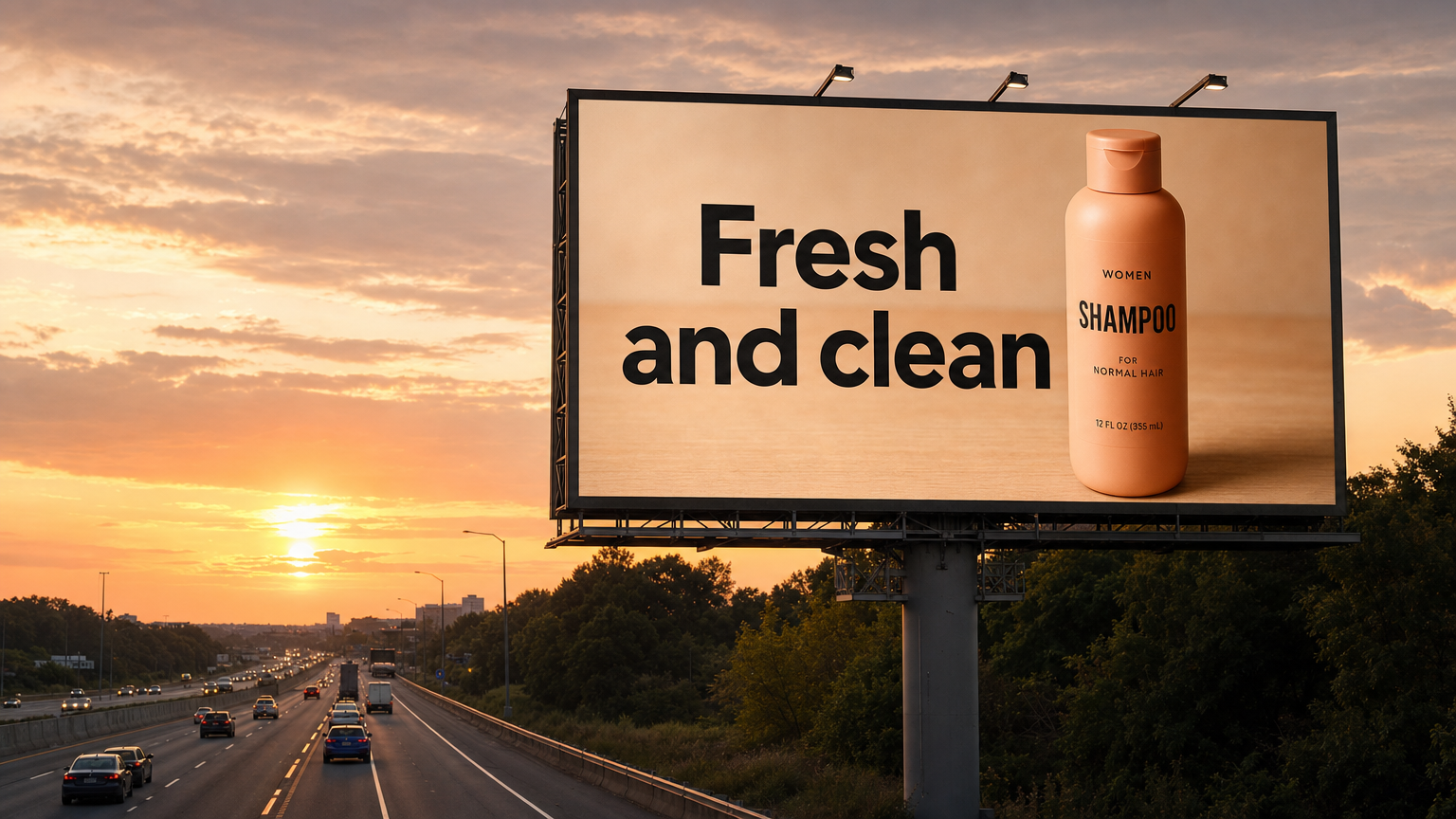
  "prompt": "Create a realistic billboard mockup of the shampoo on a highway scene during sunset.\nBillboard text (EXACT, verbatim, no extra characters):\n\"Fresh and clean\"\nTypography: bold sans-serif, high contrast, centered, clean kerning.\nEnsure text appears once and is perfectly legible.\nNo watermarks, no logos."
}{
"aspect_ratio": "16:9",
"images": [
"https://static.sandbase.ai/examples/4c2d16cb-54bf-4bf3-9c61-3b5d4fbe8d0d/input/4b819c0a-61ba-426a-953c-6d2f05f122e2.png"
],
"prompt": "Turn this drawing into a photorealistic image.\nPreserve the exact layout, proportions, and perspective.\nChoose realistic materials and lighting consistent with the sketch intent.\nDo not add new elements or text."
}{
"aspect_ratio": "16:9",
"images": [
"https://static.sandbase.ai/examples/e29ae6ba-e594-4f4a-a45a-11ba1b56f555/input/efb2db77-9821-44ff-a0ad-9125c1117e08.jpeg"
],
"prompt": "In this room photo, replace ONLY white with chairs made of wood.\nPreserve camera angle, room lighting, floor shadows, and surrounding objects.\nKeep all other aspects of the image unchanged.\nPhotorealistic contact shadows and fabric texture."
}{
"aspect_ratio": "1:1",
"images": [
"https://static.sandbase.ai/examples/31748971-bd20-487b-8a14-e6907f9337e6/input/fe056e64-026f-4a50-b828-ed2093dd648f.jpg"
],
"output_format": "png",
"prompt": "图片精修后用于电商主图,放大原有商品,该品标题是‘【新婚礼物】故宫百喜毯结婚实用高级手工定制新娘订婚闺蜜朋友(手工针织百喜毯+礼盒礼袋)’,结合标题精修图片并将关键词卖点信息放在图片上,图片精修风格凸显送礼场景,高端上档次。增强图片的商品质感、材质纹理、清晰度和光影层次,提高对比度。保留商品原始结构、颜色和比例,适度提升高级感与商业摄影效果,避免过度锐化、塑料感、颜色偏移或新增不存在的结构。只替换图片背景,保留商品主体不变。新背景需要符合商品定位和电商展示需求,干净、有层次、不过度抢占主体;商品边缘、阴影、反射和透视要与新背景自然融合。\n\n[输出尺寸比例: 1:1]\n\n输出尺寸比例:1:1。请严格按照该比例构图与出图,禁止回退默认 1:1。",
"quality": "medium",
"resolution": "1k"
}Human preference
Elo ratings from blind side-by-side votes, compared with other image and video models.
Rankings sourced from Artificial Analysis Arena
Image-editing arena: people pick the better of two edits of the same image and instruction, without seeing the model names.
GPT Image 2 edit: fine-grained edits and multi-image synthesis. Send images with an instruction to retouch, restyle, or combine them.
| Field | Type | Default | Notes |
|---|---|---|---|
images | image URL[], required | — | Images to edit or combine, Image 1, Image 2, … |
prompt | string, required | — | Up to 50,000 characters. |
quality | low / medium / high | high | Higher quality costs more; high is the default. |
resolution | 1k / 2k / 4k | — | Output size tier; omit for 1K. |
aspect_ratio | 1:1 / 1:2 / 2:1 / 1:3 / 3:1 / 2:3 / 3:2 / 3:4 / 4:3 / 4:5 / 5:4 / 9:16 / 16:9 / 9:21 / 21:9 | — | Omit to follow the first input image. |
output_format | jpeg / png / webp | png | Output file format. |
Price depends on quality and resolution, per output image, plus $0.012 for each input image after the first:
| Quality, 1 input | 1k | 2k | 4k |
|---|---|---|---|
| low | $0.02 | $0.03 | $0.04 |
| medium | $0.07 | $0.11 | $0.19 |
| high (default) | $0.23 | $0.41 | $0.73 |
Failed runs are not charged.
Other GPT Image endpoints: openai/gpt-image-2.5-sunburst, openai/gpt-image-2.5-sunburst/edit, openai/gpt-image-2.5-flare, openai/gpt-image-2.5-flare/edit, openai/gpt-image-2.
Start building
Submit this model through the SandBase Unified Run API.
# The quoted heredoc keeps Unicode and shell metacharacters unchanged.
result=$(curl --fail-with-body --silent \
  -X POST "https://api.sandbase.ai/v1/run" \
  -H "Authorization: Bearer $SANDBASE_API_KEY" \
  -H "Content-Type: application/json" \
  --data-binary @- <<'SANDBASE_JSON'
{
  "model": "openai/gpt-image-2/edit",
  "images": [
    "https://cdn.openai.com/API/docs/images/body-lotion.png",
    "https://cdn.openai.com/API/docs/images/soap.png",
    "https://cdn.openai.com/API/docs/images/incense-kit.png",
    "https://cdn.openai.com/API/docs/images/bath-bomb.png"
  ],
  "prompt": "Generate a photorealistic image of a gift basket on a white background labeled 'Relax & Unwind' with a ribbon and handwriting-like font, containing all the items in the reference pictures.",
  "quality": "high",
  "output_format": "png"
}
SANDBASE_JSON
)
run_id=$(printf '%s' "$result" | jq -r .id)
for attempt in $(seq 1 120); do
  status=$(printf '%s' "$result" | jq -r .status)
  case "$status" in completed|failed|timeout) break ;; esac
  sleep 2
  result=$(curl --fail-with-body --silent \
    -H "Authorization: Bearer $SANDBASE_API_KEY" \
    "https://api.sandbase.ai/v1/run/$run_id")
done
status=$(printf '%s' "$result" | jq -r .status)
[ "$status" = completed ] || { echo "Generation ended: $status" >&2; exit 1; }
printf '%s\n' "$result"Create a SandBase API key and set it in your server environment. All requests use Bearer authentication.
export SANDBASE_API_KEY="YOUR_API_KEY"Keep the key on your server. Do not expose it in browser code or commit it to a repository.
POST to /v1/run with this model ID and its inputs. The request example above includes submission and polling.
Use the returned run ID to poll until the status is completed, failed or timeout. Read output only after completed.
curl "https://api.sandbase.ai/v1/run/$RUN_ID" \
-H "Authorization: Bearer $SANDBASE_API_KEY"Pass a publicly accessible file URL in the model’s image, video or audio field. Supported formats and limits are shown beside each Playground input.
Use the upload or replace control on supported image fields in the Playground. Video URL fields accept a hosted driving video; they do not imply video-upload support.
imagesarrayrequiredThe URLs of the images to use for image-to-image generation or image editing.
promptstringrequiredThe text prompt to generate an image from.
Default: "Generate a photorealistic image of a gift basket on a white background labeled 'Relax & Unwind' with a ribbon and handwriting-like font, containing all the items in the reference pictures."
qualitystringQuality for the generated image
Default: "high"
Possible values: "low", "medium", "high"
resolutionstringThe resolution of the generated image. Leave unset to preserve the provider's standard dimensions.
Possible values: "1k", "2k", "4k"
aspect_ratiostringThe aspect ratio of the generated image.
Possible values: "1:1", "1:2", "2:1", "1:3", "3:1", "2:3", "3:2", "3:4", "4:3", "4:5", "5:4", "9:16", "16:9", "9:21", "21:9"
output_formatstringThe format of the generated image.
Default: "png"
Possible values: "jpeg", "png", "webp"
{
  "model": "openai/gpt-image-2/edit",
  "images": [
    "https://cdn.openai.com/API/docs/images/body-lotion.png",
    "https://cdn.openai.com/API/docs/images/soap.png",
    "https://cdn.openai.com/API/docs/images/incense-kit.png",
    "https://cdn.openai.com/API/docs/images/bath-bomb.png"
  ],
  "prompt": "Generate a photorealistic image of a gift basket on a white background labeled 'Relax & Unwind' with a ribbon and handwriting-like font, containing all the items in the reference pictures.",
  "quality": "high",
  "output_format": "png"
}A completed run exposes its result in output. The following is the model’s saved example, not a new generation.
[
  {
    "source": "OpenAI Cookbook prompt (MIT)",
    "source_url": "https://developers.openai.com/cookbook/examples/multimodal/image-gen-models-prompting-guide",
    "url": "https://static.sandbase.ai/examples/a7f81ef8-3f1e-4f19-bc04-fd6d801c7bcb/output/0c2961f3-02c4-46db-a0e6-cc9456998ed1.png"
  }
]