
seedinteger
The same seed and the same prompt given to the same version of the model will output the same image every time.
alibaba/z-image/baseZ Image Base by Alibaba - generate stunning images from text prompts with state-of-the-art AI. Supports multiple aspect ratios, styles, and high-resolution output for creative and commercial use.
Wypróbuj model
Co chcesz zrobić dalej?
Wybierz przykład, aby wczytać jego dane wejściowe i wynik do playgroundu.
{
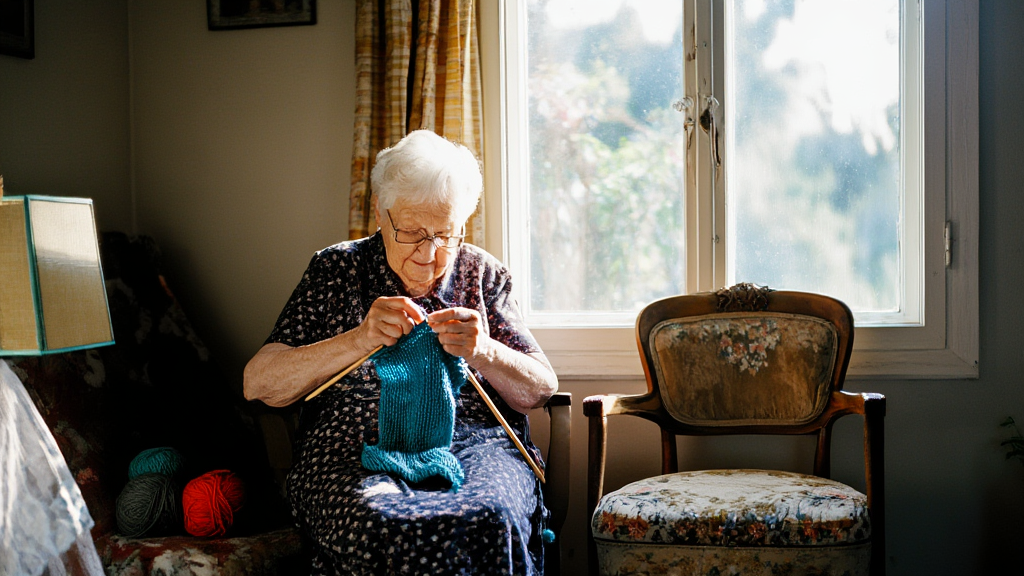
  "prompt": "Grandmother knitting by a window, an empty chair by her"
}Preferencje użytkowników
Oceny Elo na podstawie ślepych głosowań porównawczych, zestawione z innymi modelami obrazu i wideo.
Rankingi pochodzą z Artificial Analysis Arena
Arena tekst-na-obraz: użytkownicy wybierają lepszy z dwóch obrazów wygenerowanych z tego samego promptu, bez znajomości nazw modeli.
Z-Image Base is Alibaba's 6B open text-to-image model: photorealistic results and bilingual text rendering at a low per-image cost.
| Field | Type | Default | Notes |
|---|---|---|---|
prompt | string, required | — | Text instruction. |
aspect_ratio | 21:9 / 16:9 / 3:2 / 4:3 / 5:4 / 1:1 / 4:5 / 3:4 / 2:3 / 9:16 | — | Output shape. |
output_format | jpeg / png | png | Output file format. |
seed | integer | random | Fix it to compare prompt changes. |
$0.01 per image.
| Request | Price |
|---|---|
| One image | $0.01 |
Failed runs are not charged.
Related: alibaba/z-image/turbo/edit, z-image/turbo.
Zacznij tworzyć
Prześlij ten model przez SandBase Unified Run API.
# The quoted heredoc keeps Unicode and shell metacharacters unchanged.
result=$(curl --fail-with-body --silent \
  -X POST "https://api.sandbase.ai/v1/run" \
  -H "Authorization: Bearer $SANDBASE_API_KEY" \
  -H "Content-Type: application/json" \
  --data-binary @- <<'SANDBASE_JSON'
{
  "model": "alibaba/z-image/base",
  "prompt": "Grandmother knitting by a window, an empty chair by her",
  "output_format": "png"
}
SANDBASE_JSON
)
run_id=$(printf '%s' "$result" | jq -r .id)
for attempt in $(seq 1 120); do
  status=$(printf '%s' "$result" | jq -r .status)
  case "$status" in completed|failed|timeout) break ;; esac
  sleep 2
  result=$(curl --fail-with-body --silent \
    -H "Authorization: Bearer $SANDBASE_API_KEY" \
    "https://api.sandbase.ai/v1/run/$run_id")
done
status=$(printf '%s' "$result" | jq -r .status)
[ "$status" = completed ] || { echo "Generation ended: $status" >&2; exit 1; }
printf '%s\n' "$result"Utwórz klucz API SandBase i ustaw go w środowisku serwera. Wszystkie żądania używają uwierzytelniania Bearer.
export SANDBASE_API_KEY="YOUR_API_KEY"Przechowuj klucz na serwerze. Nie ujawniaj go w kodzie przeglądarkowym ani nie commituj do repozytorium.
Wyślij POST do /v1/run z tym identyfikatorem modelu i jego danymi wejściowymi. Powyższy przykład żądania obejmuje wysyłanie i odpytywanie statusu.
Użyj zwróconego ID uruchomienia, aby odpytywać status do momentu completion, failed lub timeout. Odczytaj wynik dopiero po completion.
curl "https://api.sandbase.ai/v1/run/$RUN_ID" \
-H "Authorization: Bearer $SANDBASE_API_KEY"Przekaż publicznie dostępny URL pliku w polu image, video lub audio modelu. Obsługiwane formaty i limity są pokazane obok każdego pola wejściowego w Playground.
Użyj kontrolki upload lub replace w obsługiwanych polach image w Playground. Pola URL wideo akceptują hostowany film źródłowy; nie oznacza to obsługi przesyłania wideo.
seedintegerThe same seed and the same prompt given to the same version of the model will output the same image every time.
promptstringwymaganeThe prompt to generate an image from.
aspect_ratiostringThe aspect ratio of the generated image.
Możliwe wartości: "21:9", "16:9", "3:2", "4:3", "5:4", "1:1", "4:5", "3:4", "2:3", "9:16"
output_formatstringThe format of the generated image.
Domyślnie: "png"
Możliwe wartości: "jpeg", "png"
{
  "model": "alibaba/z-image/base",
  "prompt": "Grandmother knitting by a window, an empty chair by her",
  "output_format": "png"
}Zakończone uruchomienie udostępnia swój wynik w output. Poniżej znajduje się zapisany przykład modelu, a nie nowa generacja.
[
  {
    "source": "Alibaba Model Studio schema mirror",
    "source_url": "https://www.alibabacloud.com/help/en/model-studio/",
    "url": "https://static.sandbase.ai/examples/d8e98731-1ab2-4ee4-a6ff-1af761a13f00/output/78926b85-7c91-42b4-8167-443254ee5517.png"
  }
]