
seedinteger
The same seed and the same prompt given to the same version of the model will output the same image every time.
alibaba/z-image/baseZ Image Base by Alibaba - generate stunning images from text prompts with state-of-the-art AI. Supports multiple aspect ratios, styles, and high-resolution output for creative and commercial use.
Testar o modelo
O que você gostaria de fazer em seguida?
Selecione um exemplo para carregar as entradas e o resultado no playground.
{
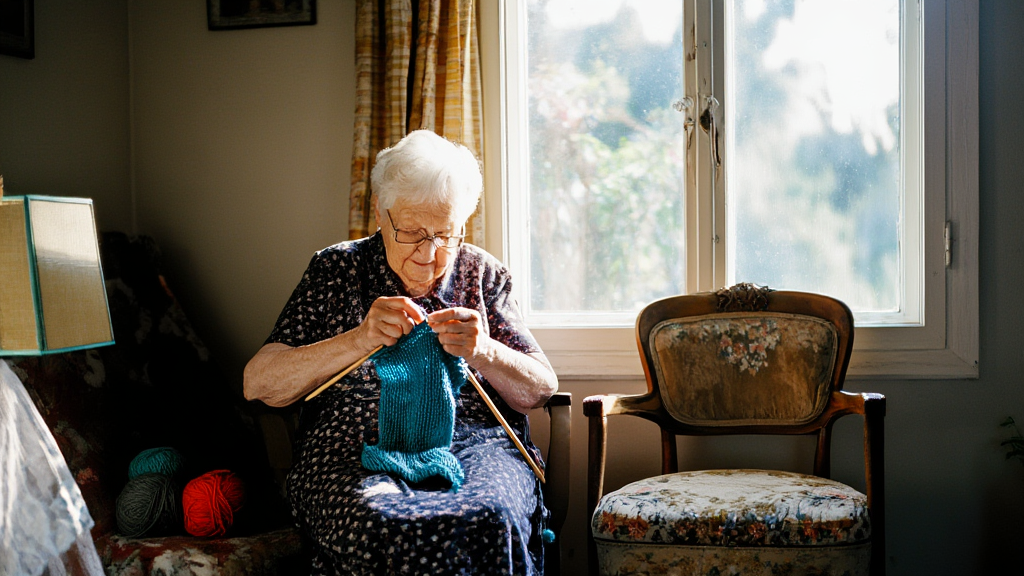
  "prompt": "Grandmother knitting by a window, an empty chair by her"
}Preferência humana
Classificações Elo de votos cegos lado a lado, comparadas com outros modelos de imagem e vídeo.
Classificações obtidas de Artificial Analysis Arena
Arena de texto para imagem: as pessoas escolhem a melhor de duas imagens geradas a partir do mesmo prompt, sem ver os nomes dos modelos.
Z-Image Base is Alibaba's 6B open text-to-image model: photorealistic results and bilingual text rendering at a low per-image cost.
| Field | Type | Default | Notes |
|---|---|---|---|
prompt | string, required | — | Text instruction. |
aspect_ratio | 21:9 / 16:9 / 3:2 / 4:3 / 5:4 / 1:1 / 4:5 / 3:4 / 2:3 / 9:16 | — | Output shape. |
output_format | jpeg / png | png | Output file format. |
seed | integer | random | Fix it to compare prompt changes. |
$0.01 per image.
| Request | Price |
|---|---|
| One image | $0.01 |
Failed runs are not charged.
Related: alibaba/z-image/turbo/edit, z-image/turbo.
Comece a construir
Envie este modelo pela SandBase Unified Run API.
# The quoted heredoc keeps Unicode and shell metacharacters unchanged.
result=$(curl --fail-with-body --silent \
  -X POST "https://api.sandbase.ai/v1/run" \
  -H "Authorization: Bearer $SANDBASE_API_KEY" \
  -H "Content-Type: application/json" \
  --data-binary @- <<'SANDBASE_JSON'
{
  "model": "alibaba/z-image/base",
  "prompt": "Grandmother knitting by a window, an empty chair by her",
  "output_format": "png"
}
SANDBASE_JSON
)
run_id=$(printf '%s' "$result" | jq -r .id)
for attempt in $(seq 1 120); do
  status=$(printf '%s' "$result" | jq -r .status)
  case "$status" in completed|failed|timeout) break ;; esac
  sleep 2
  result=$(curl --fail-with-body --silent \
    -H "Authorization: Bearer $SANDBASE_API_KEY" \
    "https://api.sandbase.ai/v1/run/$run_id")
done
status=$(printf '%s' "$result" | jq -r .status)
[ "$status" = completed ] || { echo "Generation ended: $status" >&2; exit 1; }
printf '%s\n' "$result"Crie uma chave da API SandBase e defina-a no ambiente do seu servidor. Todas as requisições usam autenticação Bearer.
export SANDBASE_API_KEY="YOUR_API_KEY"Mantenha a chave no servidor. Não a exponha em código do navegador nem a comite em um repositório.
Faça POST para /v1/run com este ID de modelo e suas entradas. O exemplo de requisição acima inclui envio e polling.
Use o ID de execução retornado para fazer polling até que o status seja completed, failed ou timeout. Leia a saída somente após completed.
curl "https://api.sandbase.ai/v1/run/$RUN_ID" \
-H "Authorization: Bearer $SANDBASE_API_KEY"Passe uma URL de arquivo acessível publicamente no campo de imagem, vídeo ou áudio do modelo. Os formatos e limites suportados são mostrados ao lado de cada entrada do Playground.
Use o controle de upload ou substituição nos campos de imagem suportados no Playground. Campos de URL de vídeo aceitam um vídeo de condução hospedado; isso não implica suporte a upload de vídeo.
seedintegerThe same seed and the same prompt given to the same version of the model will output the same image every time.
promptstringobrigatórioThe prompt to generate an image from.
aspect_ratiostringThe aspect ratio of the generated image.
Valores possíveis: "21:9", "16:9", "3:2", "4:3", "5:4", "1:1", "4:5", "3:4", "2:3", "9:16"
output_formatstringThe format of the generated image.
Padrão: "png"
Valores possíveis: "jpeg", "png"
{
  "model": "alibaba/z-image/base",
  "prompt": "Grandmother knitting by a window, an empty chair by her",
  "output_format": "png"
}Uma execução concluída expõe seu resultado em output. O texto a seguir é o exemplo salvo do modelo, não uma nova geração.
[
  {
    "source": "Alibaba Model Studio schema mirror",
    "source_url": "https://www.alibabacloud.com/help/en/model-studio/",
    "url": "https://static.sandbase.ai/examples/d8e98731-1ab2-4ee4-a6ff-1af761a13f00/output/78926b85-7c91-42b4-8167-443254ee5517.png"
  }
]