
seedinteger
The same seed and the same prompt given to the same version of the model will output the same image every time.
alibaba/qwen-image-editQwen Image Edit is Alibaba's intelligent image editing model. Transform, retouch, and reimagine existing images using text prompts - from background replacement to artistic style conversion.
Попробовать модель
PNG, JPEG, WebP или GIF · максимум 20 MiB
Что вы хотите сделать дальше?
Выберите пример, чтобы загрузить его входные данные и результат в playground.
{
  "image": "https://static.sandbase.ai/examples/69e64dd1-c75f-49b4-a0e5-675d63145694/input/4195cebd-2577-49d0-a51c-97e0fece877c.png",
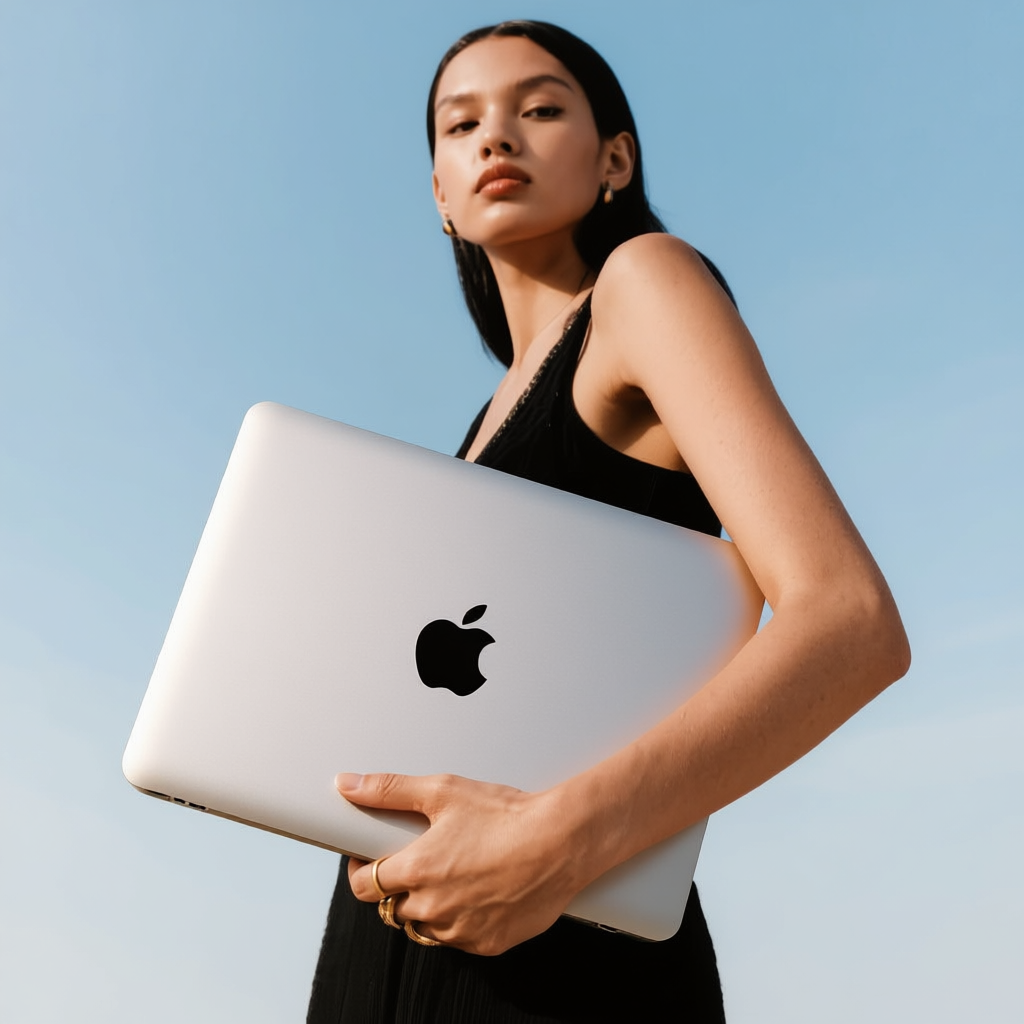
  "prompt": "Change bag to apple macbook"
}Предпочтения людей
Рейтинги Elo по результатам слепых попарных голосований, в сравнении с другими моделями для изображений и видео.
Рейтинги взяты из Artificial Analysis Arena
Arena редактирования изображений: люди выбирают лучший из двух вариантов редактирования одного и того же изображения и инструкции, не видя названий моделей.
The original Qwen Image Edit: change one image with an instruction, including Chinese and English text edits. strength controls how far the result may move from the input.
| Field | Type | Default | Notes |
|---|---|---|---|
prompt | string, required | — | Text instruction. |
image | image URL, required | — | Image to edit. JPEG, PNG, or WebP URL. |
strength | number 0.01–1 | 0.94 | How much the output may differ from the input (0.01–1). |
output_format | jpeg / png | png | Output file format. |
aspect_ratio | 21:9 / 16:9 / 3:2 / 4:3 / 5:4 / 1:1 / 4:5 / 3:4 / 2:3 / 9:16 | — | Omit to follow the input image. |
seed | integer | random | Fix it to compare prompt changes. |
$0.045 per output image, Alibaba's list price.
| Request | Price |
|---|---|
| One image | $0.045 |
Failed runs are not charged.
strength for subtle edits.Related: alibaba/qwen-image-edit/2511, alibaba/qwen-image-edit/2511/multiple-angles, alibaba/qwen-image-3/edit (newer).
Начните разработку
Отправьте эту модель через SandBase Unified Run API.
# The quoted heredoc keeps Unicode and shell metacharacters unchanged.
result=$(curl --fail-with-body --silent \
  -X POST "https://api.sandbase.ai/v1/run" \
  -H "Authorization: Bearer $SANDBASE_API_KEY" \
  -H "Content-Type: application/json" \
  --data-binary @- <<'SANDBASE_JSON'
{
  "model": "alibaba/qwen-image-edit",
  "image": "https://static.sandbase.ai/examples/alibaba/qwen-image-edit/input_image_0.png",
  "prompt": "Change bag to apple macbook",
  "strength": 0.94,
  "output_format": "png"
}
SANDBASE_JSON
)
run_id=$(printf '%s' "$result" | jq -r .id)
for attempt in $(seq 1 120); do
  status=$(printf '%s' "$result" | jq -r .status)
  case "$status" in completed|failed|timeout) break ;; esac
  sleep 2
  result=$(curl --fail-with-body --silent \
    -H "Authorization: Bearer $SANDBASE_API_KEY" \
    "https://api.sandbase.ai/v1/run/$run_id")
done
status=$(printf '%s' "$result" | jq -r .status)
[ "$status" = completed ] || { echo "Generation ended: $status" >&2; exit 1; }
printf '%s\n' "$result"Создайте ключ SandBase API и задайте его в окружении сервера. Все запросы используют аутентификацию Bearer.
export SANDBASE_API_KEY="YOUR_API_KEY"Храните ключ на сервере. Не раскрывайте его в коде браузера и не коммитьте в репозиторий.
Отправьте POST на /v1/run с этим ID модели и её входными данными. Пример запроса выше включает отправку и опрос.
Используйте возвращённый ID запуска, чтобы опрашивать статус до завершения, ошибки или таймаута. Читайте вывод только после завершения.
curl "https://api.sandbase.ai/v1/run/$RUN_ID" \
-H "Authorization: Bearer $SANDBASE_API_KEY"Передайте публично доступный URL файла в поле image, video или audio модели. Поддерживаемые форматы и лимиты показаны рядом с каждым полем Playground.
Используйте управление загрузкой или заменой в поддерживаемых полях изображений в Playground. Поля URL видео принимают размещённое видео для вождения; это не означает поддержку загрузки видео.
seedintegerThe same seed and the same prompt given to the same version of the model will output the same image every time.
imagestringобязательноThe URL of the image to edit.
promptstringобязательноThe prompt to generate the image with
strengthnumberStrength of the image-to-image transformation. Lower values preserve more of the original image.
По умолчанию: 0.94
Минимум: 0.01
Максимум: 1
aspect_ratiostringThe aspect ratio of the generated image.
Возможные значения: "21:9", "16:9", "3:2", "4:3", "5:4", "1:1", "4:5", "3:4", "2:3", "9:16"
output_formatstringThe format of the generated image.
По умолчанию: "png"
Возможные значения: "jpeg", "png"
{
  "model": "alibaba/qwen-image-edit",
  "image": "https://static.sandbase.ai/examples/alibaba/qwen-image-edit/input_image_0.png",
  "prompt": "Change bag to apple macbook",
  "strength": 0.94,
  "output_format": "png"
}В завершённом запуске результат доступен в output. Ниже приведён сохранённый пример модели, а не новая генерация.
[
  {
    "source": "Alibaba Model Studio schema mirror",
    "source_url": "https://www.alibabacloud.com/help/en/model-studio/",
    "url": "https://static.sandbase.ai/examples/69e64dd1-c75f-49b4-a0e5-675d63145694/output/e781f31d-d23b-4821-8955-084dfdd76da6.png"
  }
]