
Free AI photo enhancer
ÜcretsizAI görselMake a photo sharper, cleaner and brighter in one click: recover detail, remove noise and compression, lift dark shadows and bring faded colors back, up to 4K.
- 100% free
- No sign-up
- No watermark
- Works on phone
Örnek sonuç
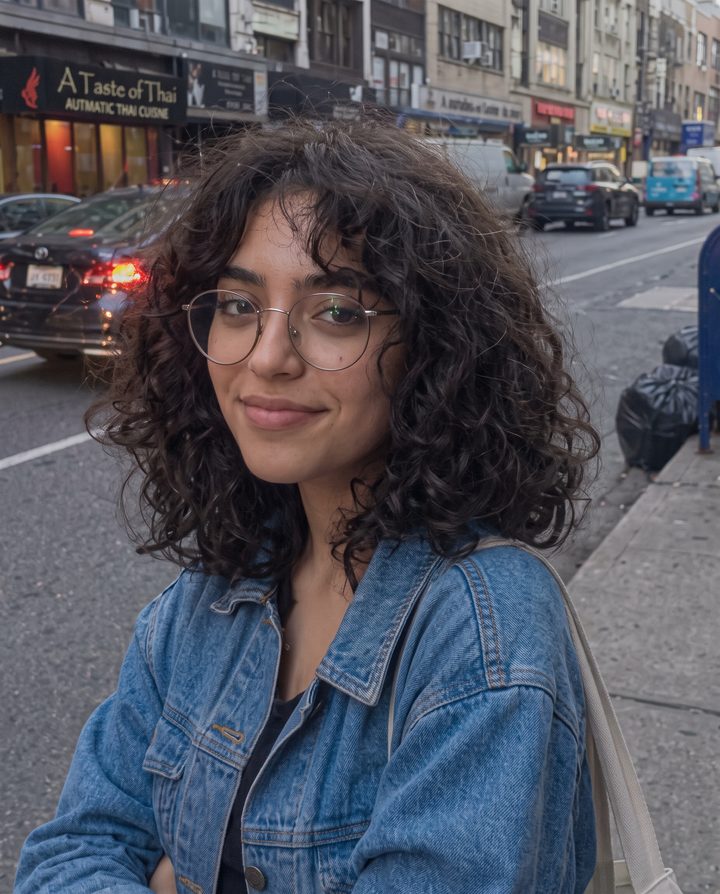
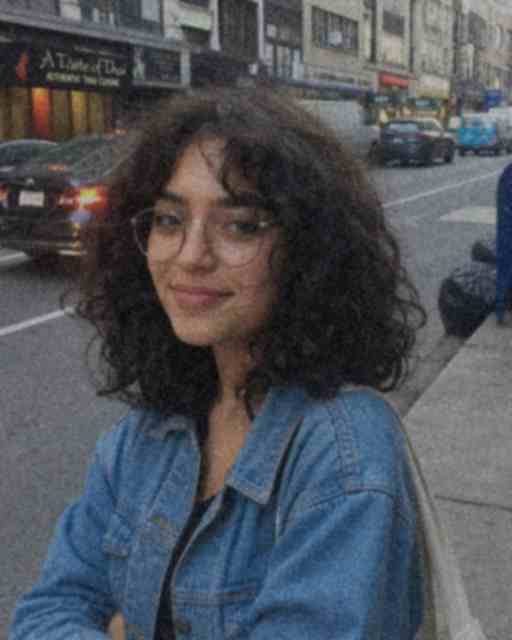 ÖnceSonra
A noisy, soft phone photo made sharp and clean.
AI Photo Enhancer nasıl kullanılır
Üç adımda, bilgisayarda veya telefonda.
- 01
Upload a photo
Drop, paste or pick a JPG, PNG, WebP or HEIC image; on a phone you can take one with the camera.
- 02
Choose fix and output size
Pick Fix (Overall, Dark photo, Faded or Faces) and Output size (2K or 4K), then select Enhance photo. A result usually takes about 35 seconds.
- 03
Compare and download
Compare it with your original, then download a JPG. Example on this page: a noisy, soft phone photo made sharp and clean.
İnsanlar bunu ne için kullanıyor
Phone photos
Rescue shots taken in poor light or with a shaky hand.
Old digital photos
Bring back detail in small, noisy files from old cameras.
Listings and profiles
Crisper images for shops, ads and profile pages.
Daha iyi sonuç için ipuçları
- Pick the fix that matches the problem: Dark photo, Faded or Faces.
- Choose 4K if you plan to print the result.
- Overall is a good first try when you are not sure what is wrong.
Daha fazla kontrol mü lazım? API'yi kullanın
Bu araç SandBase image API üzerinde çalışır. API, ücretsiz aracın sizin için sabitlediği tüm ayarları size sunar.
- Daha yüksek kalite ve boyut4K'a kadar çıktı ve ekstra geniş ve dikey dahil herhangi bir en-boy oranı.
- Kendi prompt'unuzŞablonu değiştirin, referans görseller ekleyin veya kodunuzdan ya da Agent'tan yüzlerce görseli toplu işleyin.
- Görsel başına ödemeÜcretsiz araç kotasının ötesinde SandBase bakiyenizi kullanın. Model kullanılabilirliği ve API hız sınırları yine geçerlidir.
# Set SANDBASE_API_KEY first.
# Replace photo.jpg with your local JPEG file.
IMAGE_FILE="photo.jpg"
python3 - "$IMAGE_FILE" <<'SANDBASE_PY' > request.json
import base64, json, pathlib, sys
payload = json.loads("{\"contents\":[{\"role\":\"user\",\"parts\":[{\"text\":\"Enhance this photo: Improve sharpness, fine detail, color balance and exposure, and remove noise and compression artifacts. Keep the content, composition, identity, faces, text, colors and lighting exactly the same. Do not add, remove or restyle anything.\"},{\"inline_data\":{\"mime_type\":\"image/jpeg\",\"data\":\"\"}}]}],\"generationConfig\":{\"responseModalities\":[\"IMAGE\"],\"imageConfig\":{\"imageSize\":\"4K\"}}}")
payload["contents"][0]["parts"][1]["inline_data"]["data"] = base64.b64encode(pathlib.Path(sys.argv[1]).read_bytes()).decode("ascii")
print(json.dumps(payload))
SANDBASE_PY
curl --fail-with-body https://api.sandbase.ai/v1beta/models/google/gemini-nano-banana-2.1:generateContent \
  -H "Authorization: Bearer $SANDBASE_API_KEY" \
  -H "Content-Type: application/json" \
--data-binary @request.jsonSSS
What does enhance change?
Sharpness, detail, noise, brightness and color balance. The prompt aims to preserve people, objects and composition; fine details may change.
AI Photo Enhancer ücretsiz mi?
Evet, filigransız ve kayıt olmadan. AI Photo Enhancer ile tek bir çalışma yaklaşık 35 saniye sürer ve size bir JPG verir. Bu, tüm AI image araçları arasında paylaşılan ücretsiz günlük AI image hakkından bir çalışmadır: giriş yapmadan günde 10 çalışma ve ücretsiz bir SandBase hesabıyla 30 çalışma. Araç, kaç hakkınız kaldığını gösterir ve sayaç UTC gece yarısında sıfırlanır; ağ ve site genelindeki sınırlamalar da लागू olabilir.
AI Photo Enhancer içine yüklediğim fotoğrafa ne olur?
Fotoğrafınız ve ayarlarınız, bu tek sonucu oluşturmak için SandBase ve görsel sağlayıcısı tarafından işlenir. AI Photo Enhancer hiçbir şeyi herkese açık bir galeriye yayımlamaz. Sonuçlar 24 saate kadar önbellekten yeniden kullanılabilir; bu yüzden aynı istek başka bir çalışma kullanmaz; saklamak istediğiniz her sonucu indirin.
Bu iş için SandBase API'leri
Aynı tür veriyi kendi kodunuzda veya Agent içinde kullanın: tek bir API anahtarı, çağrı başına faturalandırma.
Daha fazla araç
AI Photo Editor
Edit any photo by describing the change in plain words: weather, outfit, light, background. Review the rest of the image for unintended changes.
Food Photo Enhancer
Make a food photo look professional and delicious.
AI Photo Restoration
Restore old photos with AI: remove scratches, creases and fading, and colorize black and white pictures.
AI Image Upscaler
Generate a 2K or 4K version of a photo or artwork with AI. Compare the result carefully: fine details and text may change.
AI Object Remover
Erase people, cars, wires, text and other objects from a photo by painting over them or describing them.
AI Background Remover
Remove the background from any photo with AI and download a transparent PNG, or put the subject on white or any color.