
Free photo background blur
ÜcretsizAI görselMake any photo look like portrait mode: the subject stays sharp while the background melts into a soft blur. Works on people, pets and products, even from a phone photo.
- 100% free
- No sign-up
- No watermark
- Works on phone
Örnek sonuç
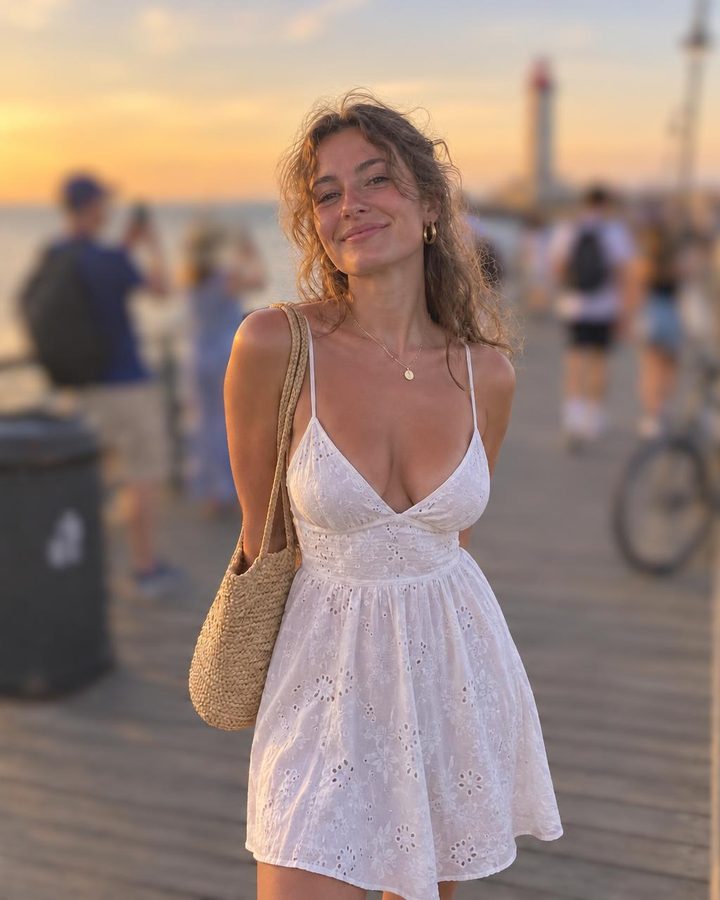
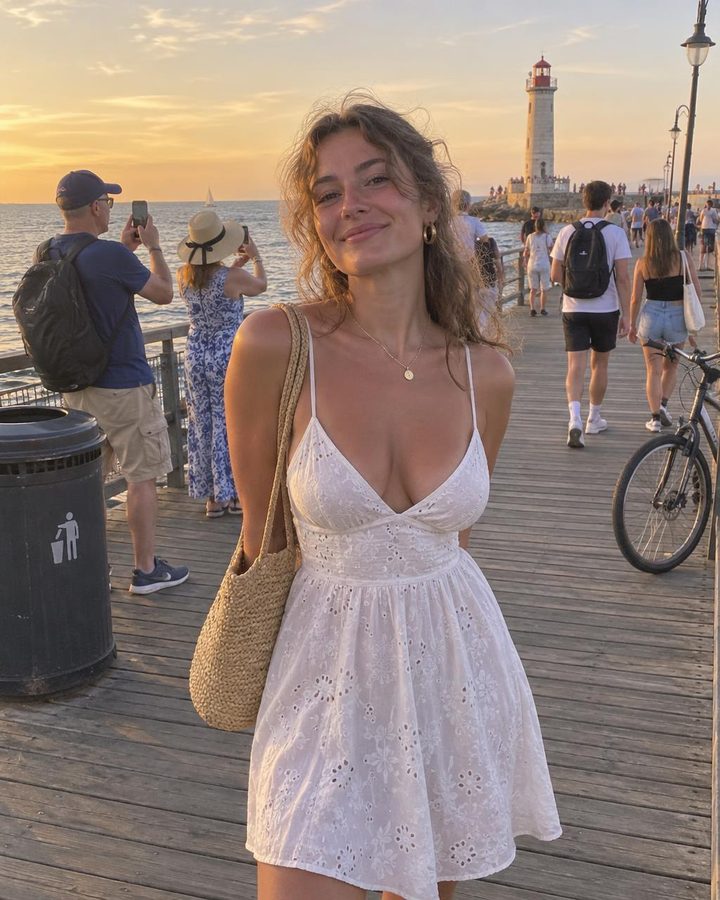 ÖnceSonra
A busy pier blurred behind the subject.
Blur Background nasıl kullanılır
Üç adımda, bilgisayarda veya telefonda.
- 01
Upload a photo
Drop, paste or pick a JPG, PNG, WebP or HEIC image; on a phone you can take one with the camera.
- 02
Choose blur strength
Pick Blur strength (Soft, Medium or Strong), then select Blur background. A result usually takes about 20 seconds.
- 03
Compare and download
Compare it with your original, then download a JPG. Example on this page: a busy pier blurred behind the subject.
Daha fazla örnek
Aynı aracın, elle düzenleme yapılmadan diğer fotoğraflardaki kullanımı. Kendiniz denemek için birini açın.
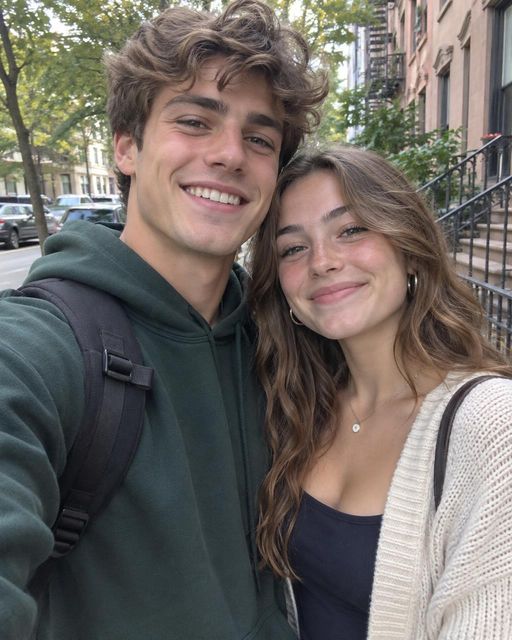
Önce 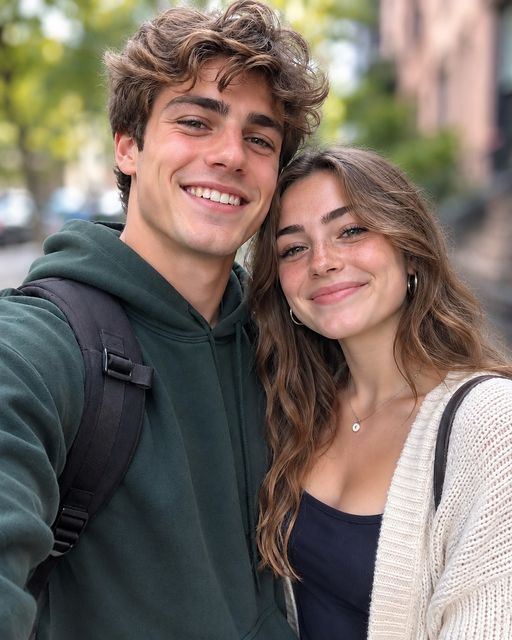
Sonra Fotoğrafınızda deneyin
Bir fotoğraf yükleyin ve saniyeler içinde sonucu alın. Ücretsiz, kayıt yok, filigran yok.
Bir fotoğraf yükleyin
İnsanlar bunu ne için kullanıyor
Portraits
Hide a busy street or a messy room behind you.
Product photos
Make a product stand out from its surroundings.
Social posts
A shallow-focus look without a big camera.
Daha iyi sonuç için ipuçları
- Start with Medium; Strong works best when the subject is close to the camera.
- Soft keeps some of the place readable, good for travel photos.
- Hair and glasses edges come out cleaner on a sharp, well-lit photo.
Daha fazla kontrol mü lazım? API'yi kullanın
Bu araç SandBase image API üzerinde çalışır. API, ücretsiz aracın sizin için sabitlediği tüm ayarları size sunar.
- Daha yüksek kalite ve boyuttek çağrıda quality=high, 2K'ya kadar boyutlar ve şeffaf arka planlar.
- Kendi prompt'unuzŞablonu değiştirin, referans görseller ekleyin veya kodunuzdan ya da Agent'tan yüzlerce görseli toplu işleyin.
- Görsel başına ödemeÜcretsiz araç kotasının ötesinde SandBase bakiyenizi kullanın. Model kullanılabilirliği ve API hız sınırları yine geçerlidir.
# Set SANDBASE_API_KEY and choose your local image file.
IMAGE_FILE="photo.jpg"
curl --fail-with-body https://api.sandbase.ai/v1/images/edits \
  -H "Authorization: Bearer $SANDBASE_API_KEY" \
  --form-string 'model=gpt-image-2.6-flare' \
  --form "image=@${IMAGE_FILE}" \
  --form-string 'quality=high' \
  --form-string 'size=2048x2048' \
--form-string 'prompt=Blur the background like a portrait-mode photo with a strong, creamy blur like a fast f/1.4 lens. Keep the main subject perfectly sharp and exactly as it is: same edges, hair, clothing, colors and position. Keep the background'\''s colors and layout, only blurred. Do not add or remove anything.'SSS
Is it a real lens blur?
It is an AI-made depth-of-field effect: the subject stays sharp and the background gets a smooth, lens-like blur with the same colors and layout.
Blur Background ücretsiz mi?
Evet, filigransız ve kayıt olmadan. Blur Background ile tek bir çalışma yaklaşık 20 saniye sürer ve size bir JPG verir. Bu, tüm AI image araçları arasında paylaşılan ücretsiz günlük AI image hakkından bir çalışmadır: giriş yapmadan günde 10 çalışma ve ücretsiz bir SandBase hesabıyla 30 çalışma. Araç, kaç hakkınız kaldığını gösterir ve sayaç UTC gece yarısında sıfırlanır; ağ ve site genelindeki sınırlamalar da लागू olabilir.
Blur Background içine yüklediğim fotoğrafa ne olur?
Fotoğrafınız ve ayarlarınız, bu tek sonucu oluşturmak için SandBase ve görsel sağlayıcısı tarafından işlenir. Blur Background hiçbir şeyi herkese açık bir galeriye yayımlamaz. Sonuçlar 24 saate kadar önbellekten yeniden kullanılabilir; bu yüzden aynı istek başka bir çalışma kullanmaz; saklamak istediğiniz her sonucu indirin.
Bu iş için SandBase API'leri
Aynı tür veriyi kendi kodunuzda veya Agent içinde kullanın: tek bir API anahtarı, çağrı başına faturalandırma.
Daha fazla araç
AI Background Remover
Remove the background from any photo with AI and download a transparent PNG, or put the subject on white or any color.
White Background Maker
Put any product or portrait photo on a pure white background, with a soft shadow or none. Ready for marketplaces and forms.
Change Background
Change the background of any photo to a scene you describe, while the subject keeps its edges and lighting.
Product Photo Background
Put a product photo on a studio, marble, wood or outdoor background with realistic light and shadow.
Change Background Color of Photo
Put the subject on a plain color background, with the rest of the photo unchanged.
Bokeh Effect
Add portrait-lens bokeh and shallow depth of field, with round, heart or star highlights.