
Free glare remover
ÜcretsizAI görselRemove bright reflections from glasses, glossy skin, framed pictures and shiny products, and get back the detail hidden under the glare.
- 100% free
- No sign-up
- No watermark
- Works on phone
Örnek sonuç

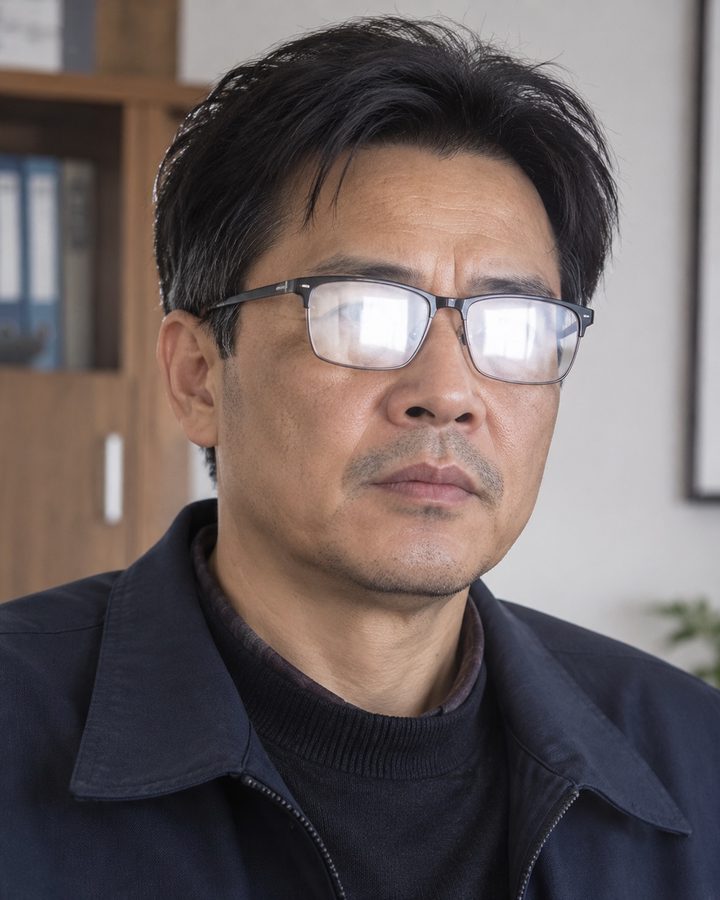 ÖnceSonra
Remove glare and shiny hot spots.
Glare Remover nasıl kullanılır
Üç adımda, bilgisayarda veya telefonda.
- 01
Upload a photo
Drop, paste or pick a JPG, PNG, WebP or HEIC image; on a phone you can take one with the camera. Then type your anything to add (optional) (optional), for example "e.g. a sunset behind me".
- 02
Choose glare on
Pick Glare on (Anywhere, Glasses, Shiny skin or Screen or glass), then select Apply. A result usually takes about 20 seconds.
- 03
Compare and download
Compare it with your original, then download a JPG. Example on this page: remove glare and shiny hot spots.
İnsanlar bunu ne için kullanıyor
Glasses in photos
Fix reflections in lenses.
Product photos
Tame hot spots on bottles and jars.
Documents and art
Remove glare from photos of frames and paper.
Daha iyi sonuç için ipuçları
- Shoot at an angle next time to avoid glare.
- Small hot spots fix best.
- Compare with the slider before you download.
Daha fazla kontrol mü lazım? API'yi kullanın
Bu araç SandBase image API üzerinde çalışır. API, ücretsiz aracın sizin için sabitlediği tüm ayarları size sunar.
- Daha yüksek kalite ve boyuttek çağrıda quality=high, 2K'ya kadar boyutlar ve şeffaf arka planlar.
- Kendi prompt'unuzŞablonu değiştirin, referans görseller ekleyin veya kodunuzdan ya da Agent'tan yüzlerce görseli toplu işleyin.
- Görsel başına ödemeÜcretsiz araç kotasının ötesinde SandBase bakiyenizi kullanın. Model kullanılabilirliği ve API hız sınırları yine geçerlidir.
# Set SANDBASE_API_KEY and choose your local image file.
IMAGE_FILE="photo.jpg"
curl --fail-with-body https://api.sandbase.ai/v1/images/edits \
  -H "Authorization: Bearer $SANDBASE_API_KEY" \
  --form-string 'model=gpt-image-2.6-flare' \
  --form "image=@${IMAGE_FILE}" \
  --form-string 'quality=high' \
  --form-string 'size=2048x2048' \
--form-string 'prompt=Remove the glare, hot spots and harsh reflections from this photo on the glasses, restoring the detail and color underneath. Keep everything else exactly as it is.'SSS
Can it remove glare from glasses?
Yes. It rebuilds the eyes behind the reflection.
What about very large glare?
Detail fully lost under white glare is redrawn, so check it looks right.
Will it change anything else?
The prompt keeps the rest of the photo as it is. Compare with the slider before you download.
Glare Remover ücretsiz mi?
Evet, filigransız ve kayıt olmadan. Glare Remover ile tek bir çalışma yaklaşık 20 saniye sürer ve size bir JPG verir. Bu, tüm AI image araçları arasında paylaşılan ücretsiz günlük AI image hakkından bir çalışmadır: giriş yapmadan günde 10 çalışma ve ücretsiz bir SandBase hesabıyla 30 çalışma. Araç, kaç hakkınız kaldığını gösterir ve sayaç UTC gece yarısında sıfırlanır; ağ ve site genelindeki sınırlamalar da लागू olabilir.
Glare Remover içine yüklediğim fotoğrafa ne olur?
Fotoğrafınız ve ayarlarınız, bu tek sonucu oluşturmak için SandBase ve görsel sağlayıcısı tarafından işlenir. Glare Remover hiçbir şeyi herkese açık bir galeriye yayımlamaz. Sonuçlar 24 saate kadar önbellekten yeniden kullanılabilir; bu yüzden aynı istek başka bir çalışma kullanmaz; saklamak istediğiniz her sonucu indirin.
Bu iş için SandBase API'leri
Aynı tür veriyi kendi kodunuzda veya Agent içinde kullanın: tek bir API anahtarı, çağrı başına faturalandırma.
Daha fazla araç
AI Object Remover
Erase people, cars, wires, text and other objects from a photo by painting over them or describing them.
AI Photo Editor
Edit any photo by describing the change in plain words: weather, outfit, light, background. Review the rest of the image for unintended changes.
AI Photo Restoration
Restore old photos with AI: remove scratches, creases and fading, and colorize black and white pictures.
AI Image Upscaler
Generate a 2K or 4K version of a photo or artwork with AI. Compare the result carefully: fine details and text may change.
Magic Eraser
Paint over anything you want gone and the magic eraser rebuilds the background behind it.
HDR Photo Editor
Recover bright skies and dark shadows for balanced HDR light.