
Free YouTube banner maker
ÜcretsizAI görselDescribe your channel, add its name, pick a style, and get wide channel art with the important parts in the central safe area that shows on every device.
- 100% free
- No sign-up
- No watermark
- Any shape
Örnek sonuç
 Örnek
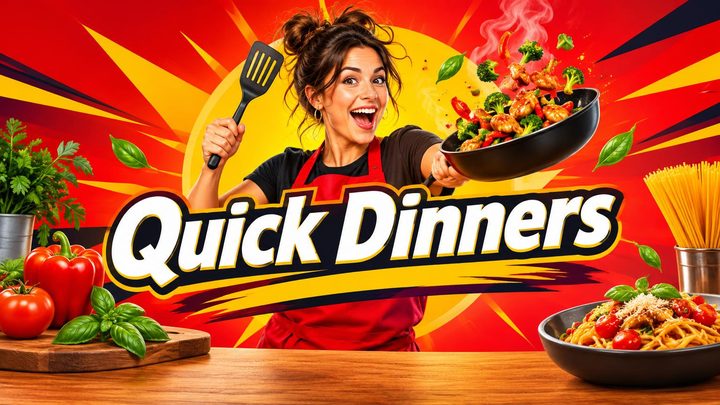
A cooking channel banner with the channel name in the center.
YouTube Banner Maker nasıl kullanılır
Üç adımda, bilgisayarda veya telefonda.
- 01
Write your what is your channel about
Type your what is your channel about, for example "a cooking channel about quick weeknight dinners", or tap one of the examples.
- 02
Choose style
Pick Style (Bold, Clean, Photographic or Playful), then select Make banner. A result usually takes about 15 seconds.
- 03
Review and download
Check the picture and read every word, then download a JPG. Example on this page: a cooking channel banner with the channel name in the center.
Daha fazla örnek
Bu araçla yapıldı, elle düzenleme yapılmadı. Ayarlarından başlamak için birini açın.
Örnek Kendi tasarımınızı oluşturun
Ne istediğinizi anlatın ve saniyeler içinde bir sonuç alın. Ücretsiz, kayıt yok, filigran yok.
Aracı açın
İnsanlar bunu ne için kullanıyor
New channels
A first banner without a designer.
Rebrands
Test new looks before you commit.
Streamers
Matching art for Twitch and YouTube.
Daha iyi sonuç için ipuçları
- Keep the channel name in the middle; edges are cut off on phones.
- Say what the channel is about in a few words.
- Clean suits tutorials; Playful suits kids and gaming.
Daha fazla kontrol mü lazım? API'yi kullanın
Bu araç SandBase image API üzerinde çalışır. API, ücretsiz aracın sizin için sabitlediği tüm ayarları size sunar.
- Daha yüksek kalite ve boyuttek çağrıda quality=high, 2K'ya kadar boyutlar ve şeffaf arka planlar.
- Kendi prompt'unuzŞablonu değiştirin, referans görseller ekleyin veya kodunuzdan ya da Agent'tan yüzlerce görseli toplu işleyin.
- Görsel başına ödemeÜcretsiz araç kotasının ötesinde SandBase bakiyenizi kullanın. Model kullanılabilirliği ve API hız sınırları yine geçerlidir.
# Set SANDBASE_API_KEY first.
curl --fail-with-body https://api.sandbase.ai/v1/images/generations \
  -H "Authorization: Bearer $SANDBASE_API_KEY" \
  -H "Content-Type: application/json" \
  --data-binary @- <<'SANDBASE_JSON'
{
  "model": "gpt-image-2.6-flare",
  "prompt": "A YouTube channel banner for a cooking channel about quick weeknight dinners. Bold colors, strong shapes and a high-energy look. Wide composition with the key subject and any text inside the central safe area, extra background to the sides, Include the channel name \"Quick Dinners\" once, large and perfectly spelled, in the center. no other text, no watermark. Keep all lettering and the main subject inside the central 80% of the frame, with a wide empty margin on every side, because the image may be resized or cropped: no letter may touch or cross an edge.",
  "size": "1536x1024",
  "quality": "high"
}
SANDBASE_JSONSSS
What size should my banner be?
YouTube asks for 2560 by 1440 pixels with a central safe area of 1546 by 423. Crop or resize the result to that size.
YouTube Banner Maker ücretsiz mi?
Evet, filigransız ve kayıt olmadan. YouTube Banner Maker ile tek bir çalışma yaklaşık 15 saniye sürer ve size bir JPG verir. Bu, tüm AI image araçları arasında paylaşılan ücretsiz günlük AI image hakkından bir çalışmadır: giriş yapmadan günde 10 çalışma ve ücretsiz bir SandBase hesabıyla 30 çalışma. Araç, kaç hakkınız kaldığını gösterir ve sayaç UTC gece yarısında sıfırlanır; ağ ve site genelindeki sınırlamalar da लागू olabilir.
YouTube Banner Maker çalıştırdığımda ne gönderir?
Bu tek sonucu oluşturmak için yalnızca seçtiğiniz metin ve seçenekler SandBase ve görsel sağlayıcısı tarafından işlenir. YouTube Banner Maker hiçbir şeyi herkese açık bir galeriye yayımlamaz. Sonuçlar 24 saate kadar önbellekten yeniden kullanılabilir; bu yüzden aynı istek başka bir çalışma kullanmaz; saklamak istediğiniz her sonucu indirin.
Bu iş için SandBase API'leri
Aynı tür veriyi kendi kodunuzda veya Agent içinde kullanın: tek bir API anahtarı, çağrı başına faturalandırma.
Daha fazla araç
YouTube Thumbnail Maker
Make a YouTube thumbnail from an idea or your own photo: big readable text, bold colors, 16:9.
AI iPhone Wallpaper Generator
Make iPhone lock screen wallpaper images from a description.
Zoom Background Generator
Make 16:9 virtual backgrounds for Zoom, Teams and Meet from a description.
AI Desktop Wallpaper Generator
Make desktop wallpaper images from a description.
Mothers Day Card Maker
Design a Mother's Day card in four themes and four styles.
Fathers Day Card Maker
Design a Father's Day card in four themes and four styles.