
imagestringbắt buộc
Photo to turn into a relief. Works best with one clear subject on a plain background. JPG, PNG or WebP up to 20 MB.
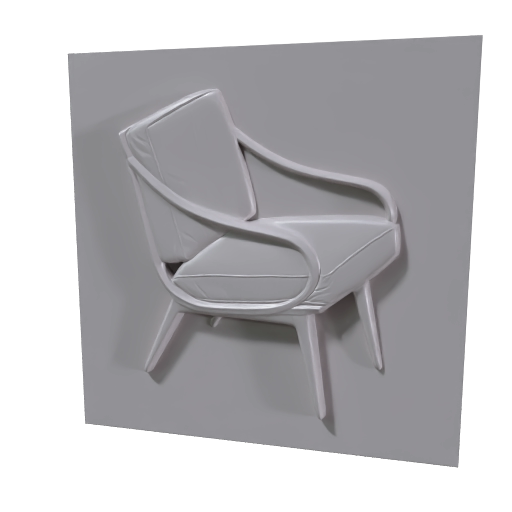
meshy/reliefMeshy Relief turns a photo into a printable 3D relief (GLB and STL) with emboss or engrave carving and an optional curved bend.
Thử model
PNG, JPEG, WebP hoặc GIF · tối đa 20 MiB
Bạn muốn làm gì tiếp theo?
Chọn một ví dụ để nạp đầu vào và kết quả của nó vào playground.
{
  "image": "https://static.sandbase.ai/examples/4c94005b-9c2a-44cc-abe7-337094aa34eb/input/dfd2b1f1-42c5-46c5-92e6-a9fc9ac0c350.png"
}Meshy Relief turns a photo into a printable 3D relief (GLB and STL) with emboss or engrave carving and an optional curved bend.
| Field | Type | Default | Notes |
|---|---|---|---|
image | image URL, required | — | Photo to turn into a relief. Works best with one clear subject on a plain background. JPG, PNG or WebP up to 20 MB. |
variant | low / high | low | 'low' gives slight depth and finer detail (patterns, badges, seals); 'high' gives bold, sculptural depth (pets, portraits, characters). |
carving_mode | emboss / engrave | emboss | 'emboss' makes nearer parts stand out; 'engrave' cuts them in. |
size_mm | number 20–250 | 60 | Length of the photo's long side in millimeters, measured flat before any bend. |
carving_depth_mm | number 0–60 | — | Carving depth in millimeters. Defaults to 3 for 'low' and 6 for 'high'. |
base_thickness_mm | number 0.1–10 | — | Base plate thickness in millimeters (default 1). Not allowed with remove_base. |
remove_base | boolean | false | Cut away the background and build no base plate. |
bend_mode | off / convex / concave | off | Bend the relief into a convex or concave curve. |
bend_axis | xz / yz | xz | 'xz' curls the left and right edges, 'yz' the top and bottom. |
bend_angle | number 0–360 | 60 | Bend angle in degrees when bending is on. |
mesh_resolution | integer 512–2048 | 1024 | Mesh points along the long side. At 2048 the GLB reaches about 150 MB and the STL about 300 MB. |
color_mapping | boolean | false | Also produce a colored relief from the photo. |
url: Main 3D file (GLB unless another export format is selected).thumbnail: Preview image rendered by the provider.stl: Additional file returned by the provider.depth_map: Additional file returned by the provider.$0.80 per request. Failed runs are not charged.
Other Meshy 3D endpoints: meshy/6.0-lite/retexture, meshy/6.0/retexture, meshy/7.0/image-to-3d, meshy/7.0/multi-image-to-3d.
Bắt đầu xây dựng
Gửi model này qua SandBase Unified Run API.
# The quoted heredoc keeps Unicode and shell metacharacters unchanged.
result=$(curl --fail-with-body --silent \
  -X POST "https://api.sandbase.ai/v1/run" \
  -H "Authorization: Bearer $SANDBASE_API_KEY" \
  -H "Content-Type: application/json" \
  --data-binary @- <<'SANDBASE_JSON'
{
  "model": "meshy/relief",
  "image": "https://static.sandbase.ai/examples/meshy/relief/input_image_0.png",
  "size_mm": 60,
  "variant": "low",
  "bend_axis": "xz",
  "bend_mode": "off",
  "bend_angle": 60,
  "remove_base": false,
  "carving_mode": "emboss",
  "color_mapping": false,
  "mesh_resolution": 1024
}
SANDBASE_JSON
)
run_id=$(printf '%s' "$result" | jq -r .id)
for attempt in $(seq 1 120); do
  status=$(printf '%s' "$result" | jq -r .status)
  case "$status" in completed|failed|timeout) break ;; esac
  sleep 2
  result=$(curl --fail-with-body --silent \
    -H "Authorization: Bearer $SANDBASE_API_KEY" \
    "https://api.sandbase.ai/v1/run/$run_id")
done
status=$(printf '%s' "$result" | jq -r .status)
[ "$status" = completed ] || { echo "Generation ended: $status" >&2; exit 1; }
printf '%s\n' "$result"Tạo một SandBase API key và đặt nó trong môi trường máy chủ của bạn. Tất cả request sử dụng xác thực Bearer.
export SANDBASE_API_KEY="YOUR_API_KEY"Giữ key trên máy chủ. Không hiển thị trong mã trình duyệt hoặc commit vào repository.
POST tới /v1/run với model ID này và các đầu vào của nó. Ví dụ request ở trên bao gồm cả bước gửi và polling.
Dùng run ID được trả về để poll cho đến khi trạng thái là completed, failed hoặc timeout. Chỉ đọc đầu ra sau khi completed.
curl "https://api.sandbase.ai/v1/run/$RUN_ID" \
-H "Authorization: Bearer $SANDBASE_API_KEY"Cung cấp một URL tệp có thể truy cập công khai trong trường image, video hoặc audio của model. Các định dạng và giới hạn được hỗ trợ hiển thị bên cạnh từng input trong Playground.
Dùng điều khiển upload hoặc replace trên các trường image được hỗ trợ trong Playground. Trường URL video chấp nhận một video driving được host; điều này không đồng nghĩa hỗ trợ tải lên video.
imagestringbắt buộcPhoto to turn into a relief. Works best with one clear subject on a plain background. JPG, PNG or WebP up to 20 MB.
size_mmnumberLength of the photo's long side in millimeters, measured flat before any bend.
Mặc định: 60
Tối thiểu: 20
Tối đa: 250
variantstring'low' gives slight depth and finer detail (patterns, badges, seals); 'high' gives bold, sculptural depth (pets, portraits, characters).
Mặc định: "low"
Giá trị có thể dùng: "low", "high"
bend_axisstring'xz' curls the left and right edges, 'yz' the top and bottom.
Mặc định: "xz"
Giá trị có thể dùng: "xz", "yz"
bend_modestringBend the relief into a convex or concave curve.
Mặc định: "off"
Giá trị có thể dùng: "off", "convex", "concave"
bend_anglenumberBend angle in degrees when bending is on.
Mặc định: 60
Tối thiểu: 0
Tối đa: 360
remove_basebooleanCut away the background and build no base plate.
Mặc định: false
carving_modestring'emboss' makes nearer parts stand out; 'engrave' cuts them in.
Mặc định: "emboss"
Giá trị có thể dùng: "emboss", "engrave"
color_mappingbooleanAlso produce a colored relief from the photo.
Mặc định: false
mesh_resolutionintegerMesh points along the long side. At 2048 the GLB reaches about 150 MB and the STL about 300 MB.
Mặc định: 1024
Tối thiểu: 512
Tối đa: 2048
carving_depth_mmnumberCarving depth in millimeters. Defaults to 3 for 'low' and 6 for 'high'.
Tối thiểu: 0
Tối đa: 60
base_thickness_mmnumberBase plate thickness in millimeters (default 1). Not allowed with remove_base.
Tối thiểu: 0.1
Tối đa: 10
{
  "model": "meshy/relief",
  "image": "https://static.sandbase.ai/examples/meshy/relief/input_image_0.png",
  "size_mm": 60,
  "variant": "low",
  "bend_axis": "xz",
  "bend_mode": "off",
  "bend_angle": 60,
  "remove_base": false,
  "carving_mode": "emboss",
  "color_mapping": false,
  "mesh_resolution": 1024
}Một run đã hoàn tất sẽ hiển thị kết quả trong output. Phần sau là ví dụ đã lưu của model, không phải một lần tạo mới.
[
  {
    "depth_map": "https://static.sandbase.ai/examples/4c94005b-9c2a-44cc-abe7-337094aa34eb/output/7046e3e3-aee4-400e-bc54-e8019df43447.png",
    "poster": "https://static.sandbase.ai/examples/4c94005b-9c2a-44cc-abe7-337094aa34eb/output/9cb0fdcd-7683-4f25-a9c5-c9bbde4d62f6.png",
    "stl": "https://static.sandbase.ai/examples/4c94005b-9c2a-44cc-abe7-337094aa34eb/output/e6dc3755-f5be-4f86-a1a2-7f300bc07186.stl",
    "thumbnail": "https://static.sandbase.ai/examples/4c94005b-9c2a-44cc-abe7-337094aa34eb/output/9cb0fdcd-7683-4f25-a9c5-c9bbde4d62f6.png",
    "url": "https://static.sandbase.ai/examples/4c94005b-9c2a-44cc-abe7-337094aa34eb/output/2295cb5f-74d9-47cf-b445-b8dbe52a9ae4.glb"
  }
]