
Free AI anime filter
Miễn phíẢnh AIUpload a photo and apply an anime filter: bright, soft pastel, dramatic or a sketch, with the pose, the hair and the clothes kept.
- 100% free
- No sign-up
- No watermark
- Works on phone
Kết quả mẫu
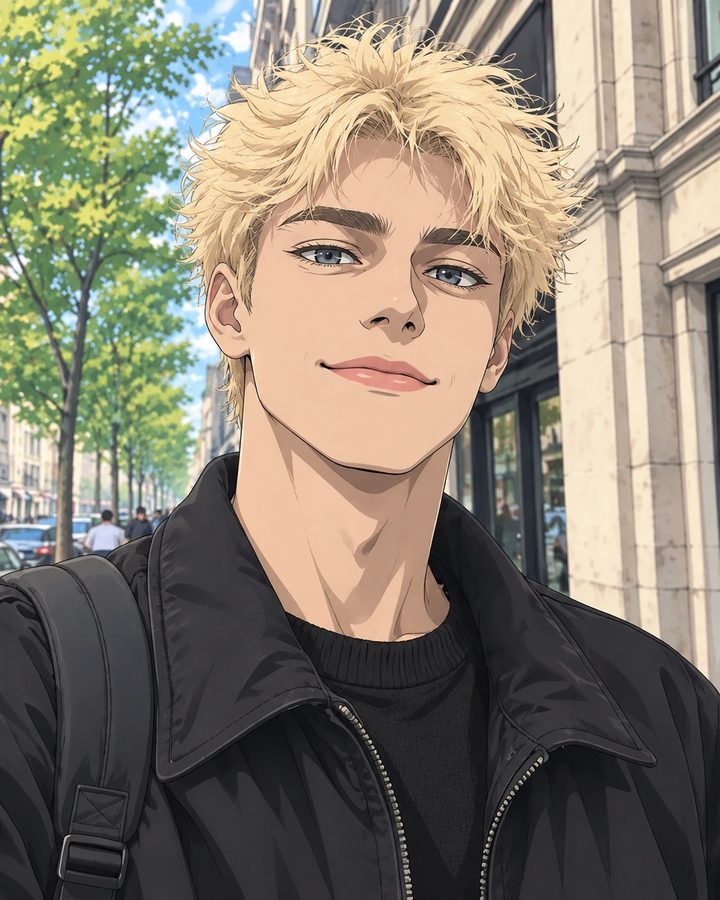
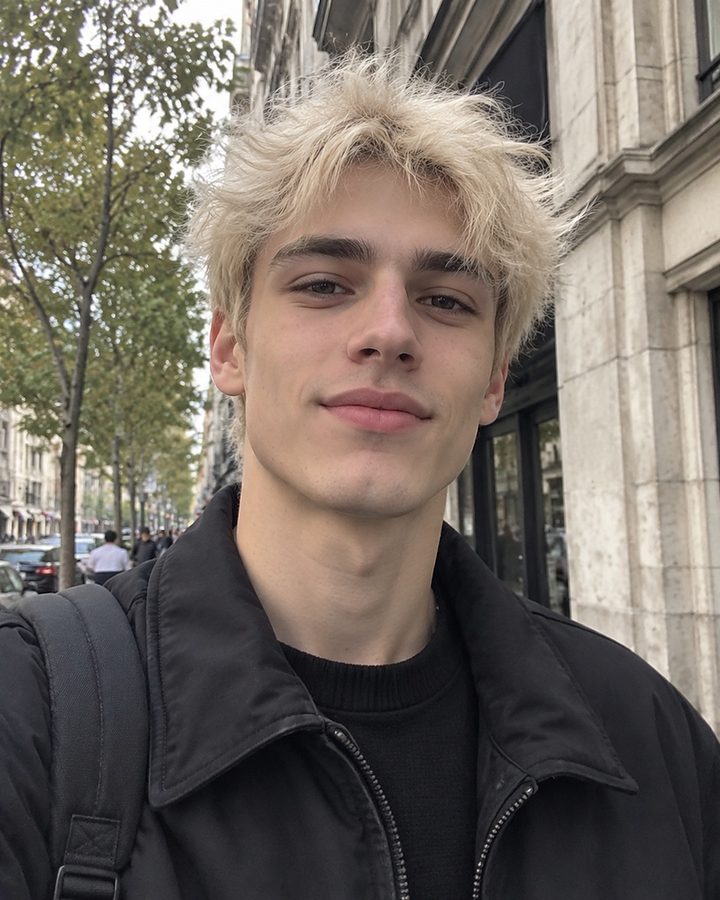 TrướcSau
A street portrait with a bright anime filter.
Cách dùng AI Anime Filter
Ba bước, trên máy tính hoặc điện thoại.
- 01
Upload a photo
Drop, paste or pick a JPG, PNG, WebP or HEIC image; on a phone you can take one with the camera.
- 02
Choose look
Pick Look (Bright anime, Soft pastel, Dramatic or Anime sketch), then select Apply filter. A result usually takes about 20 seconds.
- 03
Compare and download
Compare it with your original, then download a JPG. Example on this page: a street portrait with a bright anime filter.
Thêm ví dụ
Công cụ này trên các ảnh khác, không có chỉnh sửa thủ công. Mở một ảnh để tự thử.

Trước 
Sau Thử trên ảnh của bạn
Tải ảnh lên và nhận kết quả trong vài giây. Miễn phí, không cần đăng ký, không có watermark.
Tải ảnh lên
Mục đích sử dụng
Avatars
An anime profile picture.
Posts
A new look for your photos.
Gifts
Anime art of friends and pets.
Mẹo để có kết quả tốt hơn
- Soft pastel suits portraits; Dramatic suits action and night shots.
- Anime sketch gives a pencil-drawn look.
- Clear faces keep the likeness.
Cần kiểm soát nhiều hơn? Dùng API
Công cụ này chạy trên SandBase image API. API cho bạn mọi cài đặt mà công cụ miễn phí đã cố định sẵn.
- Chất lượng và kích thước cao hơnquality=high, kích thước đến 2K và nền trong suốt chỉ trong một lần gọi.
- Prompt của riêng bạnThay đổi mẫu, thêm ảnh tham chiếu, hoặc xử lý hàng trăm ảnh từ code hay Agent của bạn.
- Trả theo từng ảnhSử dụng số dư SandBase của bạn ngoài hạn mức miễn phí của công cụ. Vẫn áp dụng giới hạn model và giới hạn tốc độ của API.
# Set SANDBASE_API_KEY and choose your local image file.
IMAGE_FILE="photo.jpg"
curl --fail-with-body https://api.sandbase.ai/v1/images/edits \
  -H "Authorization: Bearer $SANDBASE_API_KEY" \
  --form-string 'model=gpt-image-2.6-flare' \
  --form "image=@${IMAGE_FILE}" \
  --form-string 'quality=high' \
  --form-string 'size=2048x2048' \
--form-string 'prompt=Redraw this photo as a 2D anime illustration with a bright modern anime filter with clean line art and soft cel shading. It must clearly look hand-drawn, not like a photograph: visible line art, flat cel-shaded color areas and stylized anime eyes. Keep the person recognizable: same pose, hairstyle, clothing and expression.'Câu hỏi thường gặp
What is the difference to photo to anime?
The photo to anime tool offers more styles, such as manga and chibi. This filter keeps the look closer to your photo.
AI Anime Filter có miễn phí không?
Có, không có watermark và không cần đăng ký. Một lần chạy AI Anime Filter mất khoảng 20 giây và cho bạn một JPG. Nó dùng một lượt trong hạn mức miễn phí hằng ngày cho AI image, được dùng chung cho tất cả công cụ AI image: 10 lượt mỗi ngày khi chưa đăng nhập và 30 lượt với tài khoản SandBase miễn phí. Công cụ sẽ hiển thị bạn còn bao nhiêu lượt, và số đếm được đặt lại lúc 00:00 UTC; giới hạn về mạng và toàn trang web cũng có thể áp dụng.
Ảnh tôi tải lên AI Anime Filter sẽ thế nào?
Ảnh của bạn và các cài đặt của bạn sẽ được SandBase và nhà cung cấp ảnh xử lý để tạo ra kết quả này. AI Anime Filter không công bố gì lên thư viện công khai. Kết quả có thể được dùng lại từ bộ nhớ đệm trong tối đa 24 giờ, vì vậy một yêu cầu giống hệt sẽ không dùng thêm lượt nữa; hãy tải xuống mọi kết quả bạn muốn giữ lại.
SandBase APIs cho công việc này
Loại dữ liệu tương tự trong code của bạn hoặc Agent: một API key, tính phí theo mỗi lần gọi.
Thêm tools
Pet Anime Filter
Turn a pet photo into an anime pet.
3D Cartoon Filter
Turn a selfie into a 3D animated movie character.
Anime PFP Maker
Turn a selfie into an anime profile picture, centered for small circles.
Pencil Drawing Filter
Turn a selfie into a pencil drawing.
Tintype Photo Filter
Turn a selfie into a tintype photo.
AI Avatar Generator
Turn a photo into a stylized avatar: 3D, anime, cartoon, pixel or watercolor, in a square crop.