
Free remove people from photo tool
Miễn phíẢnh AIClean up a photo: take out tourists, passers-by and photobombers and fill the gap with the scene that would be behind them.
- 100% free
- No sign-up
- No watermark
- Works on phone
Kết quả mẫu
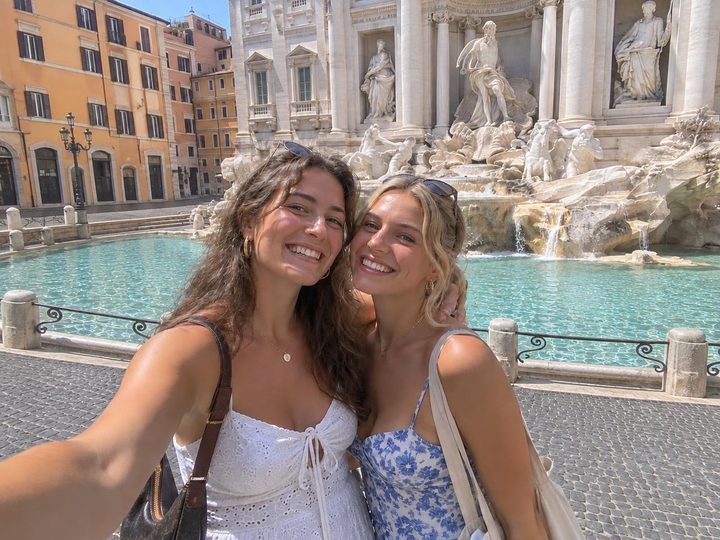
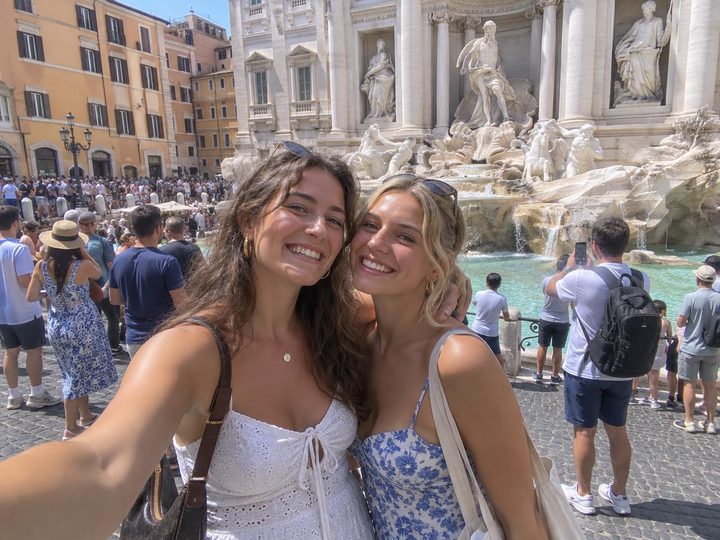 TrướcSau
Tourists removed from a town square, leaving two friends.
Cách dùng Remove People from Photo
Ba bước, trên máy tính hoặc điện thoại.
- 01
Upload a photo
Drop, paste or pick a JPG, PNG, WebP or HEIC image; on a phone you can take one with the camera. Then type your who should go (optional), for example "the people on the left".
- 02
Run it
Select Remove people (erase tourists and strangers). A result usually takes about 20 seconds.
- 03
Compare and download
Compare it with your original, then download a JPG. Example on this page: tourists removed from a town square, leaving two friends.
Mục đích sử dụng
Travel photos
A landmark without the crowd.
Real estate and events
Clean venue and property shots.
Family pictures
Remove a stranger who walked into the frame.
Mẹo để có kết quả tốt hơn
- Say who should go: “the two people on the left”.
- People in the background come out cleaner than people in front of the subject.
- Run it again on the result to remove more people.
Cần kiểm soát nhiều hơn? Dùng API
Công cụ này chạy trên SandBase image API. API cho bạn mọi cài đặt mà công cụ miễn phí đã cố định sẵn.
- Chất lượng và kích thước cao hơnquality=high, kích thước đến 2K và nền trong suốt chỉ trong một lần gọi.
- Prompt của riêng bạnThay đổi mẫu, thêm ảnh tham chiếu, hoặc xử lý hàng trăm ảnh từ code hay Agent của bạn.
- Trả theo từng ảnhSử dụng số dư SandBase của bạn ngoài hạn mức miễn phí của công cụ. Vẫn áp dụng giới hạn model và giới hạn tốc độ của API.
# Set SANDBASE_API_KEY and choose your local image file.
IMAGE_FILE="photo.jpg"
curl --fail-with-body https://api.sandbase.ai/v1/images/edits \
  -H "Authorization: Bearer $SANDBASE_API_KEY" \
  --form-string 'model=gpt-image-2.6-flare' \
  --form "image=@${IMAGE_FILE}" \
  --form-string 'quality=high' \
  --form-string 'size=2048x2048' \
--form-string 'prompt=Remove every other person in the background, every single one of them, keeping only the main person or people in the foreground from this photo. Fill the removed areas with the background that would naturally be behind them, matching the texture, lighting, perspective and grain, so the photo looks untouched. Keep everything else exactly as it is: the same people, faces, identity, pose, clothing, text, logos, colors, lighting and framing.'Câu hỏi thường gặp
Can I choose who to remove?
Yes. Describe them, for example "the man in the red jacket" or "the people on the left". With no description everyone in the background goes.
Remove People from Photo có miễn phí không?
Có, không có watermark và không cần đăng ký. Một lần chạy Remove People from Photo mất khoảng 20 giây và cho bạn một JPG. Nó dùng một lượt trong hạn mức miễn phí hằng ngày cho AI image, được dùng chung cho tất cả công cụ AI image: 10 lượt mỗi ngày khi chưa đăng nhập và 30 lượt với tài khoản SandBase miễn phí. Công cụ sẽ hiển thị bạn còn bao nhiêu lượt, và số đếm được đặt lại lúc 00:00 UTC; giới hạn về mạng và toàn trang web cũng có thể áp dụng.
Ảnh tôi tải lên Remove People from Photo sẽ thế nào?
Ảnh của bạn và các cài đặt của bạn sẽ được SandBase và nhà cung cấp ảnh xử lý để tạo ra kết quả này. Remove People from Photo không công bố gì lên thư viện công khai. Kết quả có thể được dùng lại từ bộ nhớ đệm trong tối đa 24 giờ, vì vậy một yêu cầu giống hệt sẽ không dùng thêm lượt nữa; hãy tải xuống mọi kết quả bạn muốn giữ lại.
SandBase APIs cho công việc này
Loại dữ liệu tương tự trong code của bạn hoặc Agent: một API key, tính phí theo mỗi lần gọi.
Thêm tools
Remove Text from Image
Remove captions, date stamps, subtitles and text overlays from an image; the background is rebuilt naturally.
Remove Shadow from Photo
Remove harsh shadows from a photo and even out the light on faces, documents and products.
AI Photo Editor
Edit any photo by describing the change in plain words: weather, outfit, light, background. Review the rest of the image for unintended changes.
AI Photo Restoration
Restore old photos with AI: remove scratches, creases and fading, and colorize black and white pictures.
AI Image Upscaler
Generate a 2K or 4K version of a photo or artwork with AI. Compare the result carefully: fine details and text may change.
AI Object Remover
Erase people, cars, wires, text and other objects from a photo by painting over them or describing them.