
seedinteger
The same seed and the same prompt given to the same version of the model will output the same image every time.
alibaba/qwen-image-editQwen Image Edit is Alibaba's intelligent image editing model. Transform, retouch, and reimagine existing images using text prompts - from background replacement to artistic style conversion.
Probar el modelo
PNG, JPEG, WebP o GIF · máximo 20 MiB
¿Qué le gustaría hacer después?
Seleccione un ejemplo para cargar sus entradas y el resultado en el playground.
{
  "image": "https://static.sandbase.ai/examples/69e64dd1-c75f-49b4-a0e5-675d63145694/input/4195cebd-2577-49d0-a51c-97e0fece877c.png",
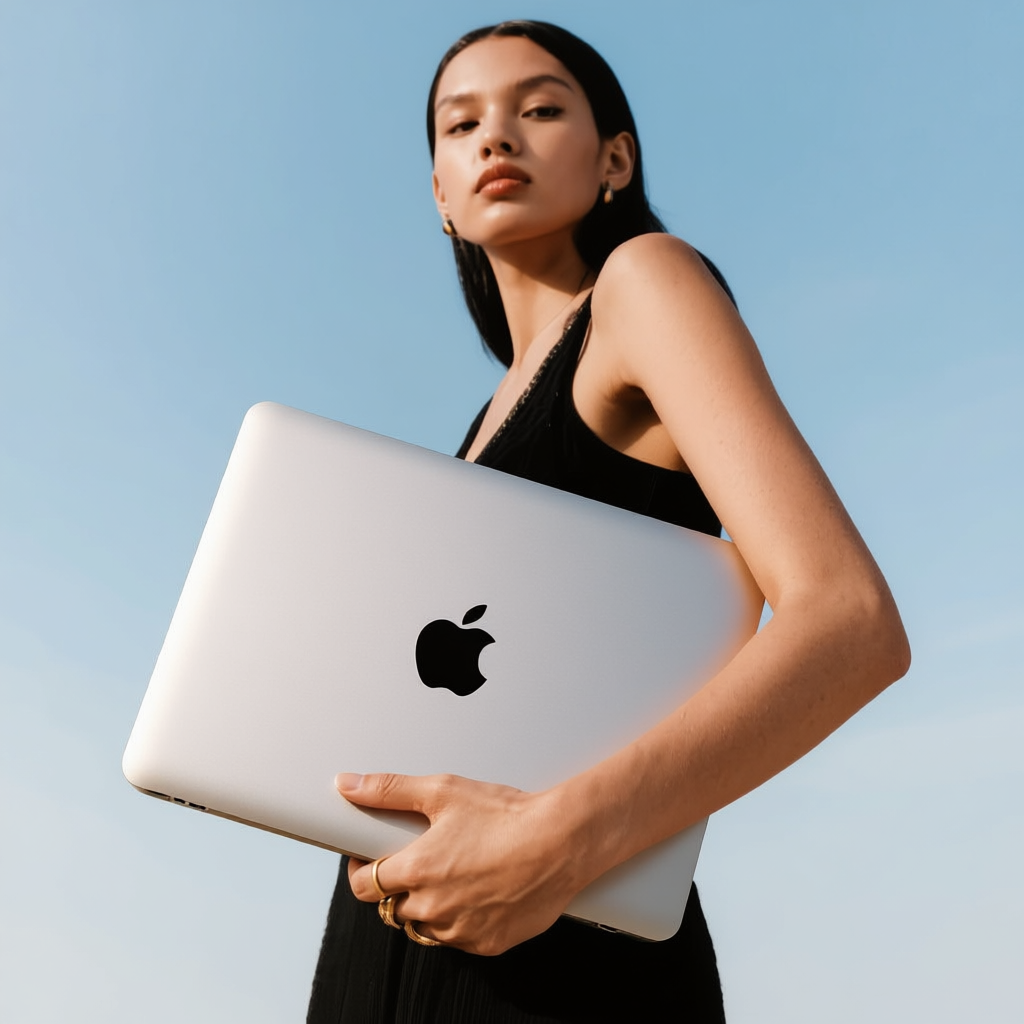
  "prompt": "Change bag to apple macbook"
}Preferencia humana
Puntuaciones Elo a partir de votos ciegos comparativos, en comparación con otros modelos de imagen y video.
Clasificaciones obtenidas de Artificial Analysis Arena
Arena de edición de imagen: las personas eligen la mejor de dos ediciones de la misma imagen e instrucción, sin ver los nombres de los modelos.
The original Qwen Image Edit: change one image with an instruction, including Chinese and English text edits. strength controls how far the result may move from the input.
| Field | Type | Default | Notes |
|---|---|---|---|
prompt | string, required | — | Text instruction. |
image | image URL, required | — | Image to edit. JPEG, PNG, or WebP URL. |
strength | number 0.01–1 | 0.94 | How much the output may differ from the input (0.01–1). |
output_format | jpeg / png | png | Output file format. |
aspect_ratio | 21:9 / 16:9 / 3:2 / 4:3 / 5:4 / 1:1 / 4:5 / 3:4 / 2:3 / 9:16 | — | Omit to follow the input image. |
seed | integer | random | Fix it to compare prompt changes. |
$0.045 per output image, Alibaba's list price.
| Request | Price |
|---|---|
| One image | $0.045 |
Failed runs are not charged.
strength for subtle edits.Related: alibaba/qwen-image-edit/2511, alibaba/qwen-image-edit/2511/multiple-angles, alibaba/qwen-image-3/edit (newer).
Empiece a construir
Envíe este modelo a través de la API de ejecución unificada de SandBase.
# The quoted heredoc keeps Unicode and shell metacharacters unchanged.
result=$(curl --fail-with-body --silent \
  -X POST "https://api.sandbase.ai/v1/run" \
  -H "Authorization: Bearer $SANDBASE_API_KEY" \
  -H "Content-Type: application/json" \
  --data-binary @- <<'SANDBASE_JSON'
{
  "model": "alibaba/qwen-image-edit",
  "image": "https://static.sandbase.ai/examples/alibaba/qwen-image-edit/input_image_0.png",
  "prompt": "Change bag to apple macbook",
  "strength": 0.94,
  "output_format": "png"
}
SANDBASE_JSON
)
run_id=$(printf '%s' "$result" | jq -r .id)
for attempt in $(seq 1 120); do
  status=$(printf '%s' "$result" | jq -r .status)
  case "$status" in completed|failed|timeout) break ;; esac
  sleep 2
  result=$(curl --fail-with-body --silent \
    -H "Authorization: Bearer $SANDBASE_API_KEY" \
    "https://api.sandbase.ai/v1/run/$run_id")
done
status=$(printf '%s' "$result" | jq -r .status)
[ "$status" = completed ] || { echo "Generation ended: $status" >&2; exit 1; }
printf '%s\n' "$result"Cree una clave de API de SandBase y configúrela en el entorno de su servidor. Todas las solicitudes usan autenticación Bearer.
export SANDBASE_API_KEY="YOUR_API_KEY"Conserve la clave en el servidor. No la exponga en código del navegador ni la confirme en un repositorio.
Haga un POST a /v1/run con este ID de modelo y sus entradas. El ejemplo de solicitud anterior incluye el envío y el sondeo.
Use el ID de ejecución devuelto para sondear hasta que el estado sea completed, failed o timeout. Lea la salida solo después de completed.
curl "https://api.sandbase.ai/v1/run/$RUN_ID" \
-H "Authorization: Bearer $SANDBASE_API_KEY"Proporcione una URL de archivo accesible públicamente en el campo de imagen, video o audio del modelo. Los formatos y límites admitidos se muestran junto a cada entrada de Playground.
Use el control de subir o reemplazar en los campos de imagen admitidos en Playground. Los campos de URL de video aceptan un video de conducción alojado; no implican compatibilidad con la subida de video.
seedintegerThe same seed and the same prompt given to the same version of the model will output the same image every time.
imagestringrequeridoThe URL of the image to edit.
promptstringrequeridoThe prompt to generate the image with
strengthnumberStrength of the image-to-image transformation. Lower values preserve more of the original image.
Valor predeterminado: 0.94
Mínimo: 0.01
Máximo: 1
aspect_ratiostringThe aspect ratio of the generated image.
Valores posibles: "21:9", "16:9", "3:2", "4:3", "5:4", "1:1", "4:5", "3:4", "2:3", "9:16"
output_formatstringThe format of the generated image.
Valor predeterminado: "png"
Valores posibles: "jpeg", "png"
{
  "model": "alibaba/qwen-image-edit",
  "image": "https://static.sandbase.ai/examples/alibaba/qwen-image-edit/input_image_0.png",
  "prompt": "Change bag to apple macbook",
  "strength": 0.94,
  "output_format": "png"
}Una ejecución completada expone su resultado en la salida. Lo siguiente es el ejemplo guardado del modelo, no una nueva generación.
[
  {
    "source": "Alibaba Model Studio schema mirror",
    "source_url": "https://www.alibabacloud.com/help/en/model-studio/",
    "url": "https://static.sandbase.ai/examples/69e64dd1-c75f-49b4-a0e5-675d63145694/output/e781f31d-d23b-4821-8955-084dfdd76da6.png"
  }
]