
Free magic eraser: paint over anything to erase it
GratuitImage IABrush over what you want gone and watch it disappear: people, signs, wires, stains or clutter. Prefer words? Describe it instead.
- 100% free
- No sign-up
- No watermark
- Works on phone
Résultat d’exemple
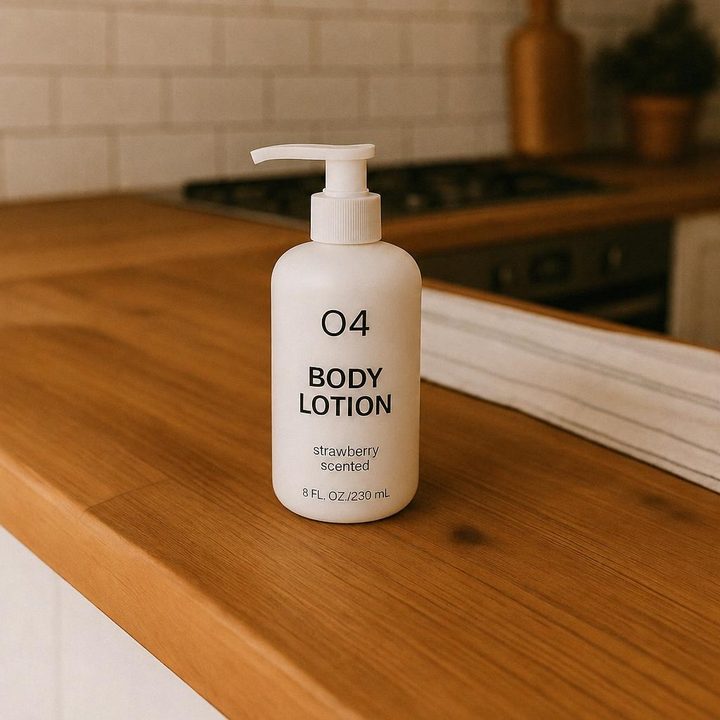
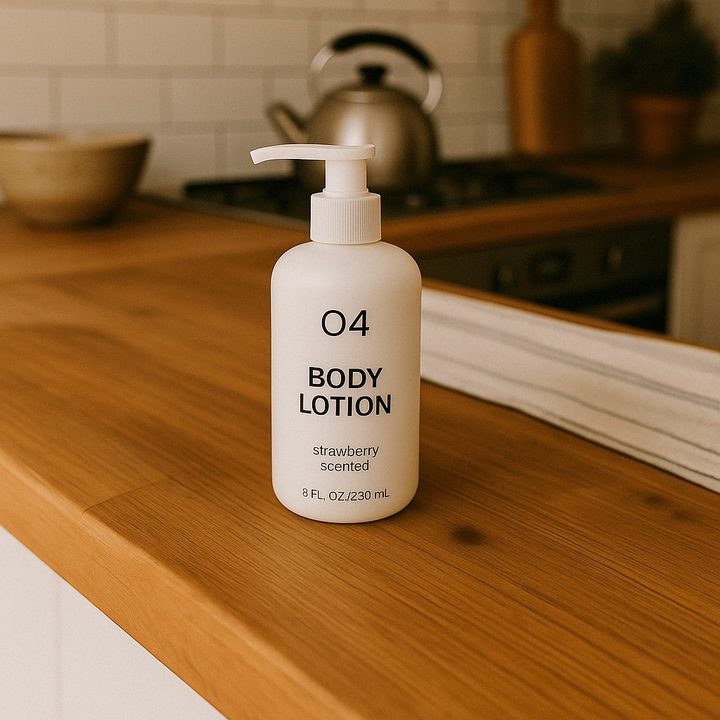 AvantAprès
The kettle and the bowl erased from a kitchen photo.
Comment utiliser le Magic Eraser
Trois étapes, sur ordinateur ou téléphone.
- 01
Upload a photo
Drop, paste or pick a JPG, PNG, WebP or HEIC image; on a phone you can take one with the camera. Then type your or describe it (optional), for example "the kettle and the bowl".
- 02
Run it
Select Erase (paint over anything to erase it). A result usually takes about 20 seconds.
- 03
Compare and download
Compare it with your original, then download a JPG. Example on this page: the kettle and the bowl erased from a kitchen photo.
À quoi les gens l’utilisent
Clutter and wires
Take cables, cups and clutter out of a shot.
Strangers and signs
Remove a person, a sign or a car from a scene.
Blemishes and marks
Clean up stains, spots and small flaws.
Conseils pour un meilleur résultat
- Paint over the thing on the photo, or describe it in the text box.
- Small objects on simple backgrounds give the cleanest result.
- Erase one object at a time for busy scenes.
Besoin de plus de contrôle ? Utilisez l’API
Cet outil s’appuie sur l’API image de SandBase. L’API vous donne tous les réglages que l’outil gratuit fixe pour vous.
- Qualité et taille supérieuresquality=high, tailles jusqu’à 2K et fonds transparents en un seul appel.
- Votre propre promptModifiez le modèle, ajoutez des images de référence ou traitez par lot des centaines d’images depuis votre code ou votre Agent.
- Payer par imageUtilisez votre solde SandBase au-delà de l’allocation gratuite de l’outil. La disponibilité des modèles et les limites de débit de l’API s’appliquent toujours.
# Set SANDBASE_API_KEY and choose your local image file.
IMAGE_FILE="photo.jpg"
curl --fail-with-body https://api.sandbase.ai/v1/images/edits \
  -H "Authorization: Bearer $SANDBASE_API_KEY" \
  --form-string 'model=gpt-image-2.6-flare' \
  --form "image=@${IMAGE_FILE}" \
  --form-string 'quality=high' \
  --form-string 'size=2048x2048' \
--form-string 'prompt=Remove the kettle and the bowl from this photo. Fill the removed areas with the background that would naturally be behind them, matching the surrounding texture, lighting, perspective and grain, so the photo looks untouched. Keep everything else exactly as it is: the same people, faces, identity, pose, clothing, text, logos, colors, lighting and framing.'FAQ
Should I paint or describe?
Paint is best for small or unusual things, or when there are several of the same kind and you only want one gone. Describing works well for clear things such as "the two people on the left".
Magic Eraser est-il gratuit ?
Oui, sans watermark ni inscription. Une exécution de Magic Eraser prend environ 20 secondes et vous donne un JPG. Elle utilise une exécution de l’allocation quotidienne gratuite d’images IA, partagée entre tous les outils d’images IA : 10 exécutions par jour sans connexion et 30 avec un compte SandBase gratuit. L’outil indique combien il vous en reste, et le compteur se réinitialise à minuit UTC ; des limites réseau et globales du site peuvent aussi s’appliquer.
Que devient la photo que j’importe dans Magic Eraser ?
Votre photo et vos réglages sont traités par SandBase et le fournisseur d’images pour produire ce résultat. Magic Eraser ne publie rien dans une galerie publique. Les résultats peuvent être réutilisés depuis un cache pendant 24 heures maximum, donc une requête identique n’utilise pas une nouvelle exécution ; téléchargez tout résultat que vous souhaitez conserver.
API SandBase pour cette tâche
Le même type de données dans votre propre code ou Agent : une seule clé API, facturation à l'appel.
Plus de tools
AI Photo Editor
Edit any photo by describing the change in plain words: weather, outfit, light, background. Review the rest of the image for unintended changes.
AI Photo Restoration
Restore old photos with AI: remove scratches, creases and fading, and colorize black and white pictures.
AI Image Upscaler
Generate a 2K or 4K version of a photo or artwork with AI. Compare the result carefully: fine details and text may change.
AI Object Remover
Erase people, cars, wires, text and other objects from a photo by painting over them or describing them.
AI Photo Enhancer
Enhance photos with AI: sharpen detail, reduce noise, fix dark or faded shots and upscale to 2K or 4K.
Motion Blur Effect
Add speed with motion blur behind the subject, with the rest of the photo unchanged.