
Free YouTube banner maker
GratuitImage IADescribe your channel, add its name, pick a style, and get wide channel art with the important parts in the central safe area that shows on every device.
- 100% free
- No sign-up
- No watermark
- Any shape
Résultat d’exemple
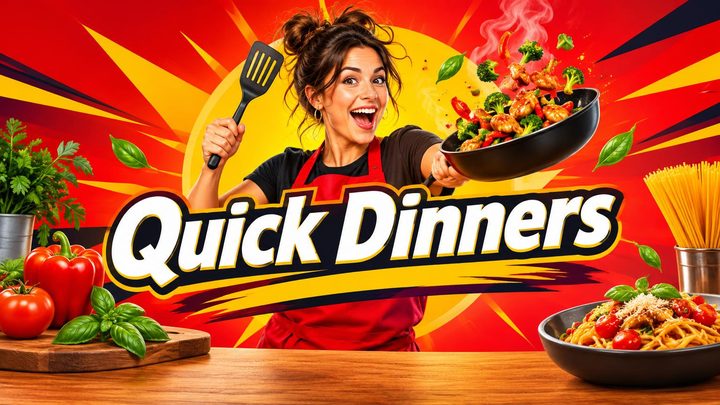 Exemple
A cooking channel banner with the channel name in the center.
Comment utiliser le YouTube Banner Maker
Trois étapes, sur ordinateur ou téléphone.
- 01
Write your what is your channel about
Type your what is your channel about, for example "a cooking channel about quick weeknight dinners", or tap one of the examples.
- 02
Choose style
Pick Style (Bold, Clean, Photographic or Playful), then select Make banner. A result usually takes about 15 seconds.
- 03
Review and download
Check the picture and read every word, then download a JPG. Example on this page: a cooking channel banner with the channel name in the center.
Plus d’exemples
Créé avec cet outil, sans retouche manuelle. Ouvrez-en un pour partir de ses réglages.
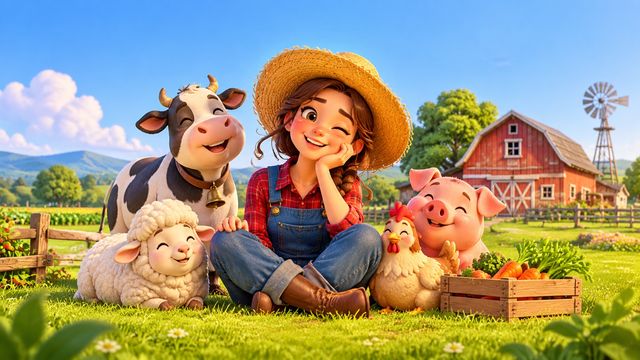
Exemple Créez le vôtre
Décrivez ce que vous voulez et obtenez un résultat en quelques secondes. Gratuit, sans inscription, sans watermark.
Ouvrir l’outil
À quoi les gens l’utilisent
New channels
A first banner without a designer.
Rebrands
Test new looks before you commit.
Streamers
Matching art for Twitch and YouTube.
Conseils pour un meilleur résultat
- Keep the channel name in the middle; edges are cut off on phones.
- Say what the channel is about in a few words.
- Clean suits tutorials; Playful suits kids and gaming.
Besoin de plus de contrôle ? Utilisez l’API
Cet outil s’appuie sur l’API image de SandBase. L’API vous donne tous les réglages que l’outil gratuit fixe pour vous.
- Qualité et taille supérieuresquality=high, tailles jusqu’à 2K et fonds transparents en un seul appel.
- Votre propre promptModifiez le modèle, ajoutez des images de référence ou traitez par lot des centaines d’images depuis votre code ou votre Agent.
- Payer par imageUtilisez votre solde SandBase au-delà de l’allocation gratuite de l’outil. La disponibilité des modèles et les limites de débit de l’API s’appliquent toujours.
# Set SANDBASE_API_KEY first.
curl --fail-with-body https://api.sandbase.ai/v1/images/generations \
  -H "Authorization: Bearer $SANDBASE_API_KEY" \
  -H "Content-Type: application/json" \
  --data-binary @- <<'SANDBASE_JSON'
{
  "model": "gpt-image-2.6-flare",
  "prompt": "A YouTube channel banner for a cooking channel about quick weeknight dinners. Bold colors, strong shapes and a high-energy look. Wide composition with the key subject and any text inside the central safe area, extra background to the sides, Include the channel name \"Quick Dinners\" once, large and perfectly spelled, in the center. no other text, no watermark. Keep all lettering and the main subject inside the central 80% of the frame, with a wide empty margin on every side, because the image may be resized or cropped: no letter may touch or cross an edge.",
  "size": "1536x1024",
  "quality": "high"
}
SANDBASE_JSONFAQ
What size should my banner be?
YouTube asks for 2560 by 1440 pixels with a central safe area of 1546 by 423. Crop or resize the result to that size.
YouTube Banner Maker est-il gratuit ?
Oui, sans watermark ni inscription. Une exécution de YouTube Banner Maker prend environ 15 secondes et vous donne un JPG. Elle utilise une exécution de l’allocation quotidienne gratuite d’images IA, partagée entre tous les outils d’images IA : 10 exécutions par jour sans connexion et 30 avec un compte SandBase gratuit. L’outil indique combien il vous en reste, et le compteur se réinitialise à minuit UTC ; des limites réseau et globales du site peuvent aussi s’appliquer.
Qu’est-ce que YouTube Banner Maker envoie quand je l’exécute ?
Seul le texte et les options que vous choisissez sont traités par SandBase et le fournisseur d’images pour produire ce résultat. YouTube Banner Maker ne publie rien dans une galerie publique. Les résultats peuvent être réutilisés depuis un cache pendant 24 heures maximum, donc une requête identique n’utilise pas une nouvelle exécution ; téléchargez tout résultat que vous souhaitez conserver.
API SandBase pour cette tâche
Le même type de données dans votre propre code ou Agent : une seule clé API, facturation à l'appel.
Plus de tools
YouTube Thumbnail Maker
Make a YouTube thumbnail from an idea or your own photo: big readable text, bold colors, 16:9.
AI iPhone Wallpaper Generator
Make iPhone lock screen wallpaper images from a description.
Zoom Background Generator
Make 16:9 virtual backgrounds for Zoom, Teams and Meet from a description.
AI Desktop Wallpaper Generator
Make desktop wallpaper images from a description.
Mothers Day Card Maker
Design a Mother's Day card in four themes and four styles.
Fathers Day Card Maker
Design a Father's Day card in four themes and four styles.