
imagesarray필수
1-10 reference images (JPG/PNG, up to 30 MB, min 300 px, aspect ratio 2:5-5:2), referenced as @Image1, @Image2, ...
kwaivgi/kling-image/v4/editKling Image V4 Edit by Kuaishou edits or recomposes 1 to 10 reference images from a text instruction at native 2K, 4K or 8K resolution.
모델 사용해 보기
PNG, JPEG, WebP, or GIF · 20 MiB maximum each · up to 10
다음에 무엇을 하시겠습니까?
예시를 선택하면 입력값과 결과가 플레이그라운드에 로드됩니다.
{
  "aspect_ratio": "16:9",
  "images": [
    "https://static.sandbase.ai/examples/af741566-8852-406d-be61-8044f265442c/input/ceb31edd-5be2-40d9-a2fa-7be80bf0160b.png"
  ],
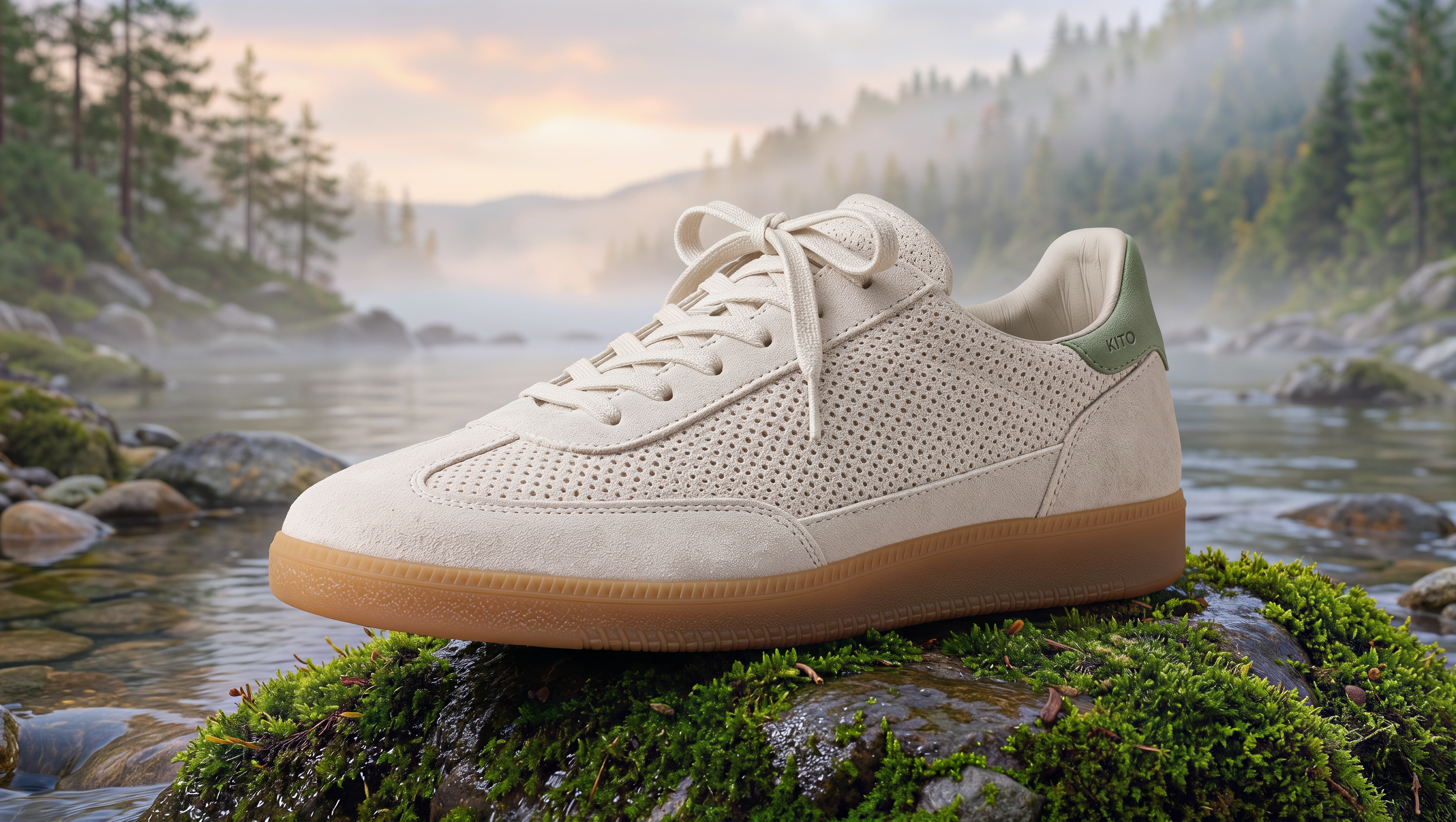
  "prompt": "Place the sneaker from @Image1 on a mossy rock beside a mountain stream at dawn, soft mist, keep the shoe design, colours and the KITO heel tab exactly."
}{
"aspect_ratio": "16:9",
"images": [
"https://static.sandbase.ai/examples/2cfc80be-f125-4f18-8644-bedf004feb6a/input/5bcf3e54-96c8-4a0f-9e71-46b534bf8821.png",
"https://static.sandbase.ai/examples/2cfc80be-f125-4f18-8644-bedf004feb6a/input/0ff16182-a90d-475f-b0c5-f88b3a1c7dc0.png"
],
"prompt": "Create a luxury magazine advertisement: the watch dial from @Image1 fitted with the strap from @Image2, lying on black velvet, headline \"AUREL — Time, Enamelled\" in elegant serif type."
}Kling Image V4 Edit edits or recomposes 1–10 reference images from a text instruction, at native 2K, 4K or 8K.
| Field | Type | Default | Notes |
|---|---|---|---|
prompt | string, required | — | Refer to inputs as @Image1, @Image2, … |
images | image URL[], required | — | 1–10 images (JPG/PNG, up to 30 MB, at least 300 px per side, aspect ratio 2:5–5:2). |
aspect_ratio | auto / 16:9 / 9:16 / 1:1 / 4:3 / 3:4 / 3:2 / 2:3 / 21:9 | auto | auto picks a shape from the prompt and references. |
resolution | 2K / 4K / 8K | 2K | Native output resolution. |
num_images | 1–9 | 1 | Independent images, each billed. |
Per output image by resolution, plus $0.003 per reference image.
| Request | Price |
|---|---|
| 1 reference, 2K (default) | $0.066 |
| 3 references, 4K | $0.103 |
| 1 reference, 8K | $0.160 |
| Failed runs are not charged. |
Other Kling Image V4 endpoints: kwaivgi/kling-image/v4, kwaivgi/kling-image/v4/edit, kwaivgi/kling-image/v4/long-image.
빌드를 시작하세요
SandBase Unified Run API를 통해 이 모델을 제출하세요.
# The quoted heredoc keeps Unicode and shell metacharacters unchanged.
result=$(curl --fail-with-body --silent \
  -X POST "https://api.sandbase.ai/v1/run" \
  -H "Authorization: Bearer $SANDBASE_API_KEY" \
  -H "Content-Type: application/json" \
  --data-binary @- <<'SANDBASE_JSON'
{
  "model": "kwaivgi/kling-image/v4/edit",
  "prompt": "Turn the scene in @Image1 into a snowy winter evening with warm window light, keep the composition.",
  "num_images": 1,
  "resolution": "2K",
  "aspect_ratio": "auto"
}
SANDBASE_JSON
)
run_id=$(printf '%s' "$result" | jq -r .id)
for attempt in $(seq 1 120); do
  status=$(printf '%s' "$result" | jq -r .status)
  case "$status" in completed|failed|timeout) break ;; esac
  sleep 2
  result=$(curl --fail-with-body --silent \
    -H "Authorization: Bearer $SANDBASE_API_KEY" \
    "https://api.sandbase.ai/v1/run/$run_id")
done
status=$(printf '%s' "$result" | jq -r .status)
[ "$status" = completed ] || { echo "Generation ended: $status" >&2; exit 1; }
printf '%s\n' "$result"SandBase API 키를 생성해 서버 환경에 설정하세요. 모든 요청에는 Bearer 인증이 사용됩니다.
export SANDBASE_API_KEY="YOUR_API_KEY"키는 서버에 보관하세요. 브라우저 코드에 노출하거나 저장소에 커밋하지 마세요.
이 모델 ID와 입력값을 사용해 /v1/run로 POST하세요. 위의 요청 예시에는 제출과 폴링이 포함되어 있습니다.
반환된 실행 ID를 사용해 상태가 completed, failed 또는 timeout이 될 때까지 폴링하세요. completed 이후에만 출력을 읽으세요.
curl "https://api.sandbase.ai/v1/run/$RUN_ID" \
-H "Authorization: Bearer $SANDBASE_API_KEY"모델의 이미지, 비디오 또는 오디오 필드에 공개적으로 접근 가능한 파일 URL을 전달하세요. 지원 형식과 제한은 각 Playground 입력 옆에 표시됩니다.
Playground의 지원되는 이미지 필드에서 업로드 또는 교체 컨트롤을 사용하세요. 비디오 URL 필드는 호스팅된 driving video를 받으며, 비디오 업로드 지원을 의미하지는 않습니다.
imagesarray필수1-10 reference images (JPG/PNG, up to 30 MB, min 300 px, aspect ratio 2:5-5:2), referenced as @Image1, @Image2, ...
promptstring필수Describe the image. Refer to reference images as @Image1, @Image2, ...
num_imagesintegerNumber of independent images to generate (1-9).
기본값: 1
최소값: 1
최대값: 9
resolutionstringOutput resolution. 8K is native ultra-high resolution.
기본값: "2K"
가능한 값: "2K", "4K", "8K"
aspect_ratiostringOutput frame shape. auto picks one from the prompt and references.
기본값: "auto"
가능한 값: "auto", "16:9", "9:16", "1:1", "4:3", "3:4", "3:2", "2:3", "21:9"
{
  "model": "kwaivgi/kling-image/v4/edit",
  "prompt": "Turn the scene in @Image1 into a snowy winter evening with warm window light, keep the composition.",
  "num_images": 1,
  "resolution": "2K",
  "aspect_ratio": "auto"
}완료된 실행의 결과는 출력에 표시됩니다. 아래 내용은 새 생성 결과가 아니라 모델에 저장된 예시입니다.
[
  {
    "url": "https://static.sandbase.ai/examples/af741566-8852-406d-be61-8044f265442c/output/b778d304-ecaa-4f46-b016-a6a435c5a075.png"
  }
]