
Z-Image Turbo Edit
alibaba/z-image/turbo/editZ Image Turbo Edit by Alibaba - AI-powered image editing, style transfer, and transformation. Edit photos with natural language instructions, remove backgrounds, change styles, and enhance images effortlessly.
- Base price
- $0.005USD / run
- Execution
- async
- Model type
- image
- Input fields
- 6
Try the model
Playground
PNG, JPEG, WebP, or GIF · 20 MiB maximum
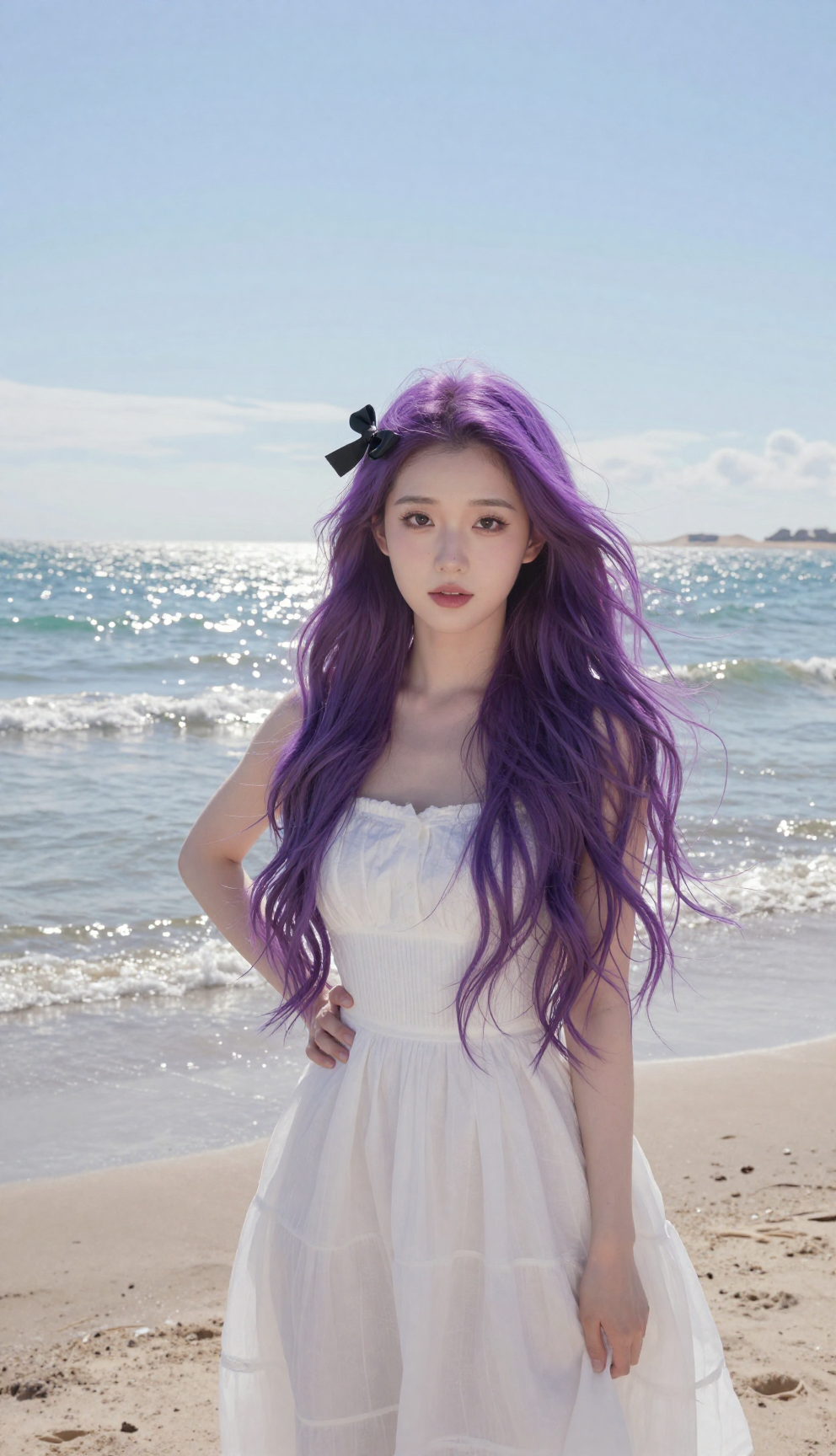
Examples
Select an example to load its inputs and result into the playground.
Model card
Specifications
Pricing
- Base price
- $0.005 / run
Context & modalities
- Input
- Schema-defined
- Output
- image
Capabilities
- Chat
- Not supported
- Vision
- Not supported
- Reasoning
- Not supported
- Structured output
- Not supported
- Function calling
- Not supported
- Audio input
- Not supported
Access
- Provider
- Alibaba
- Model ID
- alibaba/z-image/turbo/edit
- Execution
- async
- Base URL
- https://api.sandbase.ai
- API
- Unified Run API
- Endpoint
- /v1/run
API README
Z-Image Turbo Edit
Z-Image Turbo image-to-image: restyle or adjust a picture from a prompt in a few steps. strength sets how much of the original is kept.
Fields
| Field | Type | Default | Notes |
|---|---|---|---|
prompt | string, required | — | Text instruction. |
image | image URL, required | — | Image to transform. JPEG, PNG, or WebP URL. |
strength | number | 0.6 | Higher values change more of the input. |
output_format | jpeg / png | png | Output file format. |
aspect_ratio | 21:9 / 16:9 / 3:2 / 4:3 / 5:4 / 1:1 / 4:5 / 3:4 / 2:3 / 9:16 | — | Omit to follow the input image. |
seed | integer | random | Fix it to compare prompt changes. |
Billing
$0.005 per image.
| Request | Price |
|---|---|
| One image | $0.005 |
Failed runs are not charged.
Prompting
- Describe the target look; lower
strengthkeeps more of the original.
Limits
- One image in, one image out.
Also on SandBase
Related: alibaba/z-image/base, z-image/turbo.
Start building
Send your first request
OpenAI-compatible endpoint with unified authentication and usage tracking.
# The quoted heredoc keeps Unicode and shell metacharacters unchanged.
result=$(curl --fail-with-body --silent \
  -X POST "https://api.sandbase.ai/v1/run" \
  -H "Authorization: Bearer $SANDBASE_API_KEY" \
  -H "Content-Type: application/json" \
  --data-binary @- <<'SANDBASE_JSON'
{
  "model": "alibaba/z-image/turbo/edit",
  "image": "https://static.sandbase.ai/examples/alibaba/z-image/turbo/edit/input_image_0.png",
  "prompt": "A young Asian woman with long, vibrant purple hair stands on a sunlit sandy beach, posing confidently with her left hand resting on her hip. She gazes directly at the camera with a neutral expression. A sleek black ribbon bow is tied neatly on the right side of her head, just above her ear. She wears a flowing white cotton dress with a fitted bodice and a flared skirt that reaches mid-calf, slightly lifted by a gentle sea breeze. The beach behind her features fine, pale golden sand with subtle footprints, leading to calm turquoise waves under a clear blue sky with soft, wispy clouds. The lighting is natural daylight, casting soft shadows to her left, indicating late afternoon sun. The horizon line is visible in the background, with a faint silhouette of distant dunes. Her skin tone is fair with a natural glow, and her facial features are delicately defined. The composition is centered on her figure, framed from mid-thigh up, with shallow depth of field blurring the distant waves slightly.",
  "strength": 0.6,
  "output_format": "png"
}
SANDBASE_JSON
)
run_id=$(printf '%s' "$result" | jq -r .id)
for attempt in $(seq 1 120); do
  status=$(printf '%s' "$result" | jq -r .status)
  case "$status" in completed|failed|timeout) break ;; esac
  sleep 2
  result=$(curl --fail-with-body --silent \
    -H "Authorization: Bearer $SANDBASE_API_KEY" \
    "https://api.sandbase.ai/v1/run/$run_id")
done
status=$(printf '%s' "$result" | jq -r .status)
[ "$status" = completed ] || { echo "Generation ended: $status" >&2; exit 1; }
printf '%s\n' "$result"
Choose your model
Compare models
| Model | Type | Default price | Released |
|---|---|---|---|
Z-Image Turbo EditThis model Alibaba | Image | $0.01 / run | Dec 7, 2025 |
Alibaba | Image | $0.04 / run | Jul 21, 2026 |
Alibaba | Image | $0.04 / run | Jul 21, 2026 |
Alibaba | Image | $0.07 / run | Apr 1, 2026 |
Alibaba | Image | $0.03 / run | Apr 1, 2026 |
Alibaba | Image | $0.03 / run | Apr 1, 2026 |
Questions
FAQ
How do I call Alibaba Z-Image Turbo Edit through SandBase?
Create a SandBase API key, then send requests with the model ID "alibaba/z-image/turbo/edit" to Unified Run API (/v1/run) at https://api.sandbase.ai. The request examples on this page show the exact payload.
Do I need a separate Alibaba account?
No. One SandBase API key and balance gives you access to Alibaba Z-Image Turbo Edit and the other models in the catalog; you do not need to sign up with Alibaba separately.