
Free image translator
FreeAI imageUpload a picture with text in it, pick a language, and get the same picture with the words translated where they were. Layout, colors and images stay the same.
- 100% free
- No sign-up
- No watermark
- Works on phone
Sample result
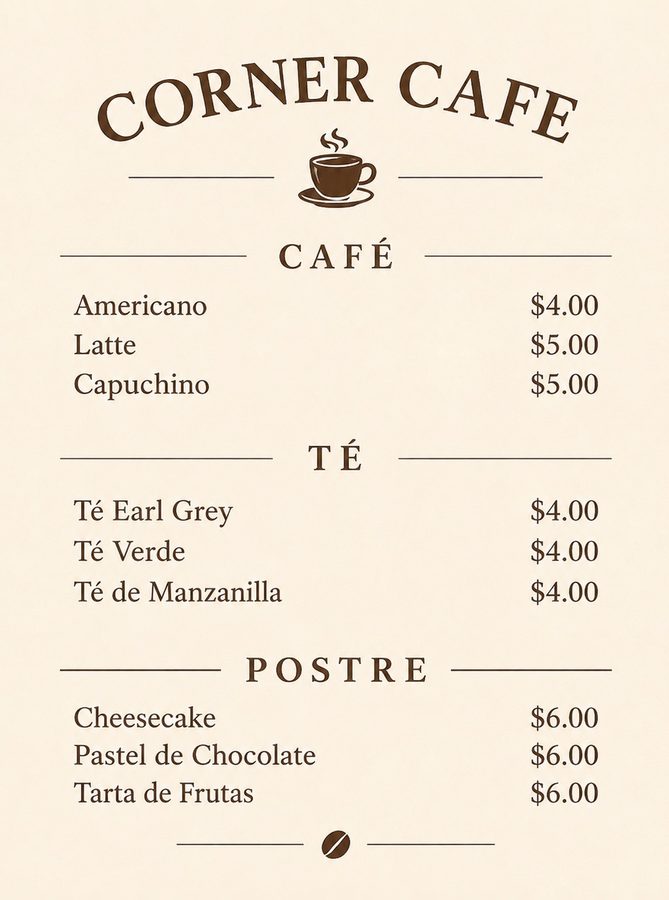
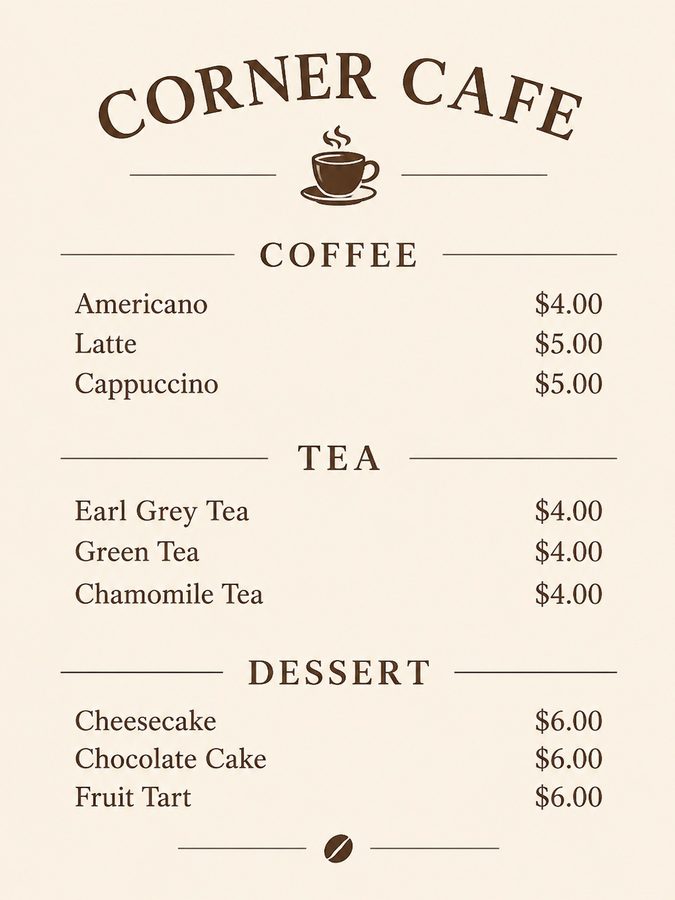 BeforeAfter
A cafe menu translated from English into Spanish.
How to use the Image Translator
Three steps, on a computer or a phone.
- 01
Upload a picture with text
Drop, paste or pick a JPG, PNG, WebP or HEIC image; on a phone you can take one with the camera. Then type your anything to add (optional) (optional), for example "e.g. keep the title in English".
- 02
Choose translate to
Pick Translate to (English, Spanish, French, German or Portuguese and 10 more), then select Translate image. A result usually takes about 30 seconds.
- 03
Compare and download
Compare it with your original, then download a JPG. Example on this page: a cafe menu translated from English into Spanish.
What people use it for
Travel
Read menus, signs and notices in another language.
Marketing
Make a poster, banner or product image for another market.
Apps and docs
Check how a screenshot or a slide reads in another language.
Need more control? Use the API
This tool runs on the SandBase image API. The API gives you every setting the free tool fixes for you.
- Higher quality and sizequality=high, sizes up to 2K, and transparent backgrounds in one call.
- Your own promptChange the template, add reference images, or batch hundreds of images from your code or Agent.
- Pay per imageUse your SandBase balance beyond the free tool allowance. Model availability and API rate limits still apply.
# Set SANDBASE_API_KEY and choose your local image file.
IMAGE_FILE="photo.jpg"
curl --fail-with-body https://api.sandbase.ai/v1/images/edits \
  -H "Authorization: Bearer $SANDBASE_API_KEY" \
  --form-string 'model=gpt-image-2.6-flare' \
  --form "image=@${IMAGE_FILE}" \
  --form-string 'quality=high' \
  --form-string 'size=2048x2048' \
--form-string 'prompt=Translate every piece of readable text in this image into Spanish and redraw it in place: same position, size, font style, color, alignment and line breaks as the original, fitted to the same space. Keep numbers, prices, brand names and logos as they are. Keep everything that is not text exactly the same: photos, drawings, background, layout and colors. If a word has no good translation, keep the original.'FAQ
Which languages can it translate to?
English, Spanish, French, German, Portuguese, Italian, Simplified Chinese, Japanese, Korean, Arabic, Hindi, Russian, Turkish, Indonesian and Vietnamese. It reads text in most languages.
Is the translation exact?
It is a machine translation drawn back into the image. Small or curved text can be misread, so read every word before you use it for anything important.
Will prices and names change?
Numbers, prices, brand names and logos are kept as they are. Check them in the result anyway.
Is Image Translator free?
Yes, with no watermark and no sign-up. One run of Image Translator takes about 30 seconds and gives you a JPG. It uses one run of the free daily AI image allowance, which is shared across all AI image tools: 10 runs a day without signing in and 30 with a free SandBase account. The tool shows how many you have left, and the count resets at midnight UTC; network and site-wide limits may also apply.
What happens to the photo I upload to Image Translator?
Your photo and your settings are processed by SandBase and the image provider to make this one result. Image Translator does not publish anything to a public gallery. Results may be reused from a cache for up to 24 hours, so an identical request does not use another run; download any result you want to keep.
SandBase APIs for this job
The same kind of data in your own code or Agent: one API key, billed per call.
More tools
Add Bunny Ears to Photo
Add bunny ears to a photo, blended in naturally.
Add Cat Ears to Photo
Add cat ears to a photo, blended in naturally.
Add Crown to Photo
Add crown to a photo, blended in naturally.
Add Flowers to Photo
Add flowers to a photo, blended in naturally.
Add Halo to Photo
Add halo to a photo, blended in naturally.
Add Hat to Photo
Add hat to a photo, blended in naturally.