MCP Execution Boundaries for Production Agents
MCP execution boundaries help production AI agents use tools safely. Learn what to control after tools are connected and before loops run.
TL;DR — MCP makes tool connection cleaner, but it does not automatically make tool execution safe. Production agents still need runtime boundaries: scoped tools, approval gates, sandboxed execution, step limits, network rules, audit logs, and a way to stop loops before they turn into incidents. Treat MCP as the connector layer. Treat execution boundaries as the operating layer.
MCP execution boundaries are becoming the difference between a neat agent demo and a system you can leave running. Connecting tools is no longer the hard part. The harder question is what the agent is allowed to do once those tools are connected.
That question matters because MCP is good at standardizing access. It gives agents a common way to discover tools, call them, and receive results. The official MCP introduction frames the protocol as a way to connect AI applications to external systems, while the MCP tools specification describes how servers expose executable capabilities to clients.
That is useful. It is also not enough.
The production failure mode is rarely “the agent could not see the tool.” It is more often “the agent saw too many tools, called the wrong one, repeated the call, touched data it did not need, or ran code in a place where code should never have run.”
MCP Solves Connection, Not Control
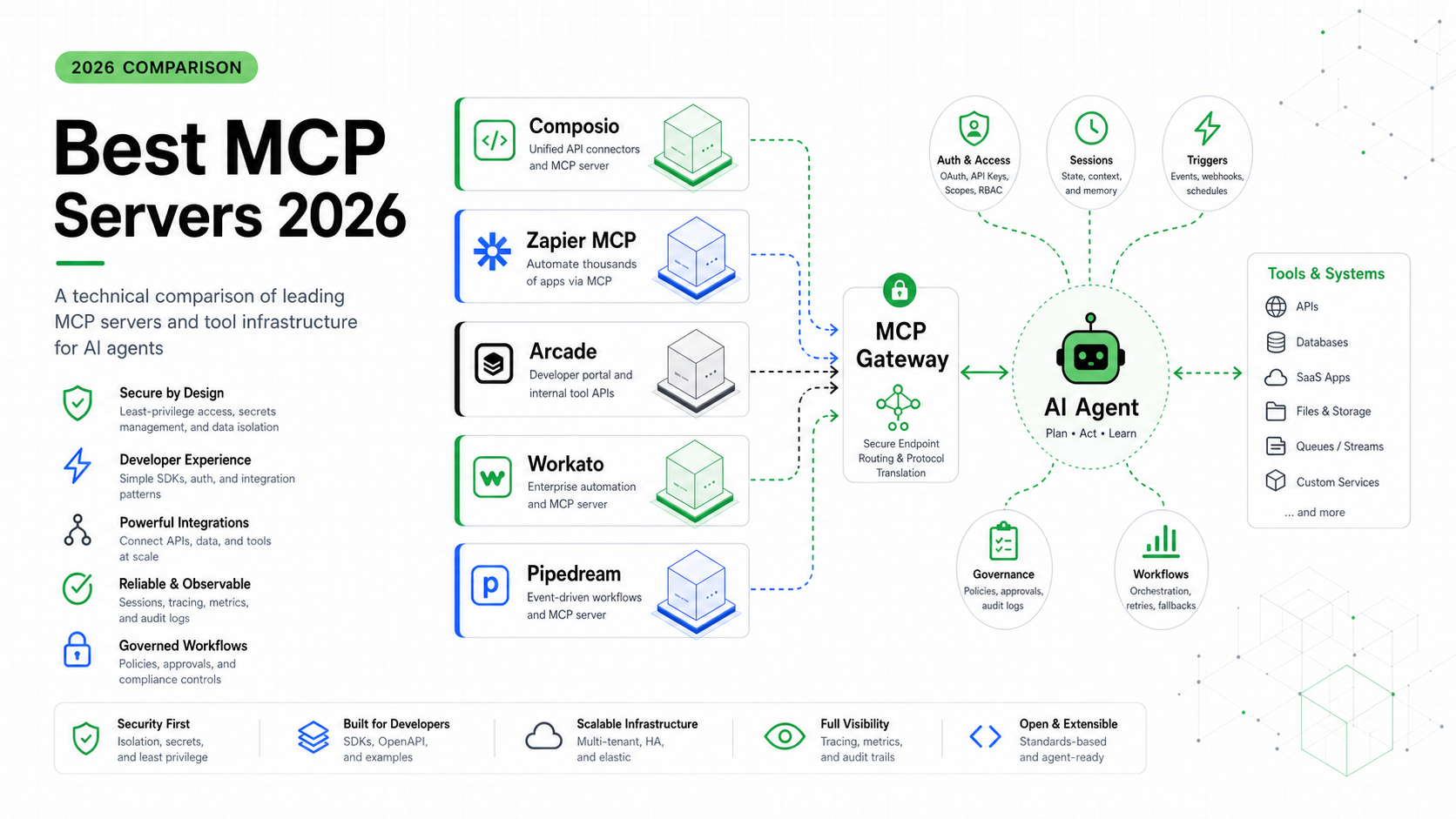
MCP is best understood as a connector layer. A server exposes tools. A client discovers them. The agent chooses whether to call one. The server runs the work and returns a result.
That gives teams a better integration story than hand-wiring every tool into every agent. It also makes the tool surface easier to share across IDEs, desktop assistants, internal apps, and hosted agents.
But execution control lives one layer lower.
| Layer | What it answers | What it does not answer |
|---|---|---|
| Function calling | How does the model request a tool call? | Which tools should exist for this task? |
| MCP | How are tools packaged, discovered, and called? | Where should risky work execute? |
| Runtime boundary | What can the call touch, spend, repeat, or mutate? | Which business goal should the agent pursue? |
| Observability | What happened during the run? | Whether the next tool call is safe by itself |
This is the same separation I would use when reviewing an agent architecture. MCP tells me how tools are available. Runtime boundaries tell me whether the system can survive the tools being used badly.
If you want the broader comparison, start with MCP vs Function Calling. This article picks up after that: what happens once the tool layer is already connected.
The Five Boundaries Production Agents Need
The easiest mistake is to treat “tool access” as binary: the agent either has the GitHub tool or it does not, either has shell access or it does not.
That is too coarse for production.
An agent working on a bug fix may need to read files, run tests, and open a pull request. It probably does not need to delete repositories, push directly to main, read billing tables, or call every internal admin API. An agent triaging support tickets may need CRM read access, but not refund permissions.
I use five boundaries when reviewing tool-heavy agents.
| Boundary | Good default | Failure if missing |
|---|---|---|
| Tool scope | Only load tools needed for the current task | The model picks from a huge, confusing tool menu |
| Execution scope | Run risky work in a sandbox or disposable workspace | Generated code touches the host or shared state |
| Network scope | Deny by default, allowlist when needed | A tool call exfiltrates data or downloads unknown code |
| Mutation scope | Require approval for writes, deletes, payments, deploys | The agent turns a suggestion into an irreversible action |
| Loop scope | Step, time, and budget limits | A stuck agent keeps calling tools until the bill hurts |
Notice that only one of these is really about MCP itself. The rest are runtime questions.
Tool Scope: Do Not Show Every Tool to Every Agent
The most underrated agent safety feature is a smaller tool list.
Large tool surfaces hurt in two ways. First, they spend tokens on schemas the agent may never use. Second, they create more chances for the model to select a tool that is technically valid but wrong for the task.
OpenAI’s Agents SDK documentation now treats tool selection as a runtime concern, not just a static list. Its tools page describes hosted tools, local runtime tools, function tools, agents as tools, and hosted MCP tools. It also describes tool search, where large tool surfaces can be deferred and loaded only when needed.
That design is pointing in the right direction: do not dump the whole company tool catalog into the prompt.
A practical pattern:
type ToolPolicy = {
  taskType: "code-review" | "customer-support" | "data-analysis";
  allowedTools: string[];
  writeRequiresApproval: boolean;
  maxToolCalls: number;
};

const policies: Record<ToolPolicy["taskType"], ToolPolicy> = {
  "code-review": {
    taskType: "code-review",
    allowedTools: ["repo.read", "tests.run", "pull_request.comment"],
    writeRequiresApproval: true,
    maxToolCalls: 25,
  },
  "customer-support": {
    taskType: "customer-support",
    allowedTools: ["ticket.read", "crm.read", "docs.search"],
    writeRequiresApproval: true,
    maxToolCalls: 12,
  },
  "data-analysis": {
    taskType: "data-analysis",
    allowedTools: ["file.read", "python.run", "chart.render"],
    writeRequiresApproval: false,
    maxToolCalls: 20,
  },
};

export function allowedForTask(taskType: ToolPolicy["taskType"]) {
  return policies[taskType].allowedTools;
}
This is intentionally boring. The point is not the code. The point is that tool exposure should be a policy decision per task, not a pile of servers attached to every session.
Execution Scope: The Shell Is Not Just Another Tool
Some tools are informational. Search docs. Read a file. Fetch a ticket. Those still need access control, but the blast radius is bounded.
Other tools execute code.
That line matters. Once an agent can run shell commands, Python, browser automation, or repository edits, you are no longer only managing model behavior. You are managing a process that can mutate a real environment.
The OpenAI Agents SDK tools documentation separates local runtime tools from hosted tools and notes that hosted code execution runs in a sandboxed environment. That distinction is exactly the one production teams should internalize: execution should happen in a controlled environment, not in the same trusted host that stores your secrets and deployment credentials.
The safe default is:
- read-only tools can run close to the app, with access checks
- code execution runs in a sandbox
- filesystem mutations happen in a disposable workspace
- external network access starts disabled or allowlisted
- persistent credentials are not mounted into the execution environment
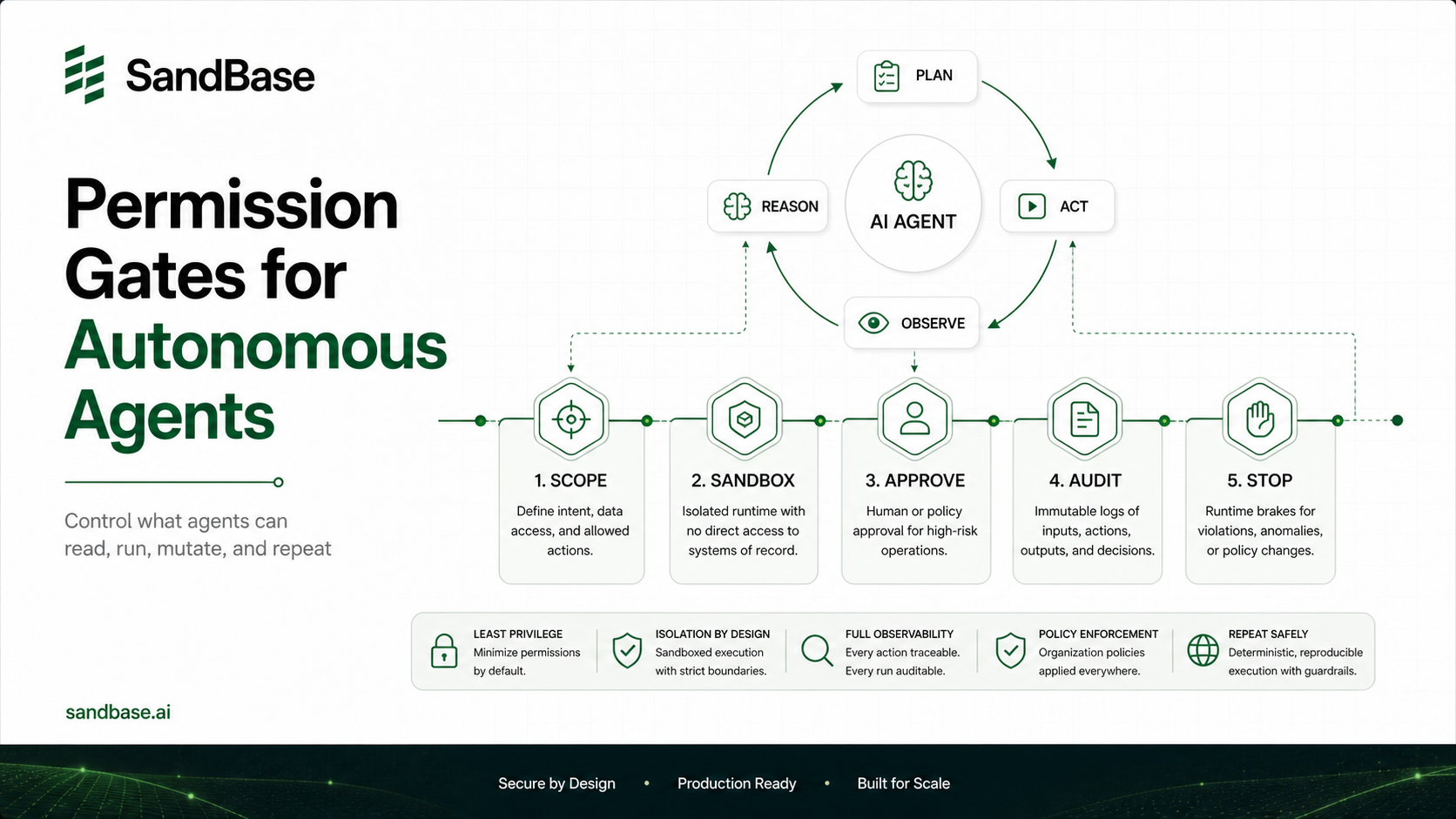
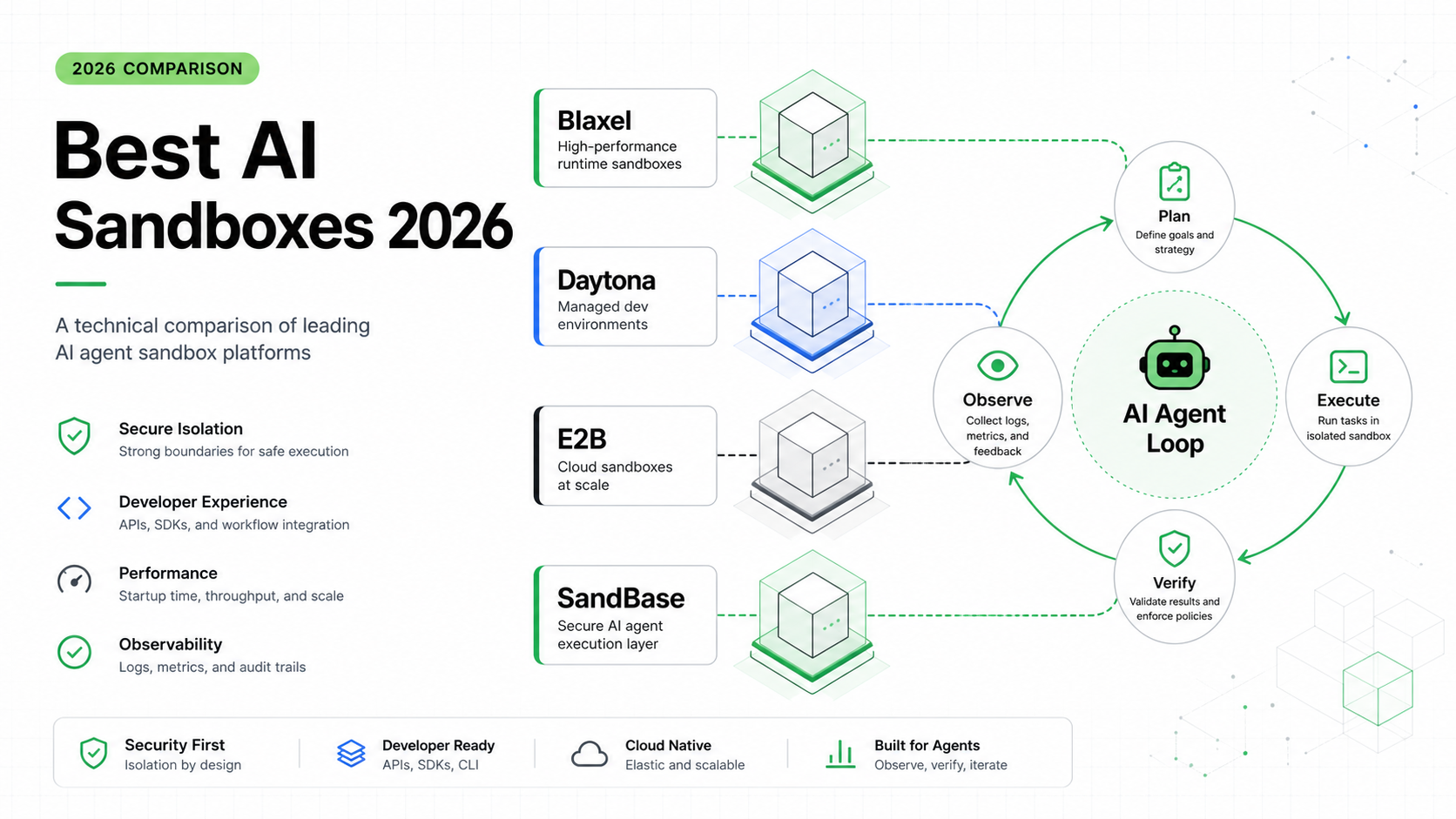
This is also why secure sandboxes for autonomous agents are not a niche security topic. They are the place where tool use becomes containable.
Mutation Scope: Reads and Writes Need Different Rules
An agent that reads a GitHub issue and summarizes it is useful. An agent that closes the issue, pushes a commit, updates the deployment, and emails the customer is also useful. It is just a completely different risk class.
Treat mutations as a separate permission tier.
Good production systems split actions like this:
| Action type | Examples | Default policy |
|---|---|---|
| Read | search docs, list issues, inspect logs | allow within task scope |
| Compute | run tests, analyze files, render chart | allow in sandbox |
| Draft | create patch, write proposed reply | allow, but keep staged |
| Mutate | push commit, update ticket, send email | require approval or explicit policy |
| Irreversible | delete data, charge card, deploy prod | require human approval |
The interesting edge is “draft.” Agents should be able to do a lot of work before approval: prepare a patch, summarize the diff, write the customer reply, produce the migration plan. The approval should sit at the boundary where staged work becomes external state.
This keeps the system useful without turning every step into a permission pop-up.
Loop Scope: A Tool-Using Agent Needs a Brake
The industry is moving from prompts to loops. That is the right direction. Agents become more useful when they can plan, act, observe, and retry.
The ugly part is that a loop with tools can fail expensively.
The failure usually looks small at first:
- a test command keeps failing for the same reason
- the agent edits the same file back and forth
- the search tool returns noisy results and the agent keeps searching
- an MCP server returns an error the agent tries to fix by calling another tool
- the model asks for a broader tool list instead of narrowing the task
None of that is dramatic. It just burns time, tokens, and sometimes external API quota.
Every agent loop needs hard brakes:
type LoopBudget = {
  maxSteps: number;
  maxToolCalls: number;
  maxWallClockMs: number;
  maxConsecutiveFailures: number;
};

export function shouldStop(run: {
  steps: number;
  toolCalls: number;
  startedAt: number;
  consecutiveFailures: number;
}, budget: LoopBudget) {
  const elapsed = Date.now() - run.startedAt;

  return (
    run.steps >= budget.maxSteps ||
    run.toolCalls >= budget.maxToolCalls ||
    elapsed >= budget.maxWallClockMs ||
    run.consecutiveFailures >= budget.maxConsecutiveFailures
  );
}
This kind of guard is not glamorous, but it pays for itself the first time a loop gets confused at 2 a.m.
If you already read Why Production AI Agents Need a Runtime Layer, this is one of the concrete places that runtime shows up. The runtime is where the brake lives.
Audit Scope: You Need a Story After the Run
Tool execution without audit logs is a trust problem.
When a production agent acts, someone will eventually ask:
- Which tool did it call?
- What arguments did it send?
- What data did it see?
- What did the tool return?
- Which policy allowed the call?
- Was a human approval involved?
- Why did the loop stop?
If the only answer is “the model decided,” the system is not ready.
The useful audit log is not just raw text. It should be structured around the run:
| Field | Why it matters |
|---|---|
| run ID | Tie all steps to one task |
| tool name | See which capability was used |
| arguments hash | Track sensitive input without dumping secrets |
| policy decision | Explain allow, deny, or approval |
| sandbox ID | Reproduce or inspect execution context |
| token and time cost | Debug budget issues |
| stop reason | Know whether the task completed, failed, or hit a limit |
This is where observability becomes product quality. If developers can inspect what happened, they can trust the system enough to expand what it is allowed to do.
A Practical Checklist Before You Ship
Before you put an MCP-heavy agent in front of users or internal teams, ask these questions.
| Question | Good answer |
|---|---|
| Which tools are loaded for this specific task? | Only the tools needed for the workflow |
| Can the agent run code? | Yes, but only inside a sandbox |
| Can the agent access the network? | Denied by default or allowlisted |
| Can the agent mutate external systems? | Only through staged drafts or approval gates |
| What stops the loop? | Step, time, failure, and budget limits |
| What gets logged? | Tool calls, decisions, costs, stop reason |
| What happens after a crash? | State is resumable or the run fails cleanly |
The uncomfortable truth: if you cannot answer these, your MCP integration is still a demo. It may be a polished demo. It may use the right protocol. But it is missing the operating layer that production agents need.
FAQ
Does MCP provide execution boundaries by itself?
No. MCP standardizes how tools are exposed and called, but execution boundaries such as sandboxing, approval gates, network rules, budgets, and audit logs are runtime responsibilities.
Is tool search enough to make MCP safe?
Tool search helps reduce the visible tool surface, which is useful for both token cost and tool selection. It does not replace sandboxing, permission checks, mutation approvals, or loop limits.
Should every MCP tool call require human approval?
No. Read-only and low-risk compute calls can usually run automatically within task scope. Approvals should sit at mutation boundaries: writes, deletes, payments, production deploys, and external messages.
What is the biggest risk with MCP in production agents?
The biggest risk is treating tool connection as if it were tool control. Once agents can call shared tools, run code, or mutate state, the runtime needs policies that limit what each task can touch and how long it can run.
Where does SandBase fit in this architecture?
SandBase focuses on the agent infrastructure layer: the part underneath agent workflows where tool execution, sandboxing, model access, runtime policy, and operational visibility need to work together.
Key Takeaways
- MCP is the connector layer for tools, not the complete control plane for production agents.
- Production agents need execution boundaries around tool scope, sandboxing, network access, mutation, loop budgets, and audit logs.
- The safest systems expose fewer tools per task and put risky execution inside disposable environments.
- Human approval should sit at mutation boundaries, not on every harmless read or compute step.
- If an agent can call tools in a loop, the runtime needs a brake and a record of why the run stopped.